ViewQwest Fiber Broadband Official Thread - Part 6

xiaofan

High Supremacy Member
Joined
Sep 16, 2018
Messages
31,404
Reaction score
8,821
fGHLHQ8.png

Managed to login to the ONR & captured the port info.

Interesting. So you can probably change the configuration to unbridged ONR. But very few people will do that since ONR has limited features. Power users in general do not like ONR.
 

xiaofan

High Supremacy Member
Joined
Sep 16, 2018
Messages
31,404
Reaction score
8,821
https://a.aliexpress.com/_oDe2cQB
Just found this amazing item on AliExpress. Check it out!
SG$41.15 | TP-Link 2.5G PCIe Network Card 2.5Gbe Ethernet Interface Adapter 10/100M/1G/2.5Gbps NIC Compatible with Windows/Linux TL-NG421
https://a.aliexpress.com/_oDe2cQB

Taobao/Small official TP-Link China Flagship Shop is selling the above card at RMB 84. You need to pay shipment and GST though.

【淘宝】https://m.tb.cn/h.gjQwFMH7cd2cuYt?tk=aXRZ3XJAs9r CZ3458 「TP-LINK 2.5G 有线PCle网卡 TL-NG421 兼容常见操作系统」
点击链接直接打开 或者 淘宝搜索直接打开
 

radon

Senior Member
Joined
Jan 1, 2000
Messages
992
Reaction score
89
Interesting. So you can probably change the configuration to unbridged ONR. But very few people will do that since ONR has limited features. Power users in general do not like ONR.
just got the user permission, can view the basic only.
The interface is similar to the old white colour ONR, just the basic.
 

xiaofan

High Supremacy Member
Joined
Sep 16, 2018
Messages
31,404
Reaction score
8,821
Last edited:

xiaofan

High Supremacy Member
Joined
Sep 16, 2018
Messages
31,404
Reaction score
8,821
1) IOcrest PCI-E 5Gbe card is very cheap at RMB 89, the chipset RealTek RTL8126 is so-so but good enough for Windows and Linux (not good for pfSense/OPNsense).

【淘宝】https://m.tb.cn/h.g8snnU2b47UkhTv?tk=7z0m3Xr1iyL CA6496 「乐扩 Pcie单口5G网卡RJ45电口网卡PXE无盘启动电竞游戏网卡有线瑞昱RTL8126芯」
点击链接直接打开 或者 淘宝搜索直接打开

2) They have a M2 version of the 5Gbe card at RMB 99.

【淘宝】https://m.tb.cn/h.gQbzBP2SadCnHjj?tk=atcr3XrXPrI HU9046 「乐扩 M.2转5G网卡瑞昱RTL8126芯片电竞游戏网卡有线」
点击链接直接打开 或者 淘宝搜索直接打开

3) Chinese Youtuber reviews of the IOcrest 5Gbe card along with the 10G USB 4 NIC mentioned above.

 
Last edited:

abstrax

Senior Member
Joined
Nov 29, 2001
Messages
1,412
Reaction score
126
Haha , do recommend which PCIe 2.5G NIC will you be getting !

my recontract due September , hand a bit itchy to go for 10gbps , but my mesh XT8 still working well for me (hence looking at 3GBPS plan)
I see there are many recommendation in this thread already.

As for me, I got a Intel X540-T2 NIC. Just setup working properly. However, still waiting for my 2.5G router and switch to test the bandwidth. I also bought other 3x 2.5G NIC from TB too.

I check Asus has 10G NIC selling online or SLS. Maybe u can go check it out.
 

Mach3.2

Great Supremacy Member
Joined
Apr 8, 2011
Messages
72,405
Reaction score
2,464
I see there are many recommendation in this thread already.

As for me, I got a Intel X540-T2 NIC. Just setup working properly. However, still waiting for my 2.5G router and switch to test the bandwidth. I also bought other 3x 2.5G NIC from TB too.

I check Asus has 10G NIC selling online or SLS. Maybe u can go check it out.
X540 doesn't support NBASE-T
 

xiaofan

High Supremacy Member
Joined
Sep 16, 2018
Messages
31,404
Reaction score
8,821
X540 doesn't support NBASE-T

Nice one. Are you saying X520 will support? The datasheet does not say it will support. Or you are saying the Fibre SPF+ variant (X520-DA2) will support if the SFP+ copper module supports 2.5Gbe/5Gbe? Is it the same for Intel X710-DA2 and X710-DA4?

It seems to me Intel server grade chipset are bit complicated when it comes to NBASE-T support (2.5GBASE-T and 5GBASE-T), only Intel X550 and X710 family officially support NBASE-T.

1) Intel 82599EA/EB/ES, only ES variant (dual SFP+) are still alive.
No NBASE-T support as per datasheet. 10/1GbE only.
Quite some low cost China Mini-PC seems to use 82599ES now, including R86S-N (except R86S-N305C which uses NVIDIA-Mellanox ConnectX-3 dual 10GbE OCP NIC 2.0 card), Miniroute R1 N100/N305, CWWK Intel 8505U/U300E/i5-1240P/i5-1335U, etc.

There is a problem with N series when it comes to PCI-E lanes (9 lanes only) yet 82599ES is using PCIE-2.0 x 4, so you may not get 10Gbps full duplex. Intel 8505/U300E/i5-1240P/i5-1335U based solution should be okay as they support more PCI-E lanes (20).
https://www.intel.com/content/www/u...gabit-ethernet-controller/specifications.html

2) Intel X520 family: -T2 (Copper) and -DA2 (SFP+) are common, EOLed, but still cabe be bought at cheap price.
10/1GbE only. No NBASE-T support as per datasheet.
https://www.intel.com/content/www/u...gabit-ethernet-controller/specifications.html

3) Intel X540 family: -T1 and -T2 (both Copper), EOLed, but still can be bought at cheap price, no NBase-T support. 10GbE/1GbE/100Mb only.
https://ark.intel.com/content/www/u...-ethernet-converged-network-adapter-x540.html

4) Intel X550 family: -T1 and -T2 (both Copper), EOLed, but still can be bought at reasonable price.
NBASE-T supported: 10GbE/5GbE/2.5GbE/1GbE/100Mb
https://ark.intel.com/content/www/u...-ethernet-converged-network-adapter-x550.html

5) Intel X710 family: more recent version, dual (-DA2 SFP+, -T2L copper) or quad (-DA4 SFP+ or -T4 copper or -T4L copper), price seems to be on the high side.
NBASE-T supported for new T2L/T4L variant: 10GbE/5GbE/2.5GbE/1GbE/100Mb, but not -T4.
https://www.intel.com/content/www/u...-adapters/x710-network-adapters/products.html
 
Last edited:

ShrmnK

Junior Member
Joined
Oct 9, 2011
Messages
78
Reaction score
82
Signed up for 3 gbps, ONR Fibrehome HG5852SA received 6+ pm. Connected to existing router and was getting local IP address assigned to my WAN (192.168.1.x) indicating ONR was not in bridge mode despite what the online guides say (that they default to ONR).
Called in to tech support and L1 agent said default is bridge mode, had to explain that that’s not the case for mine and they had to escalate to senior tech support to have mine switched to bridge mode which they call “bridged/ONT” mode.
They switched it about an hour later just after midnight and now getting CG-NAT address in 10.x.x.x space.

Latency to ping.ui.com p95 is 1ms, 50% lower than my previous provider. ;)

Having trouble configuring IPv6 tho, if anyone has any ideas how to get it working please let me know
 

xiaofan

High Supremacy Member
Joined
Sep 16, 2018
Messages
31,404
Reaction score
8,821
Signed up for 3 gbps, ONR Fibrehome HG5852SA received 6+ pm. Connected to existing router and was getting local IP address assigned to my WAN (192.168.1.x) indicating ONR was not in bridge mode despite what the online guides say (that they default to ONR).
Called in to tech support and L1 agent said default is bridge mode, had to explain that that’s not the case for mine and they had to escalate to senior tech support to have mine switched to bridge mode which they call “bridged/ONT” mode.
They switched it about an hour later just after midnight and now getting CG-NAT address in 10.x.x.x space.

Latency to ping.ui.com p95 is 1ms, 50% lower than my previous provider. ;)

Having trouble configuring IPv6 tho, if anyone has any ideas how to get it working please let me know

Interesting report.

VQ does not support IPv6. You can pay for Static IPv4 add-on if your use cases do not work with CGNAT.
 

xiaofan

High Supremacy Member
Joined
Sep 16, 2018
Messages
31,404
Reaction score
8,821
X540 doesn't support NBASE-T

Nice one. Are you saying X520 will support? The datasheet does not say it will support. Or you are saying the Fibre SPF+ variant (X520-DA2) will support if the SFP+ copper module supports 2.5Gbe/5Gbe? Is it the same for Intel X710-DA2 and X710-DA4?

Looks like this is the case if you buy the SFP+ version -- then it depends on the SFP+ copper module used.

Reference:
 

Mach3.2

Great Supremacy Member
Joined
Apr 8, 2011
Messages
72,405
Reaction score
2,464
Nice one. Are you saying X520 will support? The datasheet does not say it will support. Or you are saying the Fibre SPF+ variant (X520-DA2) will support if the SFP+ copper module supports 2.5Gbe/5Gbe? Is it the same for Intel X710-DA2 and X710-DA4?

It seems to me Intel server grade chipset are bit complicated when it comes to NBASE-T support (2.5GBASE-T and 5GBASE-T), only Intel X550 and X710 family officially support NBASE-T.

1) Intel 82599EA/EB/ES, only ES variant (dual SFP+) are still alive.
No NBASE-T support as per datasheet. 10/1GbE only.
Quite some low cost China Mini-PC seems to use 82599ES now, including R86S-N (except R86S-N305C which uses NVIDIA-Mellanox ConnectX-3 dual 10GbE OCP NIC 2.0 card), Miniroute R1 N100/N305, CWWK Intel 8505U/U300E/i5-1240P/i5-1335U, etc.

There is a problem with N series when it comes to PCI-E lanes (9 lanes only) yet 82599ES is using PCIE-2.0 x 4, so you may not get 10Gbps full duplex. Intel 8505/U300E/i5-1240P/i5-1335U based solution should be okay as they support more PCI-E lanes (20).
https://www.intel.com/content/www/u...gabit-ethernet-controller/specifications.html

2) Intel X520 family: -T2 (Copper) and -DA2 (SFP+) are common, EOLed, but still cabe be bought at cheap price.
10/1GbE only. No NBASE-T support as per datasheet.
https://www.intel.com/content/www/u...gabit-ethernet-controller/specifications.html

3) Intel X540 family: -T1 and -T2 (both Copper), EOLed, but still can be bought at cheap price, no NBase-T support. 10GbE/1GbE/100Mb only.
https://ark.intel.com/content/www/u...-ethernet-converged-network-adapter-x540.html

4) Intel X550 family: -T1 and -T2 (both Copper), EOLed, but still can be bought at reasonable price.
NBASE-T supported: 10GbE/5GbE/2.5GbE/1GbE/100Mb
https://ark.intel.com/content/www/u...-ethernet-converged-network-adapter-x550.html

5) Intel X710 family: more recent version, dual (-DA2 SFP+, -T2L copper) or quad (-DA4 SFP+ or -T4 copper or -T4L copper), price seems to be on the high side.
NBASE-T supported for new T2L/T4L variant: 10GbE/5GbE/2.5GbE/1GbE/100Mb, but not -T4.
https://www.intel.com/content/www/u...-adapters/x710-network-adapters/products.html
only the X550/X710-T2L/T4L supports NBASE-T. The rest doesn't.

Actually try to avoid the SFP+ to RJ45 modules if you can, those are really hot. Just get the proper network cards from the get go.
 

shachok86

Member
Joined
Jan 9, 2012
Messages
242
Reaction score
27
i recon to 3gbps last week and they only email to confirm if i want to keep my static ip, after that no follow up or appointment to replace my ont....my new axe7800 arrived faster than vq cs do work...now setup as aimesh node since my tuf-ax6000 is main with 2 * 2.5g port linked to keeplink 8 port 2.5g switch
 

xiaofan

High Supremacy Member
Joined
Sep 16, 2018
Messages
31,404
Reaction score
8,821
only the X550/X710-T2L/T4L supports NBASE-T. The rest doesn't.

Actually try to avoid the SFP+ to RJ45 modules if you can, those are really hot. Just get the proper network cards from the get go.

1. Yes, I will try to avoid SFP+ to RJ45 modules as much as possible but still can not run away as of now if I go for the 3Gbps/5Gbps plans (not interested in 10Gbps plans now), the only chance to toally avoid SFP+ copper module is to use VQ XGS-PON ONU option -- but I am reluctant to use VQ myself.

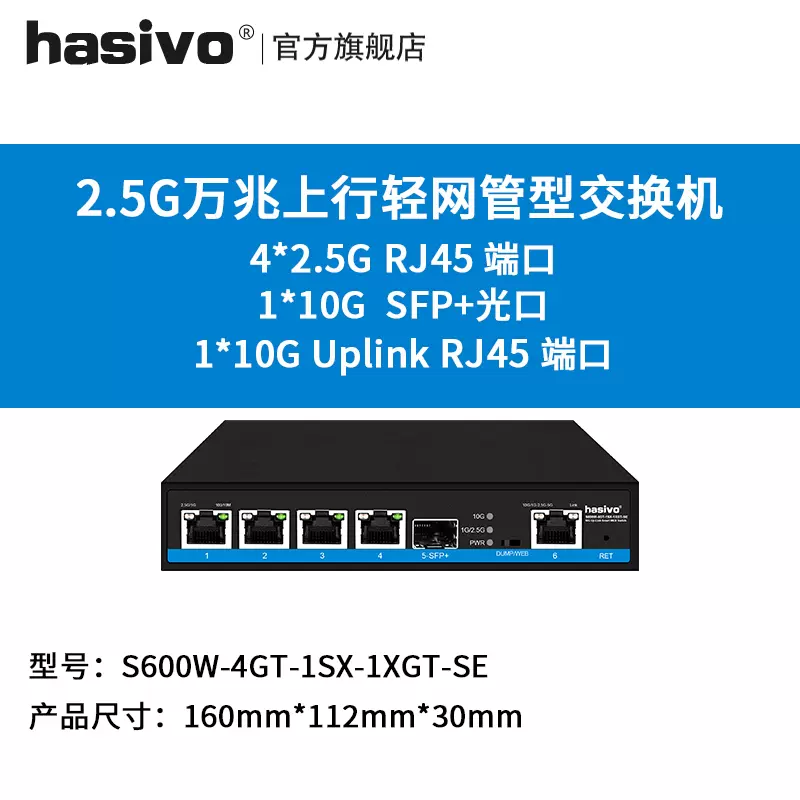
Just ordered one Hasivo switch to reduce one SFP+ copper module (about RMB399 plus GST and shipment).
O1CN01L2N86k1ypg5B7CKwG_!!1774426628.jpg_Q75.jpg_.webp


2. Intended minimum setup -- need one SFP+ to RJ45 module.

XGS-PON ONT or bridged XGS-PON ONR -- Miniroute R1 N100 SFP+ port with SFP+ copper module running PVE/pfSense (probably need a fan here)
Miniroute R1 N100 SFP+ port -- DAC cable -- Hasivo 2.5G switch 10G SFP+ uplink
Hasivo 2.5G switch 10GBASE-T port -- Laptop/Mac Mini M1 with USB 4 10G NIC for speedtest (LOL)
Miniroute R1 N100 2.5G port or Hasivo 2.5G switch 2.5G ports -- 2.5G mini PCs and 2.5G wireless AP

3. If using VQ XGS-PON ONU option, assume that it works with Miniroute R1 (Intel 82599ES based SFP+ ports), then yes I can avoid SFP+ copper module.

VQ Huawei XGS-PON ONU -- > Miniroute R1 N100 SFP+ port, running PVE/pfSense (probably need a fan here)
Miniroute R1 N100 SFP+ port -- DAC cable -- Hasivo 2.5G switch 10G SFP+ uplink
Hasivo 2.5G switch 10GBASE-T port -- Laptop/Mac Mini M1 with USB 4 10G NIC for speedtest (LOL)
Miniroute R1 N100 2.5G ports or Hasivo 2.5G switch 2.5G ports -- 2.5G mini PCs and 2.5G wireless AP

 
Last edited:

EastSider

Senior Member
Joined
Mar 10, 2008
Messages
2,090
Reaction score
23
i recon to 3gbps last week and they only email to confirm if i want to keep my static ip, after that no follow up or appointment to replace my ont....my new axe7800 arrived faster than vq cs do work...now setup as aimesh node since my tuf-ax6000 is main with 2 * 2.5g port linked to keeplink 8 port 2.5g switch
How’s your speed on this set up?
 

abstrax

Senior Member
Joined
Nov 29, 2001
Messages
1,412
Reaction score
126
i recon to 3gbps last week and they only email to confirm if i want to keep my static ip, after that no follow up or appointment to replace my ont....my new axe7800 arrived faster than vq cs do work...now setup as aimesh node since my tuf-ax6000 is main with 2 * 2.5g port linked to keeplink 8 port 2.5g switch
I waited ard 2 weeks too for the installation date. Lucky is b4 my contract expired.
 

yosemi

Senior Member
Joined
Nov 20, 2014
Messages
2,295
Reaction score
223
1. Yes, I will try to avoid SFP+ to RJ45 modules as much as possible but still can not run away as of now if I go for the 3Gbps/5Gbps plans (not interested in 10Gbps plans now), the only chance to toally avoid SFP+ copper module is to use VQ XGS-PON ONU option -- but I am reluctant to use VQ myself.

Just ordered one Hasivo switch to reduce one SFP+ copper module (about RMB399 plus GST and shipment).
O1CN01L2N86k1ypg5B7CKwG_!!1774426628.jpg_Q75.jpg_.webp


2. Intended minimum setup -- need one SFP+ to RJ45 module.

XGS-PON ONT or bridged XGS-PON ONR -- Miniroute R1 N100 SFP+ port with SFP+ copper module running PVE/pfSense (probably need a fan here)
Miniroute R1 N100 SFP+ port -- DAC cable -- Hasivo 2.5G switch 10G SFP+ uplink
Hasivo 2.5G switch 10GBASE-T port -- Laptop/Mac Mini M1 with USB 4 10G NIC for speedtest (LOL)
Miniroute R1 N100 2.5G port or Hasivo 2.5G switch 2.5G ports -- 2.5G mini PCs and 2.5G wireless AP

3. If using VQ XGS-PON ONU option, assume that it works with Miniroute R1 (Intel 82599ES based SFP+ ports), then yes I can avoid SFP+ copper module.

VQ Huawei XGS-PON ONU -- > Miniroute R1 N100 SFP+ port, running PVE/pfSense (probably need a fan here)
Miniroute R1 N100 SFP+ port -- DAC cable -- Hasivo 2.5G switch 10G SFP+ uplink
Hasivo 2.5G switch 10GBASE-T port -- Laptop/Mac Mini M1 with USB 4 10G NIC for speedtest (LOL)
Miniroute R1 N100 2.5G ports or Hasivo 2.5G switch 2.5G ports -- 2.5G mini PCs and 2.5G wireless AP

i saw this during my research, waiting for your review
 

ShrmnK

Junior Member
Joined
Oct 9, 2011
Messages
78
Reaction score
82
Interesting report.

VQ does not support IPv6. You can pay for Static IPv4 add-on if your use cases do not work with CGNAT.

Happy to report my experience is otherwise. Perhaps they up their IPv6 game with XGS-PON rollout?

Using test-ipv6.com:


Test with IPv4 DNS record ok (0.032s) using ipv4
Test with IPv6 DNS record ok (0.006s) using ipv6
Test with Dual Stack DNS record ok (0.028s) using ipv6
Test for Dual Stack DNS and large packet ok (0.022s) using ipv6
Test IPv6 large packet ok (0.010s) using ipv6
Test if your ISP's DNS server uses IPv6 ok (0.027s) using ipv6
Find IPv4 Service Provider ok (0.259s) using ipv4 ASN 18106
Find IPv6 Service Provider ok (0.245s) using ipv6 ASN 18106
 
Important Forum Advisory Note
This forum is moderated by volunteer moderators who will react only to members' feedback on posts. Moderators are not employees or representatives of HWZ. Forum members and moderators are responsible for their own posts.

Please refer to our Community Guidelines and Standards, Terms of Service and Member T&Cs for more information.
Top