
New 10Gbps/5Gbps/6Gbps/3Gbps XGS-PON based plans

xiaofan

High Supremacy Member
Joined
Sep 16, 2018
Messages
32,287
Reaction score
9,385
That's just sad. Thank you for the insight. Any response from Asus? Appears to be just a driver problem. Based on the issues you heard with the Asus adapter - is it reports on the adapter not giving the full speed, and having some speed degradation?

I've only seen an "all-or-nothing" complaint where the user was stuck at 1Gbps with that adapter.

Unfortunately among the recommended list I'll be looking to shell out at least $200 for the Intel x4 one. Also given the position of the empty PCI-E slot at the bottom the airflow is not going to be very good.

The issue reported in this forum are all about speed degradation for Marvell chipset based 10G NICs (PCI-E or TB3 version). Some users can resolve the issue by disabling Antivirus programs. Some users say re-installing Windows can sort out the issue. Some users are not able to sort out the issue.

You can try the work-around to see if it helps you or not (eg: remove 3rd party antivirus programs).

I think Asus has no capability to sort out the issue. Marvell is the one which can do the driver development.

Intel X540 NICs can be bought at about S$30 to S$50 from Taobao.
Intel X550 NICs can be bought at about S$100 to S$150 from Taobao.
 
Last edited:
wandurrrlust

Junior Member
Joined
Nov 20, 2024
Messages
1
Reaction score
1
Hi all, require some advise..

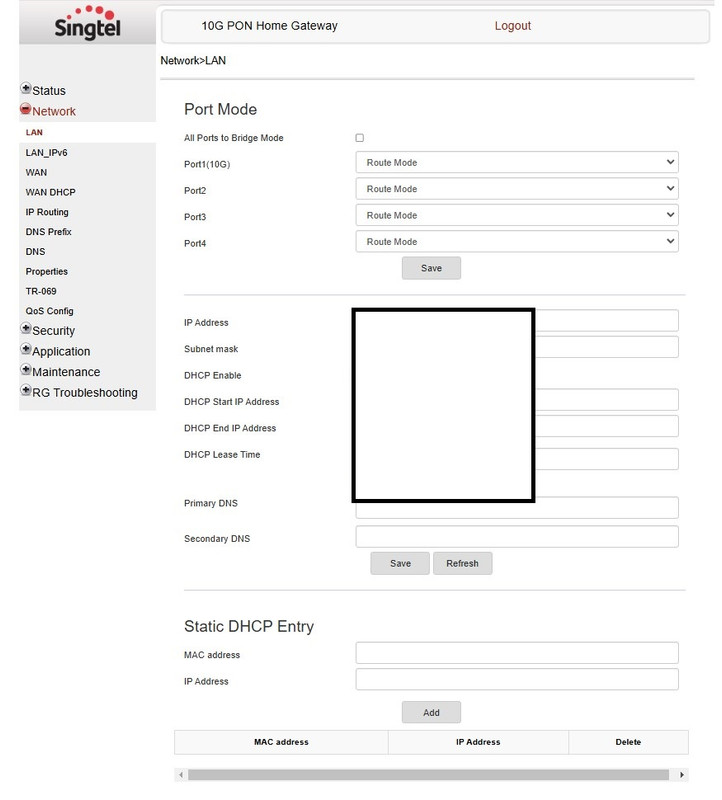
Just upgraded to 10Gbps on Singtel (was already on Singtel ONR previously) and gotten a Nokia XS-240X-A ONT as read in the forums, but when I login to check via superadmin it shows that my ports are all in Route Mode instead of Bridge Mode.

Screenshot-1.jpg


I did attempt to change the 10G port to Bridge and I just lose all internet to the HB810 provided.
Wondering if since this is an ONT, how do I reconfigure it.

Currently connected via

Nokia XS-240X-A ---- HB810 Node A Configured in AP (Living room) ---- HB810 Node B (Bedroom) ---- Wired Ethernet 10G port to PC & Wired Ethernet to PS5.

I still have my Asus Router connected to a 2.5GBps Port on the Nokia XS-240X-A

Nokia XS-240X-A ---- GT-AX11000 (Living room) ----Asus Zenwifi XT8 (Bedroom)

Issue being Double Nat / Nat Type 2 and I'm unable to connect remotely without having to portforward (in which I did and able to connect remotely with PS Portal before the 10 GBps upgrade)

I am trying to configure the ONT to be bridged on to HB810 as the ONR (Portforwarding done) got replaced with the newer ONT, and looking for advise to do so I dont have to live with double NAT..
 

xiaofan

High Supremacy Member
Joined
Sep 16, 2018
Messages
32,287
Reaction score
9,385
Hi all, require some advise..

Just upgraded to 10Gbps on Singtel (was already on Singtel ONR previously) and gotten a Nokia XS-240X-A ONT as read in the forums, but when I login to check via superadmin it shows that my ports are all in Route Mode instead of Bridge Mode.

Screenshot-1.jpg


I did attempt to change the 10G port to Bridge and I just lose all internet to the HB810 provided.
Wondering if since this is an ONT, how do I reconfigure it.

Currently connected via

Nokia XS-240X-A ---- HB810 Node A (Living room) ---- HB810 Node B (Bedroom) ---- Wired Ethernet 10G port to PC & Wired Ethernet to PS5.

I still have my Asus Router connected to a 2.5GBps Port on the Nokia XS-240X-A

Nokia XS-240X-A ---- GT-AX11000 (Living room) ----Asus Zenwifi XT8 (Bedroom)

Issue being Double Nat / Nat Type 2 and I'm unable to connect remotely without having to portforward (in which I did and able to connect remotely with PS Portal before the 10 GBps upgrade)

I am trying to configure the ONT to be bridged on to HB810 as the ONR (Portforwarding done) got replaced with the newer ONT, and looking for advise to do so I dont have to live with double NAT..

Nokia XS-240X-A ONR is very new so no one has published the bridging instruction.

It is reported to be easy to bridge by the only user of Nokia XGS-PON ONR at that time.
https://forums.hardwarezone.com.sg/...0-gbps-enhanced.7030365/page-7#post-153407206
 

ra[g]e

Supremacy Member
Joined
May 4, 2008
Messages
5,934
Reaction score
75
The issue reported in this forum are all about speed degradation for Marvell chipset based 10G NICs (PCI-E or TB3 version). Some users can resolve the issue by disabling Antivirus programs. Some users say re-installing Windows can sort out the issue. Some users are not able to sort out the issue.

You can try the work-around to see if it helps you or not (eg: remove 3rd party antivirus programs).

I think Asus has no capability to sort out the issue. Marvell is the one which can do the driver development.

Intel X540 NICs can be bought at about S$30 to S$50 from Taobao.
Intel X550 NICs can be bought at about S$100 to S$150 from Taobao.

Thanks for the information. Unfortunately the only anti-virus program that I'm using is Microsoft Defender. I'll continue to monitor, thank you for your advice.
 

tormont

Senior Member
Joined
Sep 6, 2004
Messages
609
Reaction score
1
Any price comparison guide? Thinking between 5gbps from starhub or 10gpbs from myrepublic. any advice?
 

jess_sy

Senior Member
Joined
Aug 26, 2014
Messages
2,191
Reaction score
350
Hi all, require some advise..

Just upgraded to 10Gbps on Singtel (was already on Singtel ONR previously) and gotten a Nokia XS-240X-A ONT as read in the forums, but when I login to check via superadmin it shows that my ports are all in Route Mode instead of Bridge Mode.

Screenshot-1.jpg


I did attempt to change the 10G port to Bridge and I just lose all internet to the HB810 provided.
Wondering if since this is an ONT, how do I reconfigure it.

Currently connected via

Nokia XS-240X-A ---- HB810 Node A Configured in AP (Living room) ---- HB810 Node B (Bedroom) ---- Wired Ethernet 10G port to PC & Wired Ethernet to PS5.

I still have my Asus Router connected to a 2.5GBps Port on the Nokia XS-240X-A

Nokia XS-240X-A ---- GT-AX11000 (Living room) ----Asus Zenwifi XT8 (Bedroom)

Issue being Double Nat / Nat Type 2 and I'm unable to connect remotely without having to portforward (in which I did and able to connect remotely with PS Portal before the 10 GBps upgrade)

I am trying to configure the ONT to be bridged on to HB810 as the ONR (Portforwarding done) got replaced with the newer ONT, and looking for advise to do so I dont have to live with double NAT..
If i not wrong you need to do at the WAN page first
 

xiaofan

High Supremacy Member
Joined
Sep 16, 2018
Messages
32,287
Reaction score
9,385
Nokia XS-240X-A ONR is very new so no one has published the bridging instruction.

It is reported to be easy to bridge by the only user of Nokia XGS-PON ONR at that time.
https://forums.hardwarezone.com.sg/...0-gbps-enhanced.7030365/page-7#post-153407206


Not so sure if the info about Nokia G240 GPON-ONR bridging works for the Nokia XS-240X-A ONR or not.

Take note another user says he could not get Nokia G240 ONR to be bridged used the following super-admin password info. Others who have done the bridging of Nokia G240 ONR did not post the super-admin login info.

https://forums.hardwarezone.com.sg/...the-difference.5768534/page-12#post-153330977
Oh I thought the login password is given to user by default, since I requested during ONR installation and SingTel installation technician shared it with me.

From my case,
Username: support
Password: the password printed on ONR label but need to input in reverse order.

You may test but not sure if it works on your ONR.

Initially I did try set LAN port to bridge mode but it didn’t work, then I realised that I need to create a new connection in WAN setting in bridge mode and assign the bridge connection to a LAN port, in my case I assigned LAN port 4.

There is risk if you setup wrongly. In my 1st trial I set all 4 LAN ports to bridge mode but after that I found I was blocked out from the ONR and no longer able to access login page via 192.168.1.254 on any LAN port and no internet access as well. After that I did hard reset the ONR by reset button, the internet is back under normal ONR mode, but digital line gone. I called the installation guy and asked him guided me setup digital line, then I tried to bridge the ONR in WAN setting as above mentioned and finally got it work.

I will terminate SingTel 1Gbps plan next week and move to M1 1+1Gbps plan. As you know SingTel ONR is not friendly to power users.
 

xiaofan

High Supremacy Member
Joined
Sep 16, 2018
Messages
32,287
Reaction score
9,385
Edited to correct the mistake.

Singtel special offer for existing Singtel TV customers:
Free 2Gbps plan for two years for Singtel TV subscribers;
5Gbps mesh solution at S$29.09 per month Singtel TV subscribers;
https://www.singtel.com/personal/products-services/broadband/eform/ga-dm/free2gbps
https://www.singtel.com/content/dam...ements/fibre-free2yrsbb-ga-dm-letter-tncs.pdf

Please select your preferred Broadband plan (24-month contract applies):
2 FREE years of 2Gbps Enhanced Plan (U.P. $55.90/mth)
Comes with 1x Singtel WiFi 6 Router


5Gbps Mesh Plan at $29.09/mth (U.P. $106.09/mth)
Comes with a pair of WiFi 6 mesh devices


LnAQSKp.png


Original discussions here:
https://forums.hardwarezone.com.sg/threads/singtel-3gbps-5gbps-10-gbps-enhanced.7030365/page-16
5Gbps Mesh Plan at $29.09/mth (U.P. $106.09/mth)
  • Comes with a pair of WiFi 6 mesh devices

Good deal coming from ST?:s14:
https://www.singtel.com/personal/products-services/broadband/eform/ga-dm/free2gbps

T&Cs:
https://www.singtel.com/content/dam...ements/fibre-free2yrsbb-ga-dm-letter-tncs.pdf
 
Last edited:

Jurong640

High Supremacy Member
Joined
Mar 22, 2011
Messages
35,433
Reaction score
12,233
Now Singtel comes out a cheap 5Gbps offer at S$29.09 per month to counter Starhub 5Gbps offer at S$29.55 (ONR or ONT option).

Singtel special offer: Free 2Gbps plan for two years for Singtel TV subscribers; 5Gbps mesh solution at S$29.09 per month (said to be only for new subscribers but let's see if existing users can get it or not).
https://www.singtel.com/personal/products-services/broadband/eform/ga-dm/free2gbps
https://www.singtel.com/content/dam...ements/fibre-free2yrsbb-ga-dm-letter-tncs.pdf

Please select your preferred Broadband plan (24-month contract applies):
2 FREE years of 2Gbps Enhanced Plan (U.P. $55.90/mth)
Comes with 1x Singtel WiFi 6 Router


5Gbps Mesh Plan at $29.09/mth (U.P. $106.09/mth)
Comes with a pair of WiFi 6 mesh devices


LnAQSKp.png


Original discussions here:
https://forums.hardwarezone.com.sg/threads/singtel-3gbps-5gbps-10-gbps-enhanced.7030365/page-16
not bad deal. But this seems like it's like re-contracting customers, hopefully new customers also eligible if they try and ask
 

xiaofan

High Supremacy Member
Joined
Sep 16, 2018
Messages
32,287
Reaction score
9,385
SingTel got many hidden link offers and the contents keep changing.

And I collected such offers (along with the two hidden link offers from Starhub) in the Singapore ISP Comparison thread (Post #3).

https://forums.hardwarezone.com.sg/threads/singapore-isp-comparisons.6665380/

1) Starhub got two hidden links
Notes about the Starhub 5Gbps offer at S$29.55 per month (ONR or ONT Options) for existing Starhub users.

Starhub 5Gbps special offers at S$29.55 per month are meant for new users, but existing users who have finished or nearly finished the contract can sign up as a new user and then can cancel the existing plan by returning the ONT on the same day as the 5Gbps installation day.
Take note this is not considered as a recontract or upgrade. Existing users who are still under contract will need to pay early termination fee, so it is probably not worth it.

https://www.starhub.com/personal/st...speed-5gbps-onr-at-2955_ultraspeed-5gbps.html (Special offer 5Gbps plan at S$29.55 per month, Nokia-XS-2426X-A ONR, also bundled with Nokia Beacon 2 to form a mesh with the Nokia ONR).
xDaoM71.png


https://www.starhub.com/personal/st...speed-5gbps-ont-at-2955_ultraspeed-5gbps.html (Special offer 5Gbps plan at S$29.55 per month, ONT, you have to get your own router).
MI2QcPz.jpeg


2) Singtel got many hidden links.

Take note Singtel keeps changing the offer contents.

https://www.singtel.com/personal/products-services/broadband/fibre-broadband-plans (main page to the public).

https://www.singtel.com/personal/products-services/broadband/eform/newhomes (new home offer)
https://www.singtel.com/personal/products-services/broadband/eform/newbb (new user offer)
https://www.singtel.com/personal/products-services/broadband/eform/3gbps-enhanced-plan (3Gbps offer)
https://www.singtel.com/personal/products-services/broadband/eform/5gbps (5Gbps offer)
https://www.singtel.com/personal/products-services/broadband/eform/10gbps (10Gbps offer)
https://www.singtel.com/personal/products-services/lifestyle-services/ntuc (Singtel NTUC offer, public link)
https://www.singtel.com/personal/pr...and/fibre-broadband-plans/fibre-gaming-bundle (public link)
(Singtel 5Gbps Gamer Pro Bundle and 10Gbps Gamer bundle) --> not pro at all as it uses unbridged ONR.
https://www.singtel.com/personal/products-services/broadband/fibre-everywhere-fttr (Singtel FTTR, niche plan, public link)
https://www.singtel.com/personal/products-services/broadband/homepriority (Home Priorty, niche plan, public link)

Singtel recontract offer for 2Gbps/5Gbps/10Gbps
https://www.singtel.com/personal/products-services/broadband/eform/recon-dm/fibre-2g
https://www.singtel.com/personal/products-services/broadband/eform/recon-dm/fibre-5g
https://www.singtel.com/personal/products-services/broadband/eform/recon-dm/fibre-10g

Singtel special offer for targeted existing Singtel TV customers:
Free 2Gbps plan for two years for Singtel TV subscribers;
5Gbps mesh solution at S$29.09 per month Singtel TV subscribers;
https://www.singtel.com/personal/products-services/broadband/eform/ga-dm/free2gbps
https://www.singtel.com/content/dam...ements/fibre-free2yrsbb-ga-dm-letter-tncs.pdf

Please select your preferred Broadband plan (24-month contract applies):
2 FREE years of 2Gbps Enhanced Plan (U.P. $55.90/mth)
Comes with 1x Singtel WiFi 6 Router

5Gbps Mesh Plan at $29.09/mth (U.P. $106.09/mth)
Comes with a pair of WiFi 6 mesh devices


LnAQSKp.png
 
Last edited:

xiaofan

High Supremacy Member
Joined
Sep 16, 2018
Messages
32,287
Reaction score
9,385
Comparisons of the two offers --> updated to correct the mistakes

This post is not so useful since Singtel offer is specific targeted offer to targeted existing Singtel TV customers.

Singtel 5Gbps at S$29.09 per month offer (with Singtel wird ONR plus a pair of Singtel AX5400 mesh) vs Starhub 5Gbps S$29.55 per month offer (ONR offer, with Nokia ONR AX6000 + Nokia Beacon 2 mesh solution).
Take note Starhb also has the 5Gbps S$29.55 per month offer option (without router).

1) Both are meant for new 5Gbps Fibre broadband customers. However, Singtel's offer is only for existing Singtel TV customers.

Existing Starhub users who have no contract or nearlly finishing the contract are able to sign up as new users and cancel the existing order on the same day of the installation without any penalty (and no other one time charge like NLT charges).

2) Promotion period

Starhub offer --> has been there for a while, no mentioning when the promotion will end
Singtel offer --> mention the following in the terms and condition. But often the promotion period are extended.

3) Price after 24 months contract --> different

Starhub 5Gbps offer is said to be at the same price after 24 month contract expires.
Singtel offer is not --> price goes up to S$106.09 per month.

Not a big issue though, as there will be cost effective plans at that time as well.

4) Terms and conditions

Singtel got clear Terms and Conditions for the offer.
https://www.singtel.com/content/dam...ements/fibre-free2yrsbb-ga-dm-letter-tncs.pdf

Starhub --> you will only get the terms and condtions after signing-up. No public terms and conditions.

5) Both come with ONR

Starhub --> Nokia XS-2426X-A ONR with AX6000 wireless

Singtel --> ZTE F8648P wired ONR or Nokia XS-240X-A wired ONR

Starhub has the ONT option without a router for those who do not want to use ONR. So Starhub has more choices here.

6) Both come with a mesh solution

Starhub --> Nokia XS-2426X-A ONR with AX6000 wireless + Nokia Beacon 2 (AX1800)

Singtel --> a pair of Singtel WiFi 6 mesh devices, which means one of the following mesh solution.
7) WiFi 7 router upgrade options
Starhub --> TP-Link EB810v at S$360 (S$15 x 24 or cash and carry), TP-Link HB710 at S$192 (cash and carry)
https://www.starhub.com/personal/support/article.html?id=LfNB5odcBt0mTG6Pr7GSB7

Singtel --> TP-Link HB810 at S$403.2 (S$16.80 x 24)
https://www.singtel.com/personal/products-services/broadband/eform/wifi7
 
Last edited:

xiaofan

High Supremacy Member
Joined
Sep 16, 2018
Messages
32,287
Reaction score
9,385
Hmm, I re-read the terms and conditions, I think I made a mistake here. It is really meant for targeted existing Singtel TV customers. I will correct my posts.

https://www.singtel.com/content/dam...ements/fibre-free2yrsbb-ga-dm-letter-tncs.pdf
Promotion is valid until 08 Decemnber 2024 and applies only to the address mentioned in this letter, with an active Singtel TV plan or service. The subscription discount on the 2Gbps Enhanced Plan or 5Gbps Mesh Plan will be reverted to the plan’s prevailing rate if the Singtel TV plan is terminated. Singtel reserves the right to change models of devices due to stock availability.
 
Last edited:

osmond19

Senior Member
Joined
Nov 19, 2000
Messages
1,980
Reaction score
66
Just received my SFP+ from 10Gtek (taobao)... this shld be the standard version right? Not yet install to try...
PXL-20241127-121443893.png
 

Henry Ng

Arch-Supremacy Member
Joined
Aug 9, 2011
Messages
17,071
Reaction score
975
Comparisons of the two offers --> updated to correct the mistakes

This post is not so useful since Singtel offer is specific targeted offer to targeted existing Singtel TV customers.

Singtel 5Gbps at S$29.09 per month offer (with Singtel wird ONR plus a pair of Singtel AX5400 mesh) vs Starhub 5Gbps S$29.55 per month offer (ONR offer, with Nokia ONR AX6000 + Nokia Beacon 2 mesh solution).
Take note Starhb also has the 5Gbps S$29.55 per month offer option (without router).

1) Both are meant for new 5Gbps Fibre broadband customers. However, Singtel's offer is only for existing Singtel TV customers.

Existing Starhub users who have no contract or nearlly finishing the contract are able to sign up as new users and cancel the existing order on the same day of the installation without any penalty (and no other one time charge like NLT charges).

2) Promotion period

Starhub offer --> has been there for a while, no mentioning when the promotion will end
Singtel offer --> mention the following in the terms and condition. But often the promotion period are extended.

3) Price after 24 months contract --> different

Starhub 5Gbps offer is said to be at the same price after 24 month contract expires.
Singtel offer is not --> price goes up to S$106.09 per month.

Not a big issue though, as there will be cost effective plans at that time as well.

4) Terms and conditions

Singtel got clear Terms and Conditions for the offer.
https://www.singtel.com/content/dam...ements/fibre-free2yrsbb-ga-dm-letter-tncs.pdf

Starhub --> you will only get the terms and condtions after signing-up. No public terms and conditions.

5) Both come with ONR

Starhub --> Nokia XS-2426X-A ONR with AX6000 wireless

Singtel --> ZTE F8648P wired ONR or Nokia XS-240X-A wired ONR

Starhub has the ONT option without a router for those who do not want to use ONR. So Starhub has more choices here.

6) Both come with a mesh solution

Starhub --> Nokia XS-2426X-A ONR with AX6000 wireless + Nokia Beacon 2 (AX1800)

Singtel --> a pair of Singtel WiFi 6 mesh devices, which means one of the following mesh solution.
7) WiFi 7 router upgrade options
Starhub --> TP-Link EB810v at S$360 (S$15 x 24 or cash and carry), TP-Link HB710 at S$192 (cash and carry)
https://www.starhub.com/personal/support/article.html?id=LfNB5odcBt0mTG6Pr7GSB7

Singtel --> TP-Link HB810 at S$403.2 (S$16.80 x 24)
https://www.singtel.com/personal/products-services/broadband/eform/wifi7

Actually this Starhub 5Gbps plan and Singtel 5Gbps plan are cheaper than M1 1Gbps plan.
M1 1G users can actually consider to jump ship after contract end.
 

tsammyc

Member
Joined
Mar 29, 2002
Messages
267
Reaction score
143
I recontracted MR 3gbps a few months ago and paid $50 for a TPLink BE230. Wasn't expecting much for $50 router at discount, but it's quite good with both 2.5Gbps WAN and LAN port (2 ports) as well as three 1Gbps ports. Speed test over WiFi with my MacBook Air M3 is about 1.2-1.6Gbps and LAN port does 2.35Gbps. Not bad for WiFi 7 router without 6Ghz band. Many people selling BE230 on Carousell BNIB for $90-100 because M1 bundling it and they don't want it, so I picked up another two BE230s for an Easymesh network. Because of dual 2.5Gbps ports, it's easy to setup wired 2.5Gbps backhaul, so the three BE230s work extremely well to spread Wifi 7 all over the house for a bargain.

Given that most clients are at most 2x2, the BE230 Easymesh is a cost effective way of moving above 1Gbps, while covering broad areas, without breaking the bank, especially for 3 and 2.5 Gbps plans. USB network adapters and switches for 2.5 Gbps are cheap compared to 5/10 Gbps. Lastly, since the satellite routers have an additional 2.5G port, I can hook a 2.5G switch or desktop near the satellite routers to extend the multi gigabit wired network.
 

Henry Ng

Arch-Supremacy Member
Joined
Aug 9, 2011
Messages
17,071
Reaction score
975
I recontracted MR 3gbps a few months ago and paid $50 for a TPLink BE230. Wasn't expecting much for $50 router at discount, but it's quite good with both 2.5Gbps WAN and LAN port (2 ports) as well as three 1Gbps ports. Speed test over WiFi with my MacBook Air M3 is about 1.2-1.6Gbps and LAN port does 2.35Gbps. Not bad for WiFi 7 router without 6Ghz band. Many people selling BE230 on Carousell BNIB for $90-100 because M1 bundling it and they don't want it, so I picked up another two BE230s for an Easymesh network. Because of dual 2.5Gbps ports, it's easy to setup wired 2.5Gbps backhaul, so the three BE230s work extremely well to spread Wifi 7 all over the house for a bargain.

Given that most clients are at most 2x2, the BE230 Easymesh is a cost effective way of moving above 1Gbps, while covering broad areas, without breaking the bank, especially for 3 and 2.5 Gbps plans. USB network adapters and switches for 2.5 Gbps are cheap compared to 5/10 Gbps. Lastly, since the satellite routers have an additional 2.5G port, I can hook a 2.5G switch or desktop near the satellite routers to extend the multi gigabit wired network.
Actually the wifi speed is good and beyond 1G.
 
Important Forum Advisory Note
This forum is moderated by volunteer moderators who will react only to members' feedback on posts. Moderators are not employees or representatives of HWZ. Forum members and moderators are responsible for their own posts.

Please refer to our Community Guidelines and Standards, Terms of Service and Member T&Cs for more information.
Top