
For the first case, if you happen to have two ports in the patch panel that connects to the router location, you can then connect one of the router LAN ports back to the patch panel - and add a network switch to wire up the rest of the patch panel ports to the other rooms.Sorry, i think this has been asked previously but i couldnt find it.
If TP connect to ONT only and then ONT connect to patch panel, then to router. Is it we cannot use the lan ports in the other rooms?
If TP connect to ONT and ONT connect to router directly, we can then use the lan ports in other rooms.
This was what i read somewhere, is it correct?
Thanks.
You are using an out of date browser. It may not display this or other websites correctly.
You should upgrade or use an alternative browser.
You should upgrade or use an alternative browser.
M1 FIBRE BROADBAND DISCUSSION - Part 2
- Thread starter Henry Ng
- Start date
More options
Who Replied?
marxace
Senior Member
- Joined
- Feb 6, 2003
- Messages
- 1,975
- Reaction score
- 238
Thanks. is the above scenario applicable only for M1 issued ONT or it is the same for other ISP issued ONT as well?Yes. Only one port of the ONT is functional (exception is for legacy M1 2Gbps plan which is a dual 1Gbps plan and the ONT will have two active ports). For the 3Gbps/6Gbps/10Gbps plans, single 10G LAN port of the ONT is functional.
1) Option 1, other room LAN ports become useless.
ONT 10G LAN port -- Patch Panel -- Living Room LAN port (or other room) -- Main Router
2) Option 2, room LAN ports become functional.
ONT 10G LAN port -- Main Router -- Patch Panel -- Room LAN ports
marxace
Senior Member
- Joined
- Feb 6, 2003
- Messages
- 1,975
- Reaction score
- 238
For the first case, if you happen to have two ports in the patch panel that connects to the router location, you can then connect one of the router LAN ports back to the patch panel - and add a network switch to wire up the rest of the patch panel ports to the other rooms.

this is what my DB looks like. So i am assuming P01 goes to ONT and then i plug a ethernet cable connecting ONT then to D10 which is my living room and from there i place my router. So means i cannot use the ethernet ports in other rooms right?
But if P01 connect to ONT and then connect to router and all placed in the DB, then if i want ethernet in living room D10, i have to connect ethernet cable from router to D10 in the DB box first right?
Sorry for my silly questions.
Wow, that's a lot of network points!
Is there any possibility that there are two LAN points per room?
Noticed that there's D01 and D02 at the top-left too - which is odd.
Meanwhile, yes, your understanding is correct.
My main Asus BT10 router is also in my DB cabinet with wired connection via patch panel to secondary BT10 mesh node in study room.
Is there any possibility that there are two LAN points per room?
Noticed that there's D01 and D02 at the top-left too - which is odd.
Meanwhile, yes, your understanding is correct.
My main Asus BT10 router is also in my DB cabinet with wired connection via patch panel to secondary BT10 mesh node in study room.
marxace
Senior Member
- Joined
- Feb 6, 2003
- Messages
- 1,975
- Reaction score
- 238
yes, there are 2 points in living room, 2 in each bedroom X 2, 3 points in MBR and 1 in study room and 2 in the DB box (D01 and D02) which i also feel weird why is it in the DB box.. Total 12 LAN points.Wow, that's a lot of network points!
Is there any possibility that there are two LAN points per room?
Noticed that there's D01 and D02 at the top-left too - which is odd.
Meanwhile, yes, your understanding is correct.
My main Asus BT10 router is also in my DB cabinet with wired connection via patch panel to secondary BT10 mesh node in study room.
Wow, impressive.yes, there are 2 points in living room, 2 in each bedroom X 2, 3 points in MBR and 1 in study room and 2 in the DB box (D01 and D02) which i also feel weird why is it in the DB box.. Total 12 LAN points.
Since you have two points going to the living room, say D10 and D11, D10 can connect to the ONT in DB, linked to the router WAN port in living room.
D11 in living room then connects to the router LAN port, linked to D11 in the DB.
D11 in DB then connects to another piece of equipment, i.e. network switch
Thereafter, wire up whichever points to the network switch in the DB.
SleepyBear
Junior Member
- Joined
- Jun 18, 2014
- Messages
- 17
- Reaction score
- 6
Just received my first bill.
Can check the router be805 $16/mth extra is charged to the bill?
Can check the router be805 $16/mth extra is charged to the bill?
M1 app. HomePac account.Just received my first bill.
Can check the router be805 $16/mth extra is charged to the bill?
Plan tab > Device Installment > Router add-ons
u can see the 24months installment plan breakdown, if any
SleepyBear
Junior Member
- Joined
- Jun 18, 2014
- Messages
- 17
- Reaction score
- 6
Thanks! Managed to saw it at $0.00M1 app. HomePac account.
Plan tab > Device Installment > Router add-ons
u can see the 24months installment plan breakdown, if any
But M1 still charged me. gotta ask them to rectify the issue. ._.

Dorkable
Senior Member
- Joined
- Apr 18, 2014
- Messages
- 1,725
- Reaction score
- 390
I went to M1 Shop today to apply for their 3Gbps broadband package based on their current switch-in promo price at $30.90/mth with free TP-Link BE230 router. Their staff did take a screenshot of our latest Singtel bill as part of their protocol to justify for the promo.
Understand that some of you here recently shared that M1's Huawei ONT runs rather hot. Thus, I asked the staff if their ONT is the white Huawei model, and she confirmed that it is. So when the installation is done, I will monitor to see if a cooling fan platform is needed in my case
Understand that some of you here recently shared that M1's Huawei ONT runs rather hot. Thus, I asked the staff if their ONT is the white Huawei model, and she confirmed that it is. So when the installation is done, I will monitor to see if a cooling fan platform is needed in my case

ceecookie
Arch-Supremacy Member
- Joined
- Dec 26, 2006
- Messages
- 22,542
- Reaction score
- 838
After some monitoring - i found out it was one (couldnt identify what) 2.4Ghz wifi client in my house that keep triggering MLO error in the RT-BE9U router every few minutes. Eventually after a few hours, this would trigger a crash of the router.Had to temporarily withdraw my asus BE92 from duty today... today crashed so many time until i fed up and swapped back to my older Wifi6 setup. Before that, I notice the uptime was no more than a few days before it would crash.
Now i've factory reset the BE92 and upgraded firmware to 3.0.0.6.102_37548 (previously was 37200 or 37300 something). Will monitor it running isolated to see if its stable enough.
I blacklisted the MAC ID of that client (extracted from router logs) so it couldnt connect anymore. After that, the crashes all stopped liao.
Curious, what happens when the router crashes? All wifi and wired connections break?After some monitoring - i found out it was one (couldnt identify what) 2.4Ghz wifi client in my house that keep triggering MLO error in the RT-BE9U router every few minutes. Eventually after a few hours, this would trigger a crash of the router.
I blacklisted the MAC ID of that client (extracted from router logs) so it couldnt connect anymore. After that, the crashes all stopped liao.
And require hard power cycling of the router to recover?

xonix
Arch-Supremacy Member
- Joined
- Mar 24, 2001
- Messages
- 17,592
- Reaction score
- 1,693
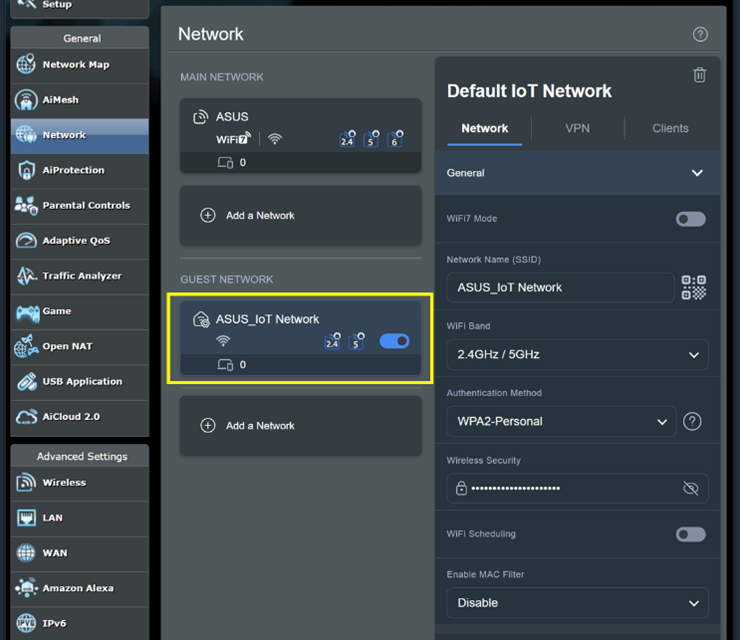
Probably compatibility issue. Many IoT devices or older devices will face problem with WiFi 6 & newer routers. Just create an IoT guest network with wifi 6 or 7 disabled and connect such devices to this signal instead.After some monitoring - i found out it was one (couldnt identify what) 2.4Ghz wifi client in my house that keep triggering MLO error in the RT-BE9U router every few minutes. Eventually after a few hours, this would trigger a crash of the router.
I blacklisted the MAC ID of that client (extracted from router logs) so it couldnt connect anymore. After that, the crashes all stopped liao.
Last edited:
So what happened to that (IOT?) blacklisted client ? Which of your device is not working now so you connect to a new IoT 2.4G SSID?blacklisted the MAC ID of that client (extracted from router logs) so it couldnt connect anymore. After that, the crashes all stopped liao.

Griggs
Senior Member
- Joined
- Mar 2, 2008
- Messages
- 1,928
- Reaction score
- 1,893
Can try call in and ask whether they can offer you new rate since you just signed up yesterdayI just saw on Facebook that M1 is having a flash promo for new sign-ups:
3Gbps bundle $29.50/mth
6Gbps bundle $34.90/mth
But I just signed up yesterday for the exact same 3Gbps bundle for $30.90/mth
ceecookie
Arch-Supremacy Member
- Joined
- Dec 26, 2006
- Messages
- 22,542
- Reaction score
- 838
Router crashing is same effect as doing manual reboot thru admin portal. Will lose wifi and network connection for about 3-4 mins while the router boots up. No need to do any power cycling.Curious, what happens when the router crashes? All wifi and wired connections break?
And require hard power cycling of the router to recover?
So what happened to that (IOT?) blacklisted client ? Which of your device is not working now so you connect to a new IoT 2.4G SSID?
I am unable to locate and identify the culprit device. It must be an old wifi-enabled IOT device around my house which I dun use anymore.


Important Forum Advisory Note
This forum is moderated by volunteer moderators who will react only to members' feedback on posts. Moderators are not employees or representatives of HWZ Forums. Forum members and moderators are responsible for their own posts.
Please refer to our Community Guidelines and Standards and Terms and Conditions for more information.
