Anybody using Singtel Mesh?

sjchai75

Member
Joined
Nov 18, 2009
Messages
256
Reaction score
3
I was searching about wireless mash when I saw this tread. I am very tempted to try this too but was thinking if I can buy the mash device instead of signing up with singtel? I also wonder if this also can provide me with an Ethernet connection too, like what the sinoji home plug can offer me.

anyone have any experience with this?
Challenger also have the Linksys

Sent from Xiaomi MI MAX using GAGT
 

Singtel

Suspended
Joined
Feb 17, 2001
Messages
1,087
Reaction score
49
Hi TheV,

Yes, a pair of WiFi Mesh units should be able to address the issue of poor wireless coverage at home. You can refer to our earlier post in this forum thread for more information on the WiFi Mesh and tips on placing them at home:
http://forums.hardwarezone.com.sg/102645647-post6.html

We currently offer two WiFi Mesh solutions for our customers to choose from:

(1) Airties WiFi Mesh for $10/month for 24 months
(2) Linksys Velop Mesh for $30/month for 24 months

The installment will be charged to your Singtel bill monthly.

To help you make a more informed decision, here are some reviews of the Airties Mesh from our customers in the forum:

http://forums.hardwarezone.com.sg/101041129-post3.html
http://forums.hardwarezone.com.sg/101041584-post5.html
http://forums.hardwarezone.com.sg/103354763-post44.html
http://forums.hardwarezone.com.sg/105546053-post181.html
http://forums.hardwarezone.com.sg/106221809-post206.html
http://forums.hardwarezone.com.sg/107171515-post226.html

HardwareZone also did a review on the Airties WiFi Mesh unit.
http://www.hardwarezone.com.sg/featu...tel-wi-fi-mesh

Do let us know if you're interested in the WiFi Mesh solutions, and we can arrange a call-back to assist you further.
 

renfred89

Arch-Supremacy Member
Joined
Nov 11, 2007
Messages
17,512
Reaction score
19
Hi Singtel,

I have the current setup.

The red box indicates the location of ONT and Singtel 7003 router.

The blue box indicates the location of my work PC, and mio TV.

Currently using TP link home plug -> TP link wireless router (AP) in blue box. Getting 10mbps up/down wired or wireless in bedrooms. MioTV works well though.

Wanted to improve the wired/wireless signal. Does a pair of Singtel mesh works?

75CvwoT.png

wifi mesh works if you strategically place them around the house.. Since you're already a singtel subscriber, the singtel wifi mesh at $240 spread across 24 months is the most affordable choice of all considering that it supports ethernet backhaul as of now.. Some other users have shared their experiences in this thread, perhaps you can read up? :D
 

renfred89

Arch-Supremacy Member
Joined
Nov 11, 2007
Messages
17,512
Reaction score
19
How does Linksys compare to the Airties?

Linksys is more expensive than airties and that linksys has more features if you use it on automatic DHCP mode. However, linksys when used on bridged mode, will not have parental control / media prioritisation.

The pairing part for linksys will involve an app and that the setup is pretty annoying cos one parent node can take about 5-10mins to set up, subsequent child nodes will also take roughly as long. Whereas for airties, both units are paired from the factory and you simply plug and play.

For speed wise, i feel linksys has slightly better speed than airties when using wireless backhaul while both brands should give roughly the same performance with ethernet backhaul, though i have no airties to test now while i'm using only linksys for the time being..
 

derrickgoh

High Supremacy Member
Joined
Jan 1, 2000
Messages
39,097
Reaction score
13

oohman

Arch-Supremacy Member
Joined
Jul 6, 2004
Messages
18,792
Reaction score
152
fp.gif


And the data point is near the front door.. currently, i have AC1900 dual band router.. but there is no signal in the master room at all .. Will these Wifi-mesh be able to give full coverage ?

Think of getting the Singtel fibre plan + wifi-mesh so I dont want to pay $10 extra every month but this wifi-mesh is not able to extend the coverage..

Any bros can comment ..tks.
 

Singtel

Suspended
Joined
Feb 17, 2001
Messages
1,087
Reaction score
49
fp.gif


And the data point is near the front door.. currently, i have AC1900 dual band router.. but there is no signal in the master room at all .. Will these Wifi-mesh be able to give full coverage ?

Think of getting the Singtel fibre plan + wifi-mesh so I dont want to pay $10 extra every month but this wifi-mesh is not able to extend the coverage..

Any bros can comment ..tks.
Hi oohman,

The PC Show 2017 promo that you see is actually the same; the monthly installment of the WiFi Mesh is included in the overall subscription fee.

The promotion is essentially 1Gbps fibre broadband plan with free 6 months subscription and WiFi Mesh.

The overall monthly subscription fee is $54.93 (U.P $69.90).

To help you make a more informed decision, here are some reviews of the Airties Mesh from our customers in the forum:

http://forums.hardwarezone.com.sg/101041129-post3.html
http://forums.hardwarezone.com.sg/101041584-post5.html
http://forums.hardwarezone.com.sg/103354763-post44.html
http://forums.hardwarezone.com.sg/105546053-post181.html
http://forums.hardwarezone.com.sg/106221809-post206.html
http://forums.hardwarezone.com.sg/107171515-post226.html

HardwareZone also did a review on the Airties WiFi Mesh unit.
http://www.hardwarezone.com.sg/featu...tel-wi-fi-mesh
 

oohman

Arch-Supremacy Member
Joined
Jul 6, 2004
Messages
18,792
Reaction score
152
Hi oohman,

The PC Show 2017 promo that you see is actually the same; the monthly installment of the WiFi Mesh is included in the overall subscription fee.

The promotion is essentially 1Gbps fibre broadband plan with free 6 months subscription and WiFi Mesh.

The overall monthly subscription fee is $54.93 (U.P $69.90).

To help you make a more informed decision, here are some reviews of the Airties Mesh from our customers in the forum:

http://forums.hardwarezone.com.sg/101041129-post3.html
http://forums.hardwarezone.com.sg/101041584-post5.html
http://forums.hardwarezone.com.sg/103354763-post44.html
http://forums.hardwarezone.com.sg/105546053-post181.html
http://forums.hardwarezone.com.sg/106221809-post206.html
http://forums.hardwarezone.com.sg/107171515-post226.html

HardwareZone also did a review on the Airties WiFi Mesh unit.
http://www.hardwarezone.com.sg/featu...tel-wi-fi-mesh

fp.gif


And the data point is near the front door.. currently, i have AC1900 dual band router.. but there is no signal in the master room at all .. Will these Wifi-mesh be able to give full coverage ?

Think of getting the Singtel fibre plan + wifi-mesh so I dont want to pay $10 extra every month but this wifi-mesh is not able to extend the coverage..

Any bros can comment ..tks.


Hi Singtel,
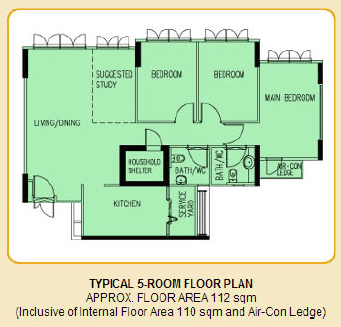
My question wrt to my floorplan.
Qn ) My data point is near the front door, thats where I have to place the router. Can the Wifi-mesh able to eliminate dead spots all through-out the house ?
 

renfred89

Arch-Supremacy Member
Joined
Nov 11, 2007
Messages
17,512
Reaction score
19
Hi Singtel,
My question wrt to my floorplan.
Qn ) My data point is near the front door, thats where I have to place the router. Can the Wifi-mesh able to eliminate dead spots all through-out the house ?

no one can tell you for sure even you presented your floor plan. Your home layout, the furnitures you place and the ding ding dong dong things you hang on the wall will also affect wifi signal.

You have to plan where you can put the wifi mesh nodes at to give you the best coverage, not merely placing the node at a location then you ask if its suitable.

I saw your floor plan, your data point at the door area is not suitable for any wifi product. reason being you have a bomb shelter blocking your wifi coverage to your rooms. I would expect your kitchen, living room and suggested study room to have wifi whereas your other rooms will have weak wifi coverage. I have never been to a bomb shelter with good wifi penetration, cos bomb shelter walls could have reinforced cement or some sort of metal shielding which forms an incomplete faraday's cage.

If i were to place the wifi mesh, i will put one node at the living room facing the walk way to your rooms, and another one at the middle of the walk way. like this you have a line of sight between the nodes and you don't need cables apart for the power supply.

If you wanna be more hard core a bit, then rely on ethernet backhaul. Put one in the living room and one in kitchen, one in master bed room. Since all 3 nodes are on ethernet backhaul, there is no need for line of sight...
 

oohman

Arch-Supremacy Member
Joined
Jul 6, 2004
Messages
18,792
Reaction score
152
If i were to place the wifi mesh, i will put one node at the living room facing the walk way to your rooms, and another one at the middle of the walk way. like this you have a line of sight between the nodes and you don't need cables apart for the power supply.
.

So u mean i keep the router at its current place and place one node in the living room and another one in the hallway. (how can i place it in the hallway, there is no power there).

Btw, I have a data point in the living room,but as I have tried, connecting a router there doesnt work. So do I have call some technician to set the access there or will the singtel guys do it all for me..


Thanks for the answers..
 

pppppppppp

Junior Member
Joined
Jun 12, 2009
Messages
61
Reaction score
0
Hi,

I just picked up a set of this Airties wifi mesh from SingTel. How do I know if my set is on the latest firmware (ethernet backhaul enabled)? Otherwise, could I be sent the link for the download please?
 

renfred89

Arch-Supremacy Member
Joined
Nov 11, 2007
Messages
17,512
Reaction score
19

pppppppppp

Junior Member
Joined
Jun 12, 2009
Messages
61
Reaction score
0


Thanks! I found that page after scrolling back a bit.. Mine's on the old one then that doesn't support ethernet backhaul. I can't line both units up for line of sight with my house layout.. Have PMed SingTel to ask for the link for the firmware. Would I be right to say then that the two units will just act like two wireless access points?

The other question is, can the Airties units share the same SSID as my Singtel router? In essence 3 nodes broadcasting the same network. Or do I have to shut off the wifi on the router and rely on the 2 Airties nodes?
 

renfred89

Arch-Supremacy Member
Joined
Nov 11, 2007
Messages
17,512
Reaction score
19
Thanks! I found that page after scrolling back a bit.. Mine's on the old one then that doesn't support ethernet backhaul. I can't line both units up for line of sight with my house layout.. Have PMed SingTel to ask for the link for the firmware. Would I be right to say then that the two units will just act like two wireless access points?

The other question is, can the Airties units share the same SSID as my Singtel router? In essence 3 nodes broadcasting the same network. Or do I have to shut off the wifi on the router and rely on the 2 Airties nodes?

Yes if the airties nodes are on ethernet backhaul, the nodes are essentially like APs but the handover from node to node classical of wifi mesh is still intact.

As some suggested you can have the same SSID for the airties wifi mesh and the router, provided that the equipments do not share the same identical wifi channel to avoid confusion. I have tested out this setup but unfortunately, mine was a hit and miss thing.

My suggestion is, if both wifi router and the parent node of the wifi mesh are close together, no point having wireless router with wifi turned on, cos it doesn't make sense when the wifi mesh node is just nearby..
 

kakaBoBo

Arch-Supremacy Member
Joined
Dec 24, 2001
Messages
21,291
Reaction score
159
my airties firmware is still on FW 1.3.25.3.
check for update alway end with no new update found.
is there any link that i can download the new firmware from ?

Regards
 

renfred89

Arch-Supremacy Member
Joined
Nov 11, 2007
Messages
17,512
Reaction score
19
As of now the firmware is still not for public circulation u less it's a new set out of the box.

I think u can pm singtel and see if they wanna send u a copy of it?

my airties firmware is still on FW 1.3.25.3.
check for update alway end with no new update found.
is there any link that i can download the new firmware from ?

Regards
 

scubacat99

Junior Member
Joined
Jun 11, 2017
Messages
14
Reaction score
0
Hi dennyk,

Thank you for reaching out to us here.

We just sent you a private message with the download link.

Do let us know if you need further assistance. :)

Hi Singtel,

Please do send me the download link for the latest firmware file for airties 4920 with ethernet backhaul support as well, thanks.
 
Important Forum Advisory Note
This forum is moderated by volunteer moderators who will react only to members' feedback on posts. Moderators are not employees or representatives of HWZ Forums. Forum members and moderators are responsible for their own posts. Please refer to our Community Guidelines and Standards and Terms and Conditions for more information.
Top