AX router recommendations?

irvine83

Member
Joined
Feb 4, 2010
Messages
408
Reaction score
0
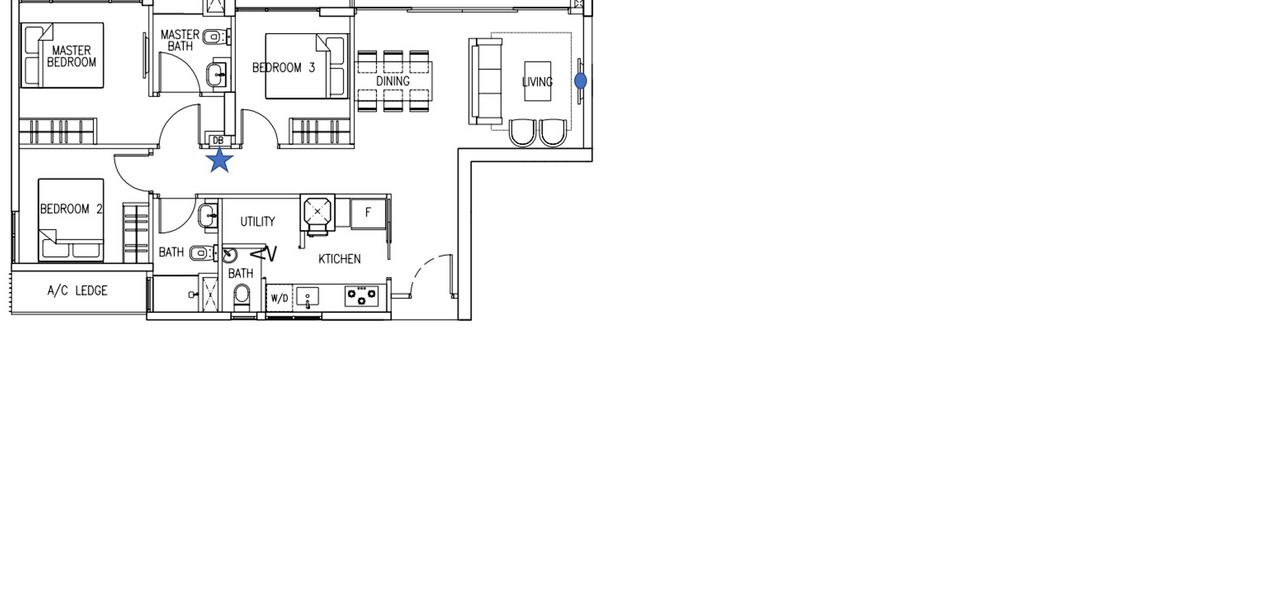
Hi everyone. I am planning to signup M1 1gb broadband for my new 4rm bto. Not sure what router to get and placement. I have attached my floorplan below:

IMG-20230908-001830.jpg


D1 at tv console will be used to connect to cordless phone base. D2 is covered by sofa don't think got place to put. No D5.

Network usage is fb/whatsapp/youtube on mobile and video call on office laptops.

Thinking of putting main router with ONT in DB and another node in D4.

What routers should I get and where to place them? Thanks.
 

xiaofan

High Supremacy Member
Joined
Sep 16, 2018
Messages
35,169
Reaction score
11,760
Hi everyone. I am planning to signup M1 1gb broadband for my new 4rm bto. Not sure what router to get and placement. I have attached my floorplan below:

IMG-20230908-001830.jpg


D1 at tv console will be used to connect to cordless phone base. D2 is covered by sofa don't think got place to put. No D5.

Network usage is fb/whatsapp/youtube on mobile and video call on office laptops.

Thinking of putting main router with ONT in DB and another node in D4.

What routers should I get and where to place them? Thanks.

What is your budget?

The following combination costs S$383 and I think it is a good combination: get the free RT-AX3000P and then use PWP to get GT-AX6000 at S$383.

Assume your DB box does not block wifi much. Then you plan should work. Put the GT-AX6000 in the DB area which should be able to cover Living room and Bedroom 3. Then put the GT-AX3000P in Bedroom 2 (please try to move it towards Bath/WC2 to avoid the structure wall) and then it should be able to cover Bedroom 2 and Main Bedroom.

If the above assumption is not valid, you can still add one more node in D2 (you need to pull an Ethernet cable out). You can get RT-AX55 from Carousell at around S$75 for this purpose. That will add the budget to S$458.

Reference: M1 offer for GT-AX6000.
https://www.m1.com.sg/home-broadband/devices/asus-rog-rapture-gt-ax6000
 

irvine83

Member
Joined
Feb 4, 2010
Messages
408
Reaction score
0
What is your budget?

The following combination costs S$383 and I think it is a good combination: get the free RT-AX3000P and then use PWP to get GT-AX6000 at S$383.

Assume your DB box does not block wifi much. Then you plan should work. Put the GT-AX6000 in the DB area which should be able to cover Living room and Bedroom 3. Then put the GT-AX3000P in Bedroom 2 (please try to move it towards Bath/WC2 to avoid the structure wall) and then it should be able to cover Bedroom 2 and Main Bedroom.

If the above assumption is not valid, you can still add one more node in D2 (you need to pull an Ethernet cable out). You can get RT-AX55 from Carousell at around S$75 for this purpose. That will add the budget to S$458.

Reference: M1 offer for GT-AX6000.
https://www.m1.com.sg/home-broadband/devices/asus-rog-rapture-gt-ax6000
Thanks for the advice. Budget ard $500. But just wondering if GT-AX6000 is overkilling as I dont use it for gaming.

Was wondering if 2x zenwifi xd6 or 2x ax3000p is sufficient.
 
Last edited:

tissue paper

Banned
Joined
Apr 20, 2021
Messages
1,449
Reaction score
568
hello, i am currently using the starhub nokia mesh (2 units), but i think its degrading a lot now

i want to change...to a better one
anyone can recommend?

i know almost nothing about routers...so even if i buy, not sure how to connect and configure

ps: i have 5 users in a 5room hdb....no gaming....just surfing web and netflix

thank you
 

xiaofan

High Supremacy Member
Joined
Sep 16, 2018
Messages
35,169
Reaction score
11,760
how about
Linksys MX2001 Atlas Pro 6 Dual-Band AX3000
or
TP-Link Deco X20 AX1800
hello, i am currently using the starhub nokia mesh (2 units), but i think its degrading a lot now

i want to change...to a better one
anyone can recommend?

i know almost nothing about routers...so even if i buy, not sure how to connect and configure

ps: i have 5 users in a 5room hdb....no gaming....just surfing web and netflix

thank you

Are you using Nokia Beacon 1 or Nokia Beacon 2? If you are using Nokia Beacon 2, as per the feedback from @Henry Ng, the coverage of Linksys Atlas 6 MX2001 is no better than the Nokia Beacon 2. Deco X20 will also be in the simiar league. So you may not gain much. If you are using Nokia Beacon 1, then probably both are good upgrade to the Nokia Beacon 1. Whether they are good enough for you is another story.

Are you using Ethernet backhaul or Wireless backhaul?

Do you have LAN ports in the rooms?

It will be good to post the floor plan with details of the locations of the ONT and two Nokia mesh nodes, so that people here can recommend a suitable solution. Please also state your budget.

If you want to gain more knowledge about Home Networking, you may want to watch the four Youtube videos mentioned in the first post of the following pinned thread, It will be very much worth the time.
https://forums.hardwarezone.com.sg/threads/understanding-the-abcs-of-home-networking.6653421/
 

tissue paper

Banned
Joined
Apr 20, 2021
Messages
1,449
Reaction score
568
Are you using Nokia Beacon 1 or Nokia Beacon 2? If you are using Nokia Beacon 2, as per the feedback from @Henry Ng, the coverage of Linksys Atlas 6 MX2001 is no better than the Nokia Beacon 2. Deco X20 will also be in the simiar league. So you may not gain much. If you are using Nokia Beacon 1, then probably both are good upgrade to the Nokia Beacon 1. Whether they are good enough for you is another story.

Are you using Ethernet backhaul or Wireless backhaul?

Do you have LAN ports in the rooms?

It will be good to post the floor plan with details of the locations of the ONT and two Nokia mesh nodes, so that people here can recommend a suitable solution. Please also state your budget.

If you want to gain more knowledge about Home Networking, you may want to watch the four Youtube videos mentioned in the first post of the following pinned thread, It will be very much worth the time.
https://forums.hardwarezone.com.sg/threads/understanding-the-abcs-of-home-networking.6653421/
Hey, thanks for the reply.
I am using the Nokia beacon 1.
i am ok with it when it was new. but now, too many drops.

i am using wireless, don’t have any lan ports in the rooms

so based on this, what will you recommend? Budget around 200

question
1) is it easy to configure a new router? Do I need to engage someone to do it?

2) can I use the new router in my living room and keep the Nokia beacon in my bedroom?
 

xiaofan

High Supremacy Member
Joined
Sep 16, 2018
Messages
35,169
Reaction score
11,760
Hey, thanks for the reply.
I am using the Nokia beacon 1.
i am ok with it when it was new. but now, too many drops.

i am using wireless, don’t have any lan ports in the rooms

so based on this, what will you recommend? Budget around 200

question
1) is it easy to configure a new router? Do I need to engage someone to do it?

2) can I use the new router in my living room and keep the Nokia beacon in my bedroom?

Given by your budget, just go with your plan even it is not optimal solution. For sure they will be better than Nokia Beacon 1.

If you are willing to learn, setting up new mesh routers are pretty easy. Just follow the instruction of the router vendor. But if you think this is too difficult, probably you can ask a friend to help.

Example setup guide from TP-Link Singapore for Deco X20.


Example setup guide from Linksys SIngapore for Atlas 6 MX2000 (similar to Starhub specific MX2001).
https://www.linksys.com/sg/support-article/?articleNum=334147

Since you have not posted the floor plan, I am not so sure whether it is a good idea to keep the Nokia Beacon 1. Too many wireless routers can be a problem as well.
 
Last edited:

tissue paper

Banned
Joined
Apr 20, 2021
Messages
1,449
Reaction score
568
Given by your budget, just go with your plan even it is not optimal solution. For sure they will be better than Nokia Beacon 1.

If you are willing to learn, setting up new mesh routers are pretty easy. Just follow the instruction of the router vendor. But if you think this is too difficult, probably you can ask a friend to help.

Example setup guide from TP-Link Singapore for Deco X20.


Example setup guide from Linksys SIngapore for Atlas 6 MX2000 (similar to Starhub specific MX2001).
https://www.linksys.com/sg/support-article/?articleNum=334147

Since you have not posted the floor plan, I am not so sure whether it is a good idea to keep the Nokia Beacon 1. Too many wireless routers can be a problem as well.

thanks for the vid...looks simple enough to configure

another question.....how do i know my drop outs are due to my Nokia Beacon and not my modem?
 

xiaofan

High Supremacy Member
Joined
Sep 16, 2018
Messages
35,169
Reaction score
11,760
thanks for the vid...looks simple enough to configure
another question.....how do i know my drop outs are due to my Nokia Beacon and not my modem?

Most likely your issue is with poor wireless performance/stability of the Nokia Beacon 1. It is not good from the beginning as it is a lousy router, in fact, the worst free ISP issued router among all ISPs since 2020, worse than SingTel Mesh Router (given by SingTel from 2020 to now) but better than Singtel AC Plus(given by Singtel from 2018 to 2020). Then it is getting worse due to aging.

Starhub is giving Nokia Beacon 2 now. It is not a good router but still way better than Nokia Beacon 1.

1) ONT or Nokia Beacon 1 router:
Connect a laptop to the ONT and then see if it is okay. I tend to believe it will be okay.

2) Nokia Beacon 1 router -- wired or just wireless:

Connect a laptop to the LAN port of Nokia Beacon 1 to see if wired connection is stable or not. I tend to believe it will be okay.
 

tissue paper

Banned
Joined
Apr 20, 2021
Messages
1,449
Reaction score
568
Most likely your issue is with poor wireless performance/stability of the Nokia Beacon 1. It is not good from the beginning as it is a lousy router, in fact, the worst free ISP issued router among all ISPs since 2020, worse than SingTel Mesh Router (given by SingTel from 2020 to now) but better than Singtel AC Plus(given by Singtel from 2018 to 2020). Then it is getting worse due to aging.

Starhub is giving Nokia Beacon 2 now. It is not a good router but still way better than Nokia Beacon 1.

1) ONT or Nokia Beacon 1 router:
Connect a laptop to the ONT and then see if it is okay. I tend to believe it will be okay.

2) Nokia Beacon 1 router -- wired or just wireless:

Connect a laptop to the LAN port of Nokia Beacon 1 to see if wired connection is stable or not. I tend to believe it will be okay.
thanks man!!

you have been very clear and concise and quick in your replies. It has helped me a lot. super appreciated

i am leaning towards the TP link Deco X20 at the moment...coz not so expensive
 

Advancer

Banned
Joined
Oct 14, 2001
Messages
4,909
Reaction score
1,329
I got some issues with my Asus RT-AX55 located in my study room recently.
Use speedtest and on some occasions completely cannot detect wifi on my samsung s23 and ipad air.
Not sure if its a router issue or others.

My connection is ONT --- Singtel Nokia ONR (DB box) --- AX55 (living room) --- AX55 (study room) (wired backhaul).

Any experts can advice?
 

xonix

Arch-Supremacy Member
Joined
Mar 24, 2001
Messages
17,587
Reaction score
1,689
I got some issues with my Asus RT-AX55 located in my study room recently.
Use speedtest and on some occasions completely cannot detect wifi on my samsung s23 and ipad air.
Not sure if its a router issue or others.

My connection is ONT --- Singtel Nokia ONR (DB box) --- AX55 (living room) --- AX55 (study room) (wired backhaul).

Any experts can advice?
Configure as AP with different SSID and you will know for sure.
 

babyjyo

Member
Joined
Feb 27, 2009
Messages
310
Reaction score
50
I got some issues with my Asus RT-AX55 located in my study room recently.
Use speedtest and on some occasions completely cannot detect wifi on my samsung s23 and ipad air.
Not sure if its a router issue or others.

My connection is ONT --- Singtel Nokia ONR (DB box) --- AX55 (living room) --- AX55 (study room) (wired backhaul).

Any experts can advice?

First, check if you can even connect to the AX (Study Room). You might need to disable or turn off the AX55 (Living Room) one.
 

Advancer

Banned
Joined
Oct 14, 2001
Messages
4,909
Reaction score
1,329
First, check if you can even connect to the AX (Study Room). You might need to disable or turn off the AX55 (Living Room) one.
Yes pretty sure it's working fine. I set it up as a standalone router and it works.
Anyway I reset the study room router and set it up all over again, let's see how it goes.
 

marcoin

Member
Joined
Oct 24, 2001
Messages
266
Reaction score
1
Hi All, need help to improve wifi speed and coverage in my unit. Asus RT-AX3000P(from M1 1GBPS plan) inside DB located at blue star.
Only have one old AC88U(Set as AP but some how speed limited up to 100mbps) at tv console at living room.
I think internal cabling has issue.
For improvement with budget, can a AX55 set to aimesh helps with improving the speed? I have tried set to aimesh with the old AC88U but speed and coverage is bad at its location.


DB.jpg
 

xonix

Arch-Supremacy Member
Joined
Mar 24, 2001
Messages
17,587
Reaction score
1,689
Hi All, need help to improve wifi speed and coverage in my unit. Asus RT-AX3000P(from M1 1GBPS plan) inside DB located at blue star.
Only have one old AC88U(Set as AP but some how speed limited up to 100mbps) at tv console at living room.
I think internal cabling has issue.
For improvement with budget, can a AX55 set to aimesh helps with improving the speed? I have tried set to aimesh with the old AC88U but speed and coverage is bad at its location.
DB.jpg
First check if the living room data point is working by testing it directly without ac88u. If it's working, then just replace the router. The ax55 is a cost effective solution but it's not a like for like replacement for your ac88u though.
 

marcoin

Member
Joined
Oct 24, 2001
Messages
266
Reaction score
1
Hi, the lan point is not accessible as it is covered by feature wall. Only a cable is routed from there which I have tested with my laptop on Lan to be limited to 100mbps. So I am looking at only wireless solution. :(
 

xiaofan

High Supremacy Member
Joined
Sep 16, 2018
Messages
35,169
Reaction score
11,760
Hi, the lan point is not accessible as it is covered by feature wall. Only a cable is routed from there which I have tested with my laptop on Lan to be limited to 100mbps. So I am looking at only wireless solution. :(

How is the coverage by using the singtel RT-AX3000P in the DB box? Is the DB box blocking wifi?

If you have to use wireless backhaul, I think it is tough for the lower end RT-AX3000P and the RT-AX55 to do the intended job, if you intend to put the RT-AX55 in the TV console area, as it is a bit far away from the main RT-AX3000P. Take note that both of them are among the lowest end dual band Asus AX routers (a bit better than RT-AX53U only).

In order for wireless mesh to work, the mesh node needs to have good connection to the main node. I am not so sure about the aging of your RT-AC88U. Assuming it is not that bad in terms of aging, and you can not get good AImesh wireless connection with the main RT-AX3000P using RT-AC88U, RT-AX55 may not be better.

When you say the connection is only 100Mbps, is it stable 100Mbps? If it is stable, then you may still want to go with RT-AX55 and use Ethernet backhaul. Even though it is capped at 100Mbps but it should still be better than using wireless backhaul.

Of course the best solution is to fix the LAN port in the living room.
 

marcoin

Member
Joined
Oct 24, 2001
Messages
266
Reaction score
1
Hi XF, I am getting 200-300mbps at all bedrms with the AX3000P which is sufficient for me. I agree as what you said if I cant fix that LAN port in my living room, I have to try with that old AC88 with wired backhaul aimesh as a better solution. Thank u.
 
Important Forum Advisory Note
This forum is moderated by volunteer moderators who will react only to members' feedback on posts. Moderators are not employees or representatives of HWZ Forums. Forum members and moderators are responsible for their own posts. Please refer to our Community Guidelines and Standards and Terms and Conditions for more information.
Top