e-Remote Broadlink RM-Pro

Elon Jobs

Senior Member
Joined
Jun 22, 2018
Messages
2,334
Reaction score
1,141
You can make use of the remote, physical switch button and smart integration (via broadlink rm pro)
I make use of it for standing fans, iron, standing lamps, LED lights etc. You can make any manual on/off switch to a smart ones with it. For the price of 2 SP switch, you can get 5 of smartvue plugs.

I agree but currently I already have 2 SP2 controlling my two standing fans and not much use for other devices. But like your said, if I've known earlier I would have gotten these 5 for the price of 2!
 

morpheouss

Junior Member
Joined
Jul 11, 2009
Messages
11
Reaction score
0
Those on livolo smart switches, how is their failure rate? Anyone using more than a year no issues ?

Also, you got it from carousell, aliexpress or taobao?

I got from Ali express livolo 3 gang with remote, remote with 2 button faulty. Quality of the light looks promising.

However having an issue of the light auto turn on, not sure if it's a problem with my S2 hub triggering. But I notice that the success rate with RM pro+ and S2 trigger is not very high...
Voice activation with alexa is ok though.

As of now, only Xiaomi Aqara did not fail me.... Waiting earnestly for its alexa integration.
 

dennis91

Member
Joined
May 31, 2007
Messages
288
Reaction score
0
Safevue RF socket is having daily deal at Qoo10, 5 for $29.30

Don't know how to get non-referral link from the app so not posting here..

Sent from Nokia 8250 using GAGT


if I want my broadlink rm pro+ to 'learn' this RF socket, do I need to buy the remote control as well? or will broadlink already 'know' how to control the socket over RF?
 

Aditshar

Member
Joined
Sep 26, 2017
Messages
218
Reaction score
0
The safevue 5 in 1 plugs comes with a remote. In IHC app, use 'lamp' to learn the RF socket via remote.

if I want my broadlink rm pro+ to 'learn' this RF socket, do I need to buy the remote control as well? or will broadlink already 'know' how to control the socket over RF?
 

coldnite

Member
Joined
Nov 25, 2013
Messages
152
Reaction score
0
As what tazzi80 said, no need to add the remote. The default package comes with 5 plugs, 1 remote (10 button - ON and OFF for each plug) pre-configured and a 12v battery.


Qoo10 charging $10 for the remote :s22: was hoping to skip it.
 

dennis91

Member
Joined
May 31, 2007
Messages
288
Reaction score
0
yup my bad. read in Q&A then realise comes with remote.

BTW anyone bought 2-way light swtiches? e.g. livolo?
does 2-way means the app is able to tell if the switch is on/off, or does 2-way mean 1 light can be controlled by 2 different switches? (i.e. one near the bed, another near the door)
 

Elon Jobs

Senior Member
Joined
Jun 22, 2018
Messages
2,334
Reaction score
1,141
Anyone using any digital lock with rmpro+?
Either wifi or rf 433mhz (insecure but I don't mind).

I did try to make my RM Pro capture my Yale digital lock remote control frequency but it was unable to do so. The frequency is not within RM Pro’s range.
 

morpheouss

Junior Member
Joined
Jul 11, 2009
Messages
11
Reaction score
0
yup my bad. read in Q&A then realise comes with remote.

BTW anyone bought 2-way light swtiches? e.g. livolo?
does 2-way means the app is able to tell if the switch is on/off, or does 2-way mean 1 light can be controlled by 2 different switches? (i.e. one near the bed, another near the door)

2 way means 2 switch at different location controlling one source. So far, only xiaomi aqara can tell the status
 

dadevil

Member
Joined
Jul 18, 2004
Messages
369
Reaction score
0
Anyone using myrepublic halo router and able to configure your rm pro? I can't seem to pair my rm pro to this router.. Any help?
 

Elon Jobs

Senior Member
Joined
Jun 22, 2018
Messages
2,334
Reaction score
1,141
Anyone using myrepublic halo router and able to configure your rm pro? I can't seem to pair my rm pro to this router.. Any help?

The “problem” with the newer high-end routers released in the past 12-18 months is they combine the 2.4Ghz and 5Ghz frequencies and have their own internal processor to determine which is the optimal frequency for a specific device depending on barriers, range, strength of device antenna etc. However, RM Pro can only detect and connect to 2.4Ghz!

So you’ll have to use a browser and log into your router (try 192.168.1.1, this is usually the default IP address) and check on the box to separate your 2.4Ghz and 5Ghz frequency. After that, your router will reboot and then you have to log in again using the same method and rename your 2.4Ghz and 5Ghz SSID with two different names (password can be the same, it’s your choice). After that, the router will reboot again and it should be fine. You can just follow the instructions and set up your RM Pro from there.
 

sumbody

Junior Member
Joined
Jul 11, 2015
Messages
25
Reaction score
0
With my Google Mesh setup, I have a hybrid 5GHz and 2.4GHz Wifi connection too.

What I did was I took the RM Pro/RM Mini into my storeroom, closed the door and set it up inside there. My connection wasn't strong enough for 5GHz Wifi inside the storeroom :s13:
 

Aditshar

Member
Joined
Sep 26, 2017
Messages
218
Reaction score
0
Make sure you have the 2.4GHz and 5GHz wifi network seperated on the router wifi settings. Config the rm pro to 2.4Ghz. It will take quite a no. of tries before you can get it connected. You will get pissed off after a while but once it working well, all your effort will be paid off.

Anyone using myrepublic halo router and able to configure your rm pro? I can't seem to pair my rm pro to this router.. Any help?
 

Elon Jobs

Senior Member
Joined
Jun 22, 2018
Messages
2,334
Reaction score
1,141
With my Google Mesh setup, I have a hybrid 5GHz and 2.4GHz Wifi connection too.

What I did was I took the RM Pro/RM Mini into my storeroom, closed the door and set it up inside there. My connection wasn't strong enough for 5GHz Wifi inside the storeroom :s13:

That’s an innovative idea, and I did consider trying that too. But I have one router and two AP at my place so I figured it was easier just to log into the three routers individually and manually turn off the 5Ghz while I do the setting up.
 

medscy

Member
Joined
Apr 17, 2006
Messages
497
Reaction score
5
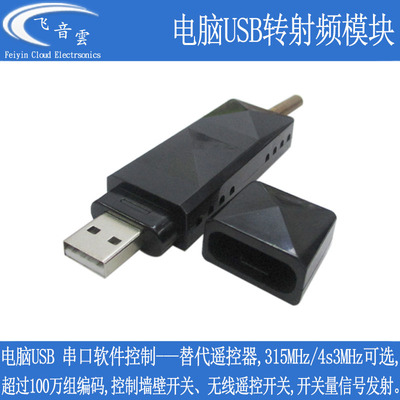
[SIC] 65k channel RF Remote

Just to share a RF remote which I recently found that is able to control my 20+ Yoogee switches. That will easily require 40+ sets of different EV1527 RF codes. This is a USB RF remote that easily can generate 65,536 different codes. With this, I am able to get my RM Pro+ to learn the codes to allow Google Assistant or Alexa to voice control all my switches.

I could have gotten one of those remotes sold in Carousell or Qoo10... but this is cheap.... Cost me slightly less than S$8 with shipping from Taobao.

TB2iCsAnpXXXXbRXXXXXXXXXXXX_!!218960742.jpg_400x400.jpg


With the extra codes, I can also set up special codes to simultaneously control a few switches (either ON/OFF at one go).

This should also work for other 3rd party RF Wall switches such as Funry and Sankou
 

xenocide

Arch-Supremacy Member
Joined
Jun 3, 2002
Messages
17,819
Reaction score
107
Just to share a RF remote which I recently found that is able to control my 20+ Yoogee switches. That will easily require 40+ sets of different EV1527 RF codes. This is a USB RF remote that easily can generate 65,536 different codes. With this, I am able to get my RM Pro+ to learn the codes to allow Google Assistant or Alexa to voice control all my switches.

I could have gotten one of those remotes sold in Carousell or Qoo10... but this is cheap.... Cost me slightly less than S$8 with shipping from Taobao.

TB2iCsAnpXXXXbRXXXXXXXXXXXX_!!218960742.jpg_400x400.jpg


With the extra codes, I can also set up special codes to simultaneously control a few switches (either ON/OFF at one go).

This should also work for other 3rd party RF Wall switches such as Funry and Sankou

so you are controlling via PC? Or?
How does this works?
 
Important Forum Advisory Note
This forum is moderated by volunteer moderators who will react only to members' feedback on posts. Moderators are not employees or representatives of HWZ Forums. Forum members and moderators are responsible for their own posts. Please refer to our Community Guidelines and Standards and Terms and Conditions for more information.
Top