[Official] Home Automation Thread

viix

Master Member
Joined
Nov 17, 2001
Messages
3,236
Reaction score
2
Hi, got a wiring/cabling question..

Say if I want to position a Google nest hub max on the living room coffee table (between sofa and TV).. It's not quite possible to do the wiring without making it look ugly right? The wiring will be across the floor no matter what..

Anyone got idea how to make this better?

Hack the floor, or carpet with some super slim cabling/trucking.
I use a carpet, with a super slim wire RATED for the device under the carpet. Punch a hole in the carpet and run up the table. Issue solved. I stress rated cause if too thin, fire hazard as the wire will heat up. Mine is a DC device, so its a short run of cable under my electrical recliner to the console. AC, different story.
 

davi502

Master Member
Joined
Nov 20, 2005
Messages
4,613
Reaction score
57
My (and surely also the wife's) criteria was full HomeKit compatibility. I think Homebridge does it quite a bit better. The aircons, and most other existing hardware, need IR blasters. There's no out-of-the-box solutions for HomeKit. Home Assistant support for 3rd party IR blasters is so-so, thus I ended up with Homebridge.

Gotta love buying all cheapo IR/RF remote controlled stuff for couple of bucks, with few minutes to set up a HomeKit automation for them (e.g. $8 for LED strips and $3 for tiny RF relay to automate an existing light).

Just waiting for few more hardware to arrive, and I shall start putting the post up.

Yes.. Please share. Definitely looking forward to it
 

BlackLab

Junior Member
Joined
Jan 1, 2012
Messages
68
Reaction score
0
Just wanted to chime in and add that Home Assistant isn't that bad a choice, cause it seems like some not in favour of it from what I read the last couple of pages.

If you have a decent understanding of scripting, and don't mind putting in some time to set it up and write your own automations, it's really the best option out there, especially for its price (i.e. it's free).

I've been running it for over a year now, with some moderate customizations, and haven't encountered any major issues with regard to breaking changes.
(The only major thing was when the Snips platform was pulled, and I had to re-setup the voice control integration all over - that was painful, but it would have happened to on any system using it.)

If you're already in the Apple ecosystem, I guess Homekit is unavoidable, but Home Assistant is generally more robust and has a lot of plug-in and integration support.

It's not for everyone, but I'd say don't dismiss it if you can spare the effort to set it up.
 
Last edited:

Naqsaq

Member
Joined
Jul 4, 2018
Messages
185
Reaction score
21
Yes.. Please share. Definitely looking forward to it

Got most already set up to write this up. So far fully controllable:
  • All aircons with real temperatures coming from Xiaomi e-ink clocks (~$20) via IR/BT
  • Bunch of $10 RGB LED strips via IR in various places
  • Ceiling fan control via RF
  • Samsung TV
  • Yamaha MusicCast preamp
  • Ouside temp/humidity via close by weather station
  • Various sockets controlling table lamps, kitchen appliances, etc. by cheap ~$10 RF hardware
  • Pi camera for ~$15

Just two more parcels to arrive to finish up:
  • Cheap ~$3 RF switches to control fixed ceiling lights
  • Yeelight bulbs
  • More Xiaomi e-ink clocks to monitor temp/humidity in all the rest of the rooms without dedicated aircon

The $200 budget will stretch a bit due to the Yeelight bulbs.
 
Last edited:

Superbigfatdaddy

Junior Member
Joined
Jun 18, 2019
Messages
36
Reaction score
0
Just wanted to chime in and add that Home Assistant isn't that bad a choice, cause it seems like some not in favour of it from what I read the last couple of pages.

If you have a decent understanding of scripting, and don't mind putting in some time to set it up and write your own automations, it's really the best option out there, especially for its price (i.e. it's free).

I've been running it for over a year now, with some moderate customizations, and haven't encountered any major issues with regard to breaking changes.
(The only major thing was when the Snips platform was pulled, and I had to re-setup the voice control integration all over - that was painful, but it would have happened to on any system using it.)

If you're already in the Apple ecosystem, I guess Homekit is unavoidable, but Home Assistant is generally more robust and has a lot of plug-in and integration support.

It's not for everyone, but I'd say don't dismiss it if you can spare the effort to set it up.

Snips has blocked off public access to their console. Can't create new voice command. How did you do it?
 

BlackLab

Junior Member
Joined
Jan 1, 2012
Messages
68
Reaction score
0
Snips has blocked off public access to their console. Can't create new voice command. How did you do it?

Sorry for the confusion, I meant I had to re-setup voice control using Alexa after Snips got pulled.

Oh well... Guess offline voice control will have to wait for when I've got a lot more time for it.
 

nzez88

Junior Member
Joined
Sep 26, 2005
Messages
38
Reaction score
0
planner / spreadsheet / diagram

hi, beginner and have place upcoming in end 2020. Anyone with good planning tools to share for home automation? e.g. google sheet, diagram that would help in planning and blind-spots?

Have a non-automation set up in parents place using GH / yeelights / vacuumbots, hoping to take it to next level with the new place!

closest i've seen is here but doesn't really include automation sensors and is more like a network diagram
ww w.reddit.com/r/homeautomation/comments/gvh6x3/used_the_extra_free_time_in_lockdown_to_diagram/
 

zoneguard

Senior Member
Joined
Jun 2, 2000
Messages
1,957
Reaction score
398
hi, beginner and have place upcoming in end 2020. Anyone with good planning tools to share for home automation? e.g. google sheet, diagram that would help in planning and blind-spots?
Why don't you just use the new place's floor plan as a starting point? You need to decide on the HA platform/protocol and install neutral wire for electrical switches.
 

viix

Master Member
Joined
Nov 17, 2001
Messages
3,236
Reaction score
2
hi, beginner and have place upcoming in end 2020. Anyone with good planning tools to share for home automation? e.g. google sheet, diagram that would help in planning and blind-spots?

Have a non-automation set up in parents place using GH / yeelights / vacuumbots, hoping to take it to next level with the new place!

closest i've seen is here but doesn't really include automation sensors and is more like a network diagram
ww w.reddit.com/r/homeautomation/comments/gvh6x3/used_the_extra_free_time_in_lockdown_to_diagram/

Yeah, get a copy of your floor plan and photocopy/enlarge it. Thats what I did. I print A2 size (2x A3) and map my switches/wiring, lighting and furniture on it.

Then you visualise your own walk through.
When my took my keys, I also masking tape out the outlines of my furniture and appliances to exact dimension. This way I know if there is sufficient space for switch/smart appliance so nothing is in the way/blocked and also easier to brief my contractor. Also helps in planning how much lights/fan you need and best place to mount your hub and AP..
 

benyee90

Senior Member
Joined
Sep 15, 2004
Messages
938
Reaction score
0
Hi iam also new to home automation. Iam planning to use aqara home gateway for my new home.

I have a question, does xiaomi (sg) and xiaomi (mainland China) smart devices work tog? I have read that some appliances will not show on sg region but only mainland China. Will sg region devices works on mainland China?

TIA
 

xenocide

Arch-Supremacy Member
Joined
Jun 3, 2002
Messages
17,819
Reaction score
107
Hi iam also new to home automation. Iam planning to use aqara home gateway for my new home.

I have a question, does xiaomi (sg) and xiaomi (mainland China) smart devices work tog? I have read that some appliances will not show on sg region but only mainland China. Will sg region devices works on mainland China?

TIA

no they do not work together.
if u wan to use SG server, u need to check the list of supported devices in the app.
 

doki81

Arch-Supremacy Member
Joined
Jun 11, 2010
Messages
12,659
Reaction score
1,171
Hi iam also new to home automation. Iam planning to use aqara home gateway for my new home.

I have a question, does xiaomi (sg) and xiaomi (mainland China) smart devices work tog? I have read that some appliances will not show on sg region but only mainland China. Will sg region devices works on mainland China?

TIA
maybe ewelink is more suitable...

Sent from Samsung Note 10 + using GAGT
 

mrsmartyspecs

Junior Member
Joined
May 28, 2020
Messages
38
Reaction score
0
Hi, I'm new to home automation. Would like to ask if I purchase a home automation system from one company for e.g. Schneider Electric, do my home products like lights, heater etc. need to be from Schneider Electric as well in order for them to be controlled under the same system??
 

doki81

Arch-Supremacy Member
Joined
Jun 11, 2010
Messages
12,659
Reaction score
1,171
From my knowledge, the home automation system generally works best with their own products (afterall it is a system that is produced by them to allow for more efficiency and smoother connection with their products). I believe if you were to try other products, you might need to find out if they are compatible by contacting the respective manufacturer. In other words, you might consider contacting Schneider Electric and the other manufacturer whether their products can be used with other manufacturer products.
own self post ..own self reply?

Sent from Samsung Note 10 + using GAGT
 

zleipnir

Arch-Supremacy Member
Joined
Mar 8, 2004
Messages
19,519
Reaction score
14
Hi, I'm trying to link Mi Home account to Google home but it keeps jumping back to the google setup device page after trying to link the Mi Home message appears. End up the Mi Home is not linked. Did anyone encounter such issue? Any solutions?

Thanks in advance.
 

wutawa

Arch-Supremacy Member
Joined
Jan 25, 2003
Messages
13,396
Reaction score
4,399
Hi, I'm trying to link Mi Home account to Google home but it keeps jumping back to the google setup device page after trying to link the Mi Home message appears. End up the Mi Home is not linked. Did anyone encounter such issue? Any solutions?

Thanks in advance.

u may have keyed in the wrong password for mi home acct. my solution is tat u need to delete the home in google home and recreate everything again.
 
Last edited:

wutawa

Arch-Supremacy Member
Joined
Jan 25, 2003
Messages
13,396
Reaction score
4,399
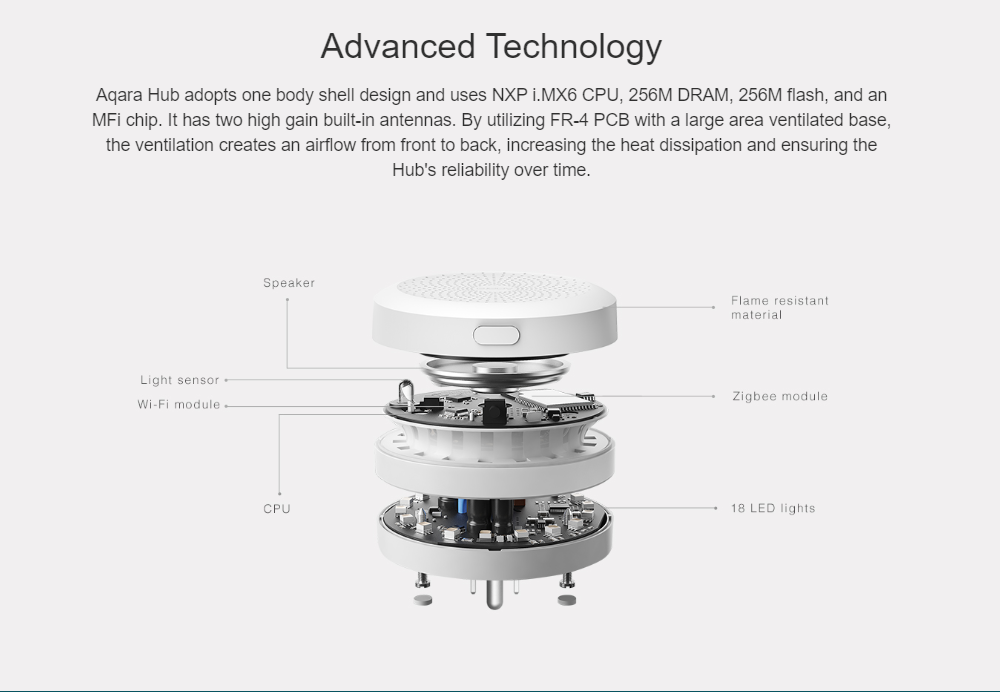
can i know what can aqara hub do on its own? what is the function of its light sensor? Can i mute its speaker?

57f8d7f537862308c737742d8b7019b0.png
 
Last edited:

zleipnir

Arch-Supremacy Member
Joined
Mar 8, 2004
Messages
19,519
Reaction score
14
u may have keyed in the wrong password for mi home acct. my solution is tat u need to delete the home in google home and recreate everything again.
Hi, I done for both Mi Home app and Google home app, still the problem exists. Are you also using Mi Home app and GHA?
 

zleipnir

Arch-Supremacy Member
Joined
Mar 8, 2004
Messages
19,519
Reaction score
14
Btw, I have 2 questions.

1. I setup SmartLife Door sensor to turn on my SmartLife light switch whenever the store room door is opened. It will lag like 5-6 seconds. Is that normal?

2. Is broadlink multi sensor good? or Other brands? I wanted to setup motion sensor to trigger the living room lights to switch on whenever someone walks in there after midnight. This is so that my parents dun need to search in the dark for the light switches or the remote. My lights have IR remote controls and are currently controlled by my Broadlink RM Pro 4.
 
Important Forum Advisory Note
This forum is moderated by volunteer moderators who will react only to members' feedback on posts. Moderators are not employees or representatives of HWZ Forums. Forum members and moderators are responsible for their own posts. Please refer to our Community Guidelines and Standards and Terms and Conditions for more information.
Top