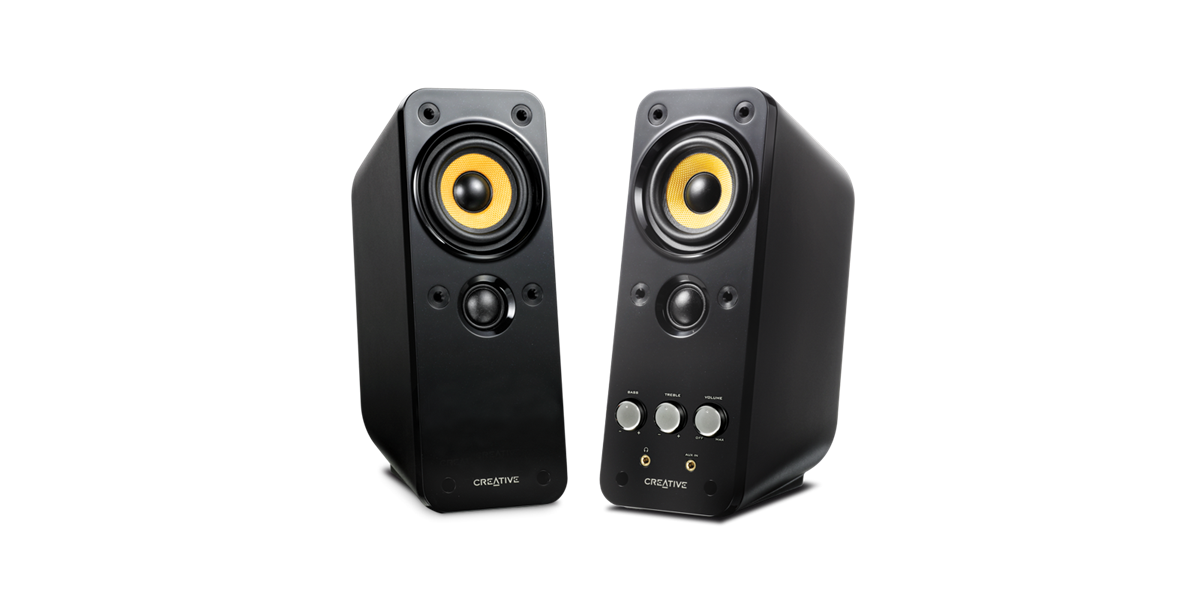
Recommendations for computer speakers

Shahmatt

Senior Member
Joined
Oct 2, 2006
Messages
2,494
Reaction score
42
Yes, so from PC the left and right signal to the speaker.

The speaker system will segregate the signal to speaker and subwoofer through it's
own inbuild amplifier and no setting required.
User can adjust it's treble, Bass and volume.

However S350DB is very big and expensive, if I am not wrong should cost around $400.
This set only shops at Sim Lim Square sells them.
Even for me I find it hard to recommend as it take up a lot of space.

Just for academic interest. I note that both the Edifier T5 and Wharfedale WH-S8E have low pass filters. They also have a crossover frequency adjustment (see image). Would this filter out higher freq sounds?

WH-D10-1609a89d70cf44.png
 

86technie

High Supremacy Member
Joined
Jun 8, 2006
Messages
39,022
Reaction score
5,080
Just for academic interest. I note that both the Edifier T5 and Wharfedale WH-S8E have low pass filters. They also have a crossover frequency adjustment (see image). Would this filter out higher freq sounds?
WH-D10-1609a89d70cf44.png
Those are for use with AVR to integrate speakers with the subwoofer.
When bass notes hit all speaker are in sync without any delay etc. By adjusting the settings.
It does not work PC audio out as PC out is basically a line out but not a speaker nor LFE output.
 

wwenze

Greater Supremacy Member
Joined
Dec 2, 2002
Messages
82,859
Reaction score
26,952
Just for academic interest. I note that both the Edifier T5 and Wharfedale WH-S8E have low pass filters. They also have a crossover frequency adjustment (see image). Would this filter out higher freq sounds?
WH-D10-1609a89d70cf44.png
Yes.

Generally speaking most subwoofers have no problem reaching as high as 150Hz or even more if you set the crossover frequency to max (which is usually 150Hz)

And since most good speakers have no problem reaching as low as 100Hz, you want the speakers to play down to 100Hz then let the sub take over. That's the purpose of a crossover.

In your case tho, because the speakers in your monitor completely suck, it can probably reach as "low" as 500Hz if you're lucky.

Btw you mentioned "coming from the T3", do you still have the T3?
 

Shahmatt

Senior Member
Joined
Oct 2, 2006
Messages
2,494
Reaction score
42
Yes.

Generally speaking most subwoofers have no problem reaching as high as 150Hz or even more if you set the crossover frequency to max (which is usually 150Hz)

And since most good speakers have no problem reaching as low as 100Hz, you want the speakers to play down to 100Hz then let the sub take over. That's the purpose of a crossover.

In your case tho, because the speakers in your monitor completely suck, it can probably reach as "low" as 500Hz if you're lucky.

Btw you mentioned "coming from the T3", do you still have the T3?
I sold the T3.

I only need to reach 125Hz on the sub. I can hear from 125Hz when playing this audio clip:


Actually the display speakers don't suck. They are surprisingly clear, especially when the "Maxxaudio" sound processing is disabled. I would not be considering adding a sub if the main speakers suck.
 

wwenze

Greater Supremacy Member
Joined
Dec 2, 2002
Messages
82,859
Reaction score
26,952
In that case, and if you don't mind having to output from two sound devices at the same time (assuming your monitor cannot output speaker and 3.5mm at the same time)

Then I say go for the sub

And the upside is you can eventually use the sub with another stereo speaker in the future.

But don't go for the Edifier T5. The auto standby cannot be turned off. I would try my luck with WH-S8E instead.
 

86technie

High Supremacy Member
Joined
Jun 8, 2006
Messages
39,022
Reaction score
5,080
I sold the T3.

I only need to reach 125Hz on the sub. I can hear from 125Hz when playing this audio clip:


Actually the display speakers don't suck. They are surprisingly clear, especially when the "Maxxaudio" sound processing is disabled. I would not be considering adding a sub if the main speakers suck.

Measurements does not reflect real world performance.
Later if it does not turn out how you want it to be, HTS speakers are very hard to sell
Second hand as most people use soundbar.

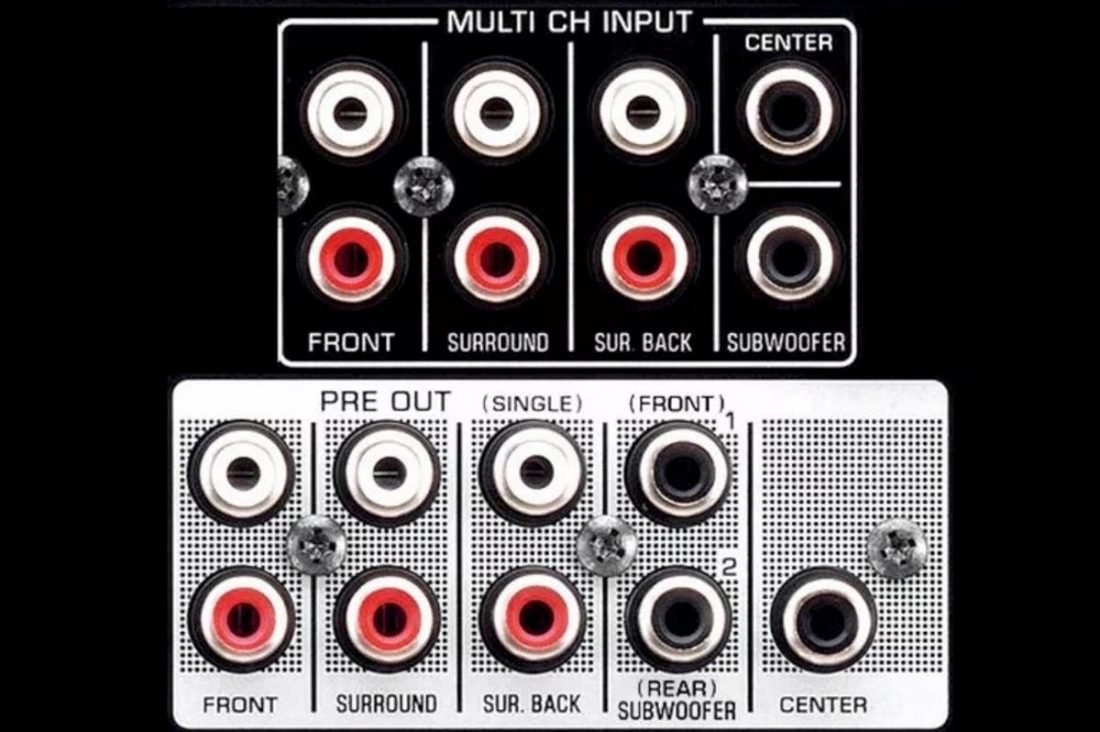
As mention many times does PC or monitor have this output?

multi-channel-output-1100x732.jpg

Than if there is, go ahead and buy a subwoofer but PC line out and speaker works different.
Ignore me all you want, remember who is giving proper advice.
If you want to experiment is up to you, if it doesn't work as intended than you have a very hard time selling.

I still recommend get a PC 2.1 speaker.

 
Last edited:

Shahmatt

Senior Member
Joined
Oct 2, 2006
Messages
2,494
Reaction score
42
Measurements does not reflect real world performance.
Later if it does not turn out how you want it to be, HTS speakers are very hard to sell
Second hand as most people use soundbar.

As mention many times does PC or monitor have this output?

multi-channel-output-1100x732.jpg

Than if there is, go ahead and buy a subwoofer but PC line out and speaker works different.
Ignore me all you want, remember who is giving proper advice.
If you want to experiment is up to you, if it doesn't work as intended than you have a very hard time selling.

I still recommend get a PC 2.1 speaker.


I don't want to experiment so no worriea. Do you know if those motherboards that have c/sub output can produce a clean bass signal like you mention?

Anyway seems like my MSI B350I pro AC board only has three standard output. Even though on paper it can support 7.1. Not sure how that is supposed to work.
 

86technie

High Supremacy Member
Joined
Jun 8, 2006
Messages
39,022
Reaction score
5,080
I don't want to experiment so no worriea. Do you know if those motherboards that have c/sub output can produce a clean bass signal like you mention?

Anyway seems like my MSI B350I pro AC board only has three standard output. Even though on paper it can support 7.1. Not sure how that is supposed to work.
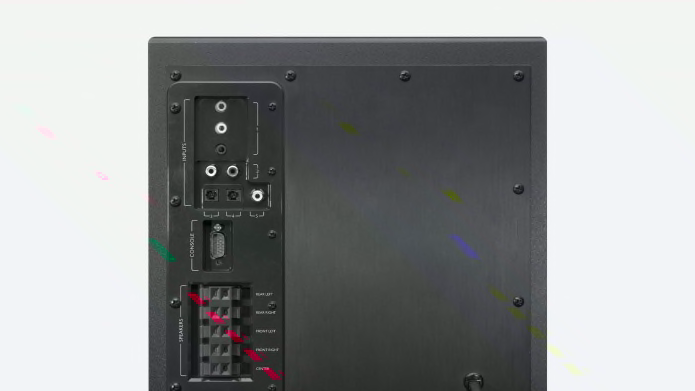
The C/sub output is just a line out is not a LFE output.

z906-feature-3.jpg


Is meant to pair with such speaker.
Before this discussion become more and confusing.
You have to ask yourself what do you want?
Something that does not take up space and decent sound?

Earlier you were looking at T100, if you are looking for some thing small size than consider
Creative Gigaworks T20 Series II.

pdt-mhl-gigaworks_t20_series_II.png


https://sg.creative.com/p/speakers/gigaworks-t20-series-ii

At $119 there are better options like Logitech Z407 which is why I did not recommend earlier not to mention bass is lacking for this speaker.
 

Shahmatt

Senior Member
Joined
Oct 2, 2006
Messages
2,494
Reaction score
42
The C/sub output is just a line out is not a LFE output.

z906-feature-3.jpg


Is meant to pair with such speaker.
Before this discussion become more and confusing.
You have to ask yourself what do you want?
Something that does not take up space and decent sound?

Earlier you were looking at T100, if you are looking for some thing small size than consider
Creative Gigaworks T20 Series II.

pdt-mhl-gigaworks_t20_series_II.png


https://sg.creative.com/p/speakers/gigaworks-t20-series-ii

At $119 there are better options like Logitech Z407 which is why I did not recommend earlier not to mention bass is lacking for this speaker.
The Z407 is more sensible as the satellites seem smaller and I have space below the desk for a woofer. So I will just go with that.
 

Shahmatt

Senior Member
Joined
Oct 2, 2006
Messages
2,494
Reaction score
42
In that case, and if you don't mind having to output from two sound devices at the same time (assuming your monitor cannot output speaker and 3.5mm at the same time)

Then I say go for the sub

And the upside is you can eventually use the sub with another stereo speaker in the future.

But don't go for the Edifier T5. The auto standby cannot be turned off. I would try my luck with WH-S8E instead.

Just for closure. I experimented with using simple wired earphones plugged into the motherboard and running the display speakers. There is a tiny lag between the two - probably because the display has its own DAC and there is a delay from that. Pretty sure any subwoofer plugged in would sound horrible so this method cannot be used at all.

FWIW, display also does not have a feature allowing both subwoofer and speaker output at the same time.

So only way to go is either purchase small bookshelves to pair with a woofer or 2.1 speakers.
 

wwenze

Greater Supremacy Member
Joined
Dec 2, 2002
Messages
82,859
Reaction score
26,952
Maybe the lag is coming from the Windows audio stack. Each input or output stage can add 20ms to 100ms, and you are daisy-chaining two audio devices.

Use voicemeeter to create a virtual device that outputs to both simultaneously.

https://vb-audio.com/Voicemeeter/
Voicemeeter_Standard_Interface.jpg


Once that is done and if you want further control, use EqualizerAPO to further fine tune any delay needed.

BRmeWHx.png
 

Shahmatt

Senior Member
Joined
Oct 2, 2006
Messages
2,494
Reaction score
42
Maybe the lag is coming from the Windows audio stack. Each input or output stage can add 20ms to 100ms, and you are daisy-chaining two audio devices.

Use voicemeeter to create a virtual device that outputs to both simultaneously.

https://vb-audio.com/Voicemeeter/
Voicemeeter_Standard_Interface.jpg


Once that is done and if you want further control, use EqualizerAPO to further fine tune any delay needed.

BRmeWHx.png

The Voice Meter works. Will try to borrow a subwoofer to test. Thanks.
 

86technie

High Supremacy Member
Joined
Jun 8, 2006
Messages
39,022
Reaction score
5,080
Before anyone give wrong advice or do not understand between speaker and subwoofer.
If you want a professional grade 2.1 which will sound better than PC 2.1 speaker.

You will need the following:
- Mixer like Yamaha 2 Channel and etc.

preview.jpg

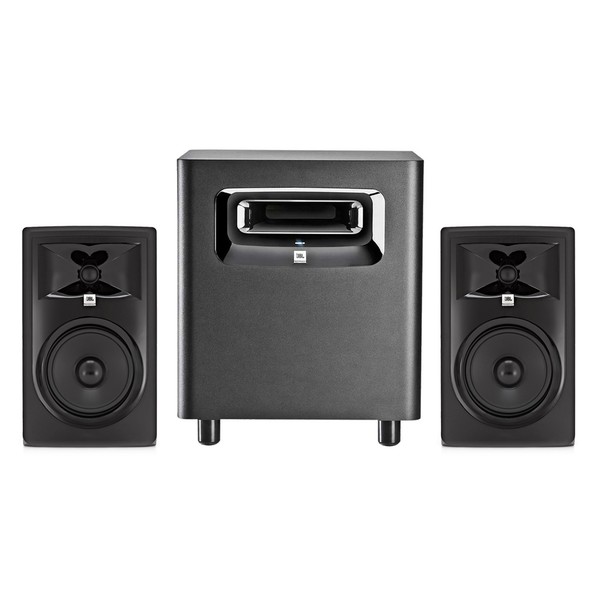
- JBL Studio monitor with suwboofer.

There's learning curve to setup and use such speaker since it is meant for professional audio.
If anyone wants to know how to properly setup a 2.1 speaker this is the correct setup not any others.
Cost wise up to $1k-$2k, training wise you can check with respective vendors.
Stop with whatever nonense, connect here and there use software etc. it does not work that way
and the sound will be worse.

If unsure you can visit shops like Swee Lee music shops, ask them for proper advice how to setup a 2.1 speaker. They have physical shops you can visit like Star Vista, Bras Basah etc.
However please take note such setup is not intended for gaming but music production.
 
Last edited:

ragnarok95

Senior Moderator
Senior Moderator
Joined
Mar 9, 2004
Messages
124,678
Reaction score
6,034
If you do not want to know the learning curve, just get a proper 2.1 setup out of the box. Connect it up and enjoy it with your games/movies/music. It's that simple.
 

86technie

High Supremacy Member
Joined
Jun 8, 2006
Messages
39,022
Reaction score
5,080
Here are some speakers I have used tested.

Edifier Speakers

- R1010BT 2.0 - below $100
Pros: Small size, decent sound
Cons: Volume knob at the back, bass is not strong and awkward.

- Edifier R1280DB 2.0 - $149
Pros: Good balanced sound.
Cons: Big size, you need ample space.

Logitech Speakers

- Z120 -2.0 - $19
Pros: Small Size, can replace speakers from monitor.
Cons: Not for those looking for more power or gaming.

- Z313 - 2.1 - $49
Pros: Balanced sound, good mid and bass.
Cons: Not for those looking for more power.

- Z333 2.1 - $99
Pros: Good sound with better bass than Z313
Cons: Low frequency like rumble isn't well produced.

- Z407 2.1 - $149
Pros: It's based on Z313 design Balanced sound, good mid and bass. Wireless remote with BT.
Cons: None

- Z625 2.1- $199
Pros: Powerful bass for movies and games, more than 2 inputs like 3.5mm, RCA and optical.
Cons: Big sized, bass is over powering thus mid-range is weak.

- Z607 5.1 $199
Note: Avoid this model, it's terrible speaker with bass distortion.

*For Logitech products, if brought from Challenger. Within the warranty period, can go
back to any Challenger for repair/RMA so need not travel down to Ubi for repair/RMA.

Klispch Speaker

Klispch Promedia 2.1 - $399 (Note the one with BT version not older model)
Pros: Excellents mids and bass
Cons: BT is out of date as it is using BT 2.0

Acoustic Energy Loudspeakers

Aego 3 - $450
Pros: Good soundstage, good audio with bass. Soundbar and 2.1 configuration
Cons: Only available at Audio Basic Adelphi

Take your pick, if anyone wants to replace speakers from monitor without spending too much.
Go for Z313 seriously, I have a few of these and they are good replacement for speakers from monitor.
The only bad model from Logitech is the Z607 5.1 speaker, I have returned the unit due to bass distortion meaning design issue.
 
Last edited:

86technie

High Supremacy Member
Joined
Jun 8, 2006
Messages
39,022
Reaction score
5,080
The Voice Meter works. Will try to borrow a subwoofer to test. Thanks.
Let me emphasis again subwoofer is meant to compliment speakers by boasting low frequencies.
They are not meant to pair with speakers from monitor, even if it works.
The bass will be off so if you really into subwoofer, you need a decent bookshelf speaker with mixer or stereo amp.

I have shared other alternatives if Logitech branding is not to your liking which is Edifier.
Else will be Sony Soundbar but those can be very big so it can take a lot of space.
 

ragnarok95

Senior Moderator
Senior Moderator
Joined
Mar 9, 2004
Messages
124,678
Reaction score
6,034
End of the day, you need to see your budget too. You can try Audioengine speakers. If you need more bass, can add in a subwoofer in the future.

You can also try creative stage too. Decent price and decent sound.
 

Shahmatt

Senior Member
Joined
Oct 2, 2006
Messages
2,494
Reaction score
42
Let me emphasis again subwoofer is meant to compliment speakers by boasting low frequencies.
They are not meant to pair with speakers from monitor, even if it works.
The bass will be off so if you really into subwoofer, you need a decent bookshelf speaker with mixer or stereo amp.

I have shared other alternatives if Logitech branding is not to your liking which is Edifier.
Else will be Sony Soundbar but those can be very big so it can take a lot of space.

Thanks for the long detailed posts. I don't intend to spend money unnecessarily. Currently Z407 is still what I will most likely buy. But I got an opportunity to borrow a sub to try, so will do so without incurring expense.

Why take the trouble? It is basically due to the following reasons:
1. For the last few years I have gone on the SFF route: ITX board inside a very small enclosure. Did away with graphics card and rely on Raven Ridge APU. External laptop style adapter. I believe wwenze is an expert in this area, as he advised me on the PSU many years ago.
2. Switching to a display with speakers is also to do with that thinking: try to consolidate and reduce things on my desk.
3. Initially I was thinking of two extra speakers: 2.0. But better than 2.0 is 0.1 under the desk.

Also, upon studying my MSI B350i pro ac mobo. I found the following:
1. I can see that in the realtek settings there is a dedicated "subwoofer out" selection.
2. There is a setting allowing me to limit the frequency output of the existing speakers by preventing it from going too low - e.g: I can cut out frequency less than 80 to 200Hz.

Most likely the test sub won't work. But if it produces acceptable results then I feel I would have taken one more step to a simpler PC setup.
 

wwenze

Greater Supremacy Member
Joined
Dec 2, 2002
Messages
82,859
Reaction score
26,952
If your sub has stereo inputs + crossover knob, you should be using the stereo out with it to begin with.

Then you will also come across subs with mono input, usually as part of a home theatre speaker package. This you need either an AVR or your soundcard to do the bass management.
 

TanKianW

Supremacy Member
Joined
Apr 21, 2005
Messages
6,675
Reaction score
3,323
Thanks for the long detailed posts. I don't intend to spend money unnecessarily. Currently Z407 is still what I will most likely buy. But I got an opportunity to borrow a sub to try, so will do so without incurring expense.

Why take the trouble? It is basically due to the following reasons:
1. For the last few years I have gone on the SFF route: ITX board inside a very small enclosure. Did away with graphics card and rely on Raven Ridge APU. External laptop style adapter. I believe wwenze is an expert in this area, as he advised me on the PSU many years ago.
2. Switching to a display with speakers is also to do with that thinking: try to consolidate and reduce things on my desk.
3. Initially I was thinking of two extra speakers: 2.0. But better than 2.0 is 0.1 under the desk.

Also, upon studying my MSI B350i pro ac mobo. I found the following:
1. I can see that in the realtek settings there is a dedicated "subwoofer out" selection.
2. There is a setting allowing me to limit the frequency output of the existing speakers by preventing it from going too low - e.g: I can cut out frequency less than 80 to 200Hz.

Most likely the test sub won't work. But if it produces acceptable results then I feel I would have taken one more step to a simpler PC setup.

Simpler PC setup?

Logitech Z120 for you? :ROFLMAO:
Um3jw5H.jpg
 
Important Forum Advisory Note
This forum is moderated by volunteer moderators who will react only to members' feedback on posts. Moderators are not employees or representatives of HWZ. Forum members and moderators are responsible for their own posts.

Please refer to our Community Guidelines and Standards, Terms of Service and Member T&Cs for more information.
Top