[SIC] Really good Ryzen mini PC

watzup_ken

High Supremacy Member
Joined
Nov 21, 2003
Messages
25,671
Reaction score
2,123
I just bought Asus PN51 barebones and looking for cheap and good? 3200MHZ 2x8GB DDR4 RAM . I checked internet and it seem like PN51 are not compatible with some RAM as users report BIOS don't have XMP profiles.

Any recommendations? I am not into overclocking.
You need DDR4 3200 CL22 sticks. Don't go for "overclocked" ones where they will lower the latency to below CL22. Oveclocked ones will need to run XMP which may not be supported for most mobile devices because the memory overclocking/ XMP profile application may be disabled.
 

twinbaby

Supremacy Member
Joined
Jul 8, 2014
Messages
5,466
Reaction score
1,534
I was browsing Lazada when I noticed some new mini pc with athlon 300u CPU showing up. it is a mobile CPU chip. I wonder if these mini pc are any better than those Intel N4000 CPU.

https://s.lazada.sg/s.ZrkIC
Updated: Only support M2 SSD. Do not support NVME or 2.5inch Harddisk. Not for me then.
Why the need for NVMe or 2.5inch harddrive?
Was it because you need to clone them?
 

Slowdown

Master Member
Joined
Apr 18, 2003
Messages
3,620
Reaction score
896
Why the need for NVMe or 2.5inch harddrive?
Was it because you need to clone them?
Because I have both from my existing rig that I wanted to deploy to the new rig. NVME SSD to store OS and HDD to store movies.
 

lorian

Member
Joined
Jan 18, 2003
Messages
160
Reaction score
5
You need DDR4 3200 CL22 sticks. Don't go for "overclocked" ones where they will lower the latency to below CL22. Oveclocked ones will need to run XMP which may not be supported for most mobile devices because the memory overclocking/ XMP profile application may be disabled.
Many thanks for the reply. I am able to find a few hits from Amazon SG

Crucial RAM 16GB Kit (2x8GB) DDR4 3200 MHz CL22 Laptop Memory CT2K8G4SFRA32A
S$142.17

TEAMGROUP Elite DDR4 16GB Kit (2 x 8GB) 3200MHz PC4-25600 CL22 Unbuffered Non-ECC 1.2V SODIMM 260-Pin Laptop Notebook PC Computer Memory Module Ram Upgrade - TED416G3200C22DC-S01-16GB
S$82.47

Timetec 16GB KIT(2x8GB) DDR4 3200MHz PC4-25600 CL22 1.2V Unbuffered Non-ECC Single Rank 1R8 for Gaming Compatible with AMD and Intel Laptop RAM (16GB KIT(2x8GB))
S$92.28

Most probably I am going for Teamgroup ones since Crucial a bit over my budget and I did not heard about Timetec.
I wait till Black Friday to buy.
 

Teo Ming Ern

Arch-Supremacy Member
Joined
Jan 1, 2000
Messages
12,324
Reaction score
288
I read this thread with great interest as I always wanted to have a mini PC for the space saving... but those advertised by the price lists on HWZ are really very expensive, whereas these here are quite cheap... anyone can hlep a noob understand the difference in prices?

I am actually looking for something in this ballpark:
1. 16 GB RAM
2. Modern processor to support Win 11 (Intel or AMD doesn't matter)
3. Integrated graphics should be ok
4. Integrated audio also ok
5. Need space for 1 SSD (Samsung EVO 850) + 3 to 4 HDDs (3.5")
6. HDDs could be installed as external? Prefer internal.

Preferably below $500 if possible...

Will be used to surf internet, edit some photos, watch videos, and do office work... not demanding at all... but want it to be smooth and lag free...
 

networked

Supremacy Member
Joined
Sep 19, 2000
Messages
8,661
Reaction score
1,480
I read this thread with great interest as I always wanted to have a mini PC for the space saving... but those advertised by the price lists on HWZ are really very expensive, whereas these here are quite cheap... anyone can hlep a noob understand the difference in prices?

I am actually looking for something in this ballpark:
1. 16 GB RAM
2. Modern processor to support Win 11 (Intel or AMD doesn't matter)
3. Integrated graphics should be ok
4. Integrated audio also ok
5. Need space for 1 SSD (Samsung EVO 850) + 3 to 4 HDDs (3.5")
6. HDDs could be installed as external? Prefer internal.

Preferably below $500 if possible...

Will be used to surf internet, edit some photos, watch videos, and do office work... not demanding at all... but want it to be smooth and lag free...
read the thread from page 1, senpai.

all the answers inside.
 

Slowdown

Master Member
Joined
Apr 18, 2003
Messages
3,620
Reaction score
896
I read this thread with great interest as I always wanted to have a mini PC for the space saving... but those advertised by the price lists on HWZ are really very expensive, whereas these here are quite cheap... anyone can hlep a noob understand the difference in prices?

I am actually looking for something in this ballpark:
1. 16 GB RAM
2. Modern processor to support Win 11 (Intel or AMD doesn't matter)
3. Integrated graphics should be ok
4. Integrated audio also ok
5. Need space for 1 SSD (Samsung EVO 850) + 3 to 4 HDDs (3.5")
6. HDDs could be installed as external? Prefer internal.

Preferably below $500 if possible...

Will be used to surf internet, edit some photos, watch videos, and do office work... not demanding at all... but want it to be smooth and lag free...
Any machine that can take in 3.5" HDD is not mini pc anymore.

You have to ask yourself some questions on why you need those 3 to 4 HDD. I also used to have such setup but now I only use mini pc and my expectation is one NVME SSD for OS and one 2.5" HDD (or SSD) for data. My HDD is 2TB. When filled I start deleting files. Important data like precious picture you can keep offline in external drive or even NAS.

This thread is mainly visited by folks who wants tiny. Full desktop setup I think there are other threads. To go small you must learn to let go of things. Tiny Living!
 

Teo Ming Ern

Arch-Supremacy Member
Joined
Jan 1, 2000
Messages
12,324
Reaction score
288
Any machine that can take in 3.5" HDD is not mini pc anymore.

You have to ask yourself some questions on why you need those 3 to 4 HDD. I also used to have such setup but now I only use mini pc and my expectation is one NVME SSD for OS and one 2.5" HDD (or SSD) for data. My HDD is 2TB. When filled I start deleting files. Important data like precious picture you can keep offline in external drive or even NAS.

This thread is mainly visited by folks who wants tiny. Full desktop setup I think there are other threads. To go small you must learn to let go of things. Tiny Living!
Yeah I understand... that's why I want tiny... but with lots of photos... I need those HDDs... I'll probably have to put them in a HDD enclosure and connect via USB cable... that may also prolong the life of the HDDs... but 2.5" HDD pretty much too slow for my liking....
 

Teo Ming Ern

Arch-Supremacy Member
Joined
Jan 1, 2000
Messages
12,324
Reaction score
288
read the thread from page 1, senpai.

all the answers inside.
I've read through... but still unsure... cos I see some boxes running AMD Athlon (which I thought was outdated) and Intel Pentium and I get confused... thought those pretty weak?
 

firesong

Supremacy Member
Deluxe Member
Joined
Jan 17, 2001
Messages
8,871
Reaction score
4,885
I read this thread with great interest as I always wanted to have a mini PC for the space saving... but those advertised by the price lists on HWZ are really very expensive, whereas these here are quite cheap... anyone can hlep a noob understand the difference in prices?

I am actually looking for something in this ballpark:
1. 16 GB RAM
2. Modern processor to support Win 11 (Intel or AMD doesn't matter)
3. Integrated graphics should be ok
4. Integrated audio also ok
5. Need space for 1 SSD (Samsung EVO 850) + 3 to 4 HDDs (3.5")
6. HDDs could be installed as external? Prefer internal.

Preferably below $500 if possible...

Will be used to surf internet, edit some photos, watch videos, and do office work... not demanding at all... but want it to be smooth and lag free...
To help with perspective, I think the tiny PCs we have in mind are like these. There won't be enough space for even a single 3.5" drive.

i56400t_8gb_256ssd_tiny_pc_1620999431_f584bd2d.jpegMini-PC-Featured.jpeg

For 4 3.5" HDDs, you might struggle to find even a Mini-ITX enclosure to house all that. More likely than not, you'll end up with a mini-ATX instead. Many mini-ITX PCs have one or even 2 M2 SSDs onboard, and some enclosures have space for a single additional 2.5" maybe 3.5" large capacity storage drive. Since they are smaller, the power supplies are also correspondingly smaller, though some mini-ITX enclosures can take full sized PSUs.

I've read through... but still unsure... cos I see some boxes running AMD Athlon (which I thought was outdated) and Intel Pentium and I get confused... thought those pretty weak?
For the most part, many are also low-power devices, running off an external 65W or so power brick rather than a 200-300W mini power supply. So they are either using mobile processors or lower-end processors. The Pentium and Athlon names were reused by Intel/AMD to designate these lower end processors from their higher end Core/Ryzen product lines. They are still pretty capable machines for day to day use, or for running mini home servers, and more powerful than people realise. We tend to have overpowered PCs today, mainly driven by the gaming industry. But for most desktop work, a 4th-6th gen Intel processor is still perfectly capable - even enough for some photo editing.

 
Last edited:

ghgan1

Senior Member
Joined
Aug 29, 2003
Messages
742
Reaction score
153
Yeah I understand... that's why I want tiny... but with lots of photos... I need those HDDs... I'll probably have to put them in a HDD enclosure and connect via USB cable... that may also prolong the life of the HDDs... but 2.5" HDD pretty much too slow for my liking....

Option 1, get a mini pc with ssd and get a cheap xpenology NAS from taobao and install your 3.5" in the nas.
https://item.taobao.com/item.htm?sp...kFLkW&id=590928112139&ns=1&abbucket=19#detailOption 2, get a mini pc with ssd and a few external hdd and connect via usb.
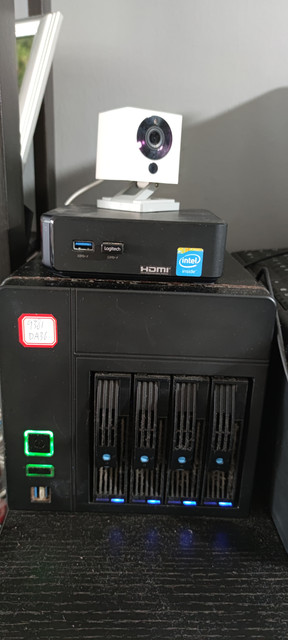
Option 3, get a cheap xpenology NAS from taobao and replace the motherboard with better itx motherboard with ram and ssd, install windows and 3.5 inch hdd, the NAS become your extra large mini pc.
 

Teo Ming Ern

Arch-Supremacy Member
Joined
Jan 1, 2000
Messages
12,324
Reaction score
288
To help with perspective, I think the tiny PCs we have in mind are like these. There won't be enough space for even a single 3.5" drive.

View attachment 30010View attachment 30011

For 4 3.5" HDDs, you might struggle to find even a Mini-ITX enclosure to house all that. More likely than not, you'll end up with a mini-ATX instead. Many mini-ITX PCs have one or even 2 M2 SSDs onboard, and some enclosures have space for a single additional 2.5" maybe 3.5" large capacity storage drive. Since they are smaller, the power supplies are also correspondingly smaller, though some mini-ITX enclosures can take full sized PSUs.


For the most part, many are also low-power devices, running off an external 65W or so power brick rather than a 200-300W mini power supply. So they are either using mobile processors or lower-end processors. The Pentium and Athlon names were reused by Intel/AMD to designate these lower end processors from their higher end Core/Ryzen product lines. They are still pretty capable machines for day to day use, or for running mini home servers, and more powerful than people realise. We tend to have overpowered PCs today, mainly driven by the gaming industry. But for most desktop work, a 4th-6th gen Intel processor is still perfectly capable - even enough for some photo editing.
I see... thank you! I was wondering if something like the Pentium or Athlon was sufficient cos the tiny form factor is very attractive... looking for something with enough heft for photo editing... that's why I specced 16 GB RAM... got any suggestions?
 

Teo Ming Ern

Arch-Supremacy Member
Joined
Jan 1, 2000
Messages
12,324
Reaction score
288
Option 1, get a mini pc with ssd and get a cheap xpenology NAS from taobao and install your 3.5" in the nas.
https://item.taobao.com/item.htm?sp...kFLkW&id=590928112139&ns=1&abbucket=19#detailOption 2, get a mini pc with ssd and a few external hdd and connect via usb.
Option 3, get a cheap xpenology NAS from taobao and replace the motherboard with better itx motherboard with ram and ssd, install windows and 3.5 inch hdd, the NAS become your extra large mini pc.
Thank you! That's quite interesting to see the NAS bigger than the mini PC...
 

Teo Ming Ern

Arch-Supremacy Member
Joined
Jan 1, 2000
Messages
12,324
Reaction score
288
To help with perspective, I think the tiny PCs we have in mind are like these. There won't be enough space for even a single 3.5" drive.

View attachment 30010View attachment 30011

For 4 3.5" HDDs, you might struggle to find even a Mini-ITX enclosure to house all that. More likely than not, you'll end up with a mini-ATX instead. Many mini-ITX PCs have one or even 2 M2 SSDs onboard, and some enclosures have space for a single additional 2.5" maybe 3.5" large capacity storage drive. Since they are smaller, the power supplies are also correspondingly smaller, though some mini-ITX enclosures can take full sized PSUs.


For the most part, many are also low-power devices, running off an external 65W or so power brick rather than a 200-300W mini power supply. So they are either using mobile processors or lower-end processors. The Pentium and Athlon names were reused by Intel/AMD to designate these lower end processors from their higher end Core/Ryzen product lines. They are still pretty capable machines for day to day use, or for running mini home servers, and more powerful than people realise. We tend to have overpowered PCs today, mainly driven by the gaming industry. But for most desktop work, a 4th-6th gen Intel processor is still perfectly capable - even enough for some photo editing.
By day to day, I presume you mean stuff like surfing internet with multiple Chrome tabs open, editing photos using Photoshop, streaming videos or downloading stuff? I don't play any games or encode videos... would a Pentium or Athlon work out with 16 GB RAM? How about Windows 11?

EDIT: I did a bit of digging and realise what I need is a HDD enclosure for my 4 HDDs... USB interface would be slower than having the drives parked in my PC tower and running of the SATA interface... But I guess there's a price to pay for miniaturisation...
 
Last edited:

yusoffb01

Arch-Supremacy Member
Joined
Jun 17, 2008
Messages
16,815
Reaction score
1,769
You just need 4 usb 3 ports and run snapraid software
PdteFGd_d.webp


Individually the drives can run 160MBps but when all in use, the limit is about 400MBps
 

yusoffb01

Arch-Supremacy Member
Joined
Jun 17, 2008
Messages
16,815
Reaction score
1,769
I've read through... but still unsure... cos I see some boxes running AMD Athlon (which I thought was outdated) and Intel Pentium and I get confused... thought those pretty weak?
different generation. intel use the word celeron and pentium until now is it outdated?

zV04Swr.jpeg


Athlon based on ryzen is faster than 8th gen intel, and faster than celeron and pentium crap found in mini pc
 

Slowdown

Master Member
Joined
Apr 18, 2003
Messages
3,620
Reaction score
896
By day to day, I presume you mean stuff like surfing internet with multiple Chrome tabs open, editing photos using Photoshop, streaming videos or downloading stuff? I don't play any games or encode videos... would a Pentium or Athlon work out with 16 GB RAM? How about Windows 11?

EDIT: I did a bit of digging and realise what I need is a HDD enclosure for my 4 HDDs... USB interface would be slower than having the drives parked in my PC tower and running of the SATA interface... But I guess there's a price to pay for miniaturisation...
If you are really concerned about the performance of the CPU (that comes with the mini pc) and desire something faster, then I will recommend that you consider building your mini pc using Asrock Deskmini X300 or A300 (depending on which model is available). X300 is the newer model of A300 and both are for AMD CPU. I used A300 for almost two years. The Intel model is H470.

This machine allows you to choose which CPU you want to install. The motherboard in this machine allows you to install 2 NVME SSD and 2 2.5inch SATA SSD (or HDD). I think that will give you the added flexibility of putting the more important stuff inside your mini pc while keeping the less important stuff on external HDD enclosure. You can also choose how much ram you want in your machine.

What I don't like about this machine is DUST. It has a CPU Cooler and opening in the casing to allow air to go into the machine. Over time it collect alot of dust in the small casing. I prefer a passively cooled CPU which gather much less dust and hence I opt for a lower powered CPU machine. I owned 4 mini pc to date. Deskmini is the only mini pc that I have to take out and remove dust twice a year.

AMD Version:
https://www.asrock.com/nettop/AMD/DeskMini X300 Series/index.us.asp
Intel Version:
https://www.asrock.com/nettop/Intel/DeskMini H470 Series/index.us.asp
 
Last edited:
Important Forum Advisory Note
This forum is moderated by volunteer moderators who will react only to members' feedback on posts. Moderators are not employees or representatives of HWZ Forums. Forum members and moderators are responsible for their own posts. Please refer to our Community Guidelines and Standards and Terms and Conditions for more information.
Top