SIMBA Fibre Broadband

slash

Senior Member
Joined
Jan 1, 2000
Messages
840
Reaction score
39
Then it should be something else that blocked the website ..
Maybe is the ONR issue.

Anyway if want to make use of the NDP $20 off, need to go down to their outlet, can't find the e-voucher code. Will plan some other day.
 

slash

Senior Member
Joined
Jan 1, 2000
Messages
840
Reaction score
39
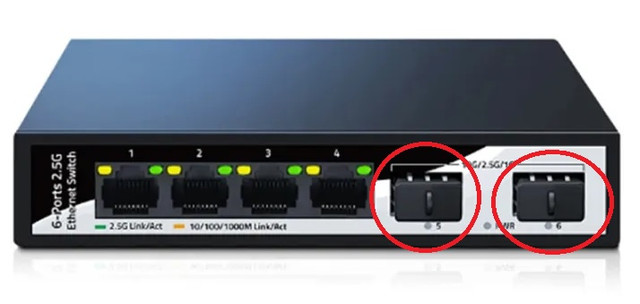
Got a noob question. If I use this type of 10GBE switch, I should plug either port 5 or 6 to WAN (ONT)?

Can I also use one of them to plug in LAN to get 10Gps speed? Or only can utilise 1-4 for LAN?


Nefalrin

Banned
Joined
Dec 4, 2018
Messages
4,399
Reaction score
2,148
Got a noob question. If I use this type of 10GBE switch, I should plug either port 5 or 6 to WAN (ONT)?

Can I also use one of them to plug in LAN to get 10Gps speed? Or only can utilise 1-4 for LAN?

This is a switch and not router leh.

I think you need to plug in router to your ONT to get internet connection.

Does it provide NAT server ? If no NAT then it is not use for internet ..

Not sure .. 😂
 

slash

Senior Member
Joined
Jan 1, 2000
Messages
840
Reaction score
39
This is a switch and not router leh.

I think you need to plug in router to your ONT to get internet connection.

Does it provide NAT server ? If no NAT then it is not use for internet ..

Not sure .. 😂
Damn... so still need to get a 10Gbps router if want to use 10Gbps 🤢
But if use this type of switch can plug direct to pc LAN? Then other port to another router?
 

Nefalrin

Banned
Joined
Dec 4, 2018
Messages
4,399
Reaction score
2,148
Damn... so still need to get a 10Gbps router if want to use 10Gbps 🤢
But if use this type of switch can plug direct to pc LAN? Then other port to another router?
That is why 10gbps router is not cheap wor ..

If this is a switch then it is used to connect pc devices and can connect one port to the router so all pc can access internet.
 

xiaofan

High Supremacy Member
Joined
Sep 16, 2018
Messages
36,669
Reaction score
12,415
Damn... so still need to get a 10Gbps router if want to use 10Gbps 🤢
But if use this type of switch can plug direct to pc LAN? Then other port to another router?

If your PC has 10GBase-T LAN card, you need a SFP+ 10G copper module (not so cheap but not too expensive either, hot) to use with the switch to connect to the PC.

If your PC has 10G SFP+ port based NIC, you can connect the SFP+ ports of the switch to the PC's SFP+ port with a cheap DAC able.

Reference: SFP+ copper/optic module, DAC cable and AOC cable
https://forums.hardwarezone.com.sg/threads/10gbase-t-module-ubiquiti-vs-10gtek-simple-test.7036627/

Reference: router and switch with SFP+ ports
https://forums.hardwarezone.com.sg/...port-switch-and-vq-xgs-pon-onu-stick.7047645/
 

xiaofan

High Supremacy Member
Joined
Sep 16, 2018
Messages
36,669
Reaction score
12,415
Example setup using mini PCs with SFP+ ports as router to use with SIMBA 10Gbps plan, then use a 2.5G switch with dual SFP+ ports.

The following kind of assume you only have one 10G capable wired device.

1) SIMBA XGS-PON ONT 10G LAN port -- Intel N305 CPU based mini PC with SFP+ WAN port plus 10Gbe copper module (WAN port), hot, may need fan to cool down the SFP+ copper module.

2) Intel N305 CPU based mini PC SFP+ LAN port -- DAC cable -- 2.5G Switch with SFP+ uplink

3) 2.5G switch SFP+ port with 10Gbe copper module (hot, may need fan to cool down) -- Desktop with PCI-E 10G NIC RJ45 port, Windows laptop or Mac Mini M1 with with USB4/TB4 to 10G NIC, or 10G NAS

4) Mini PC or 2.5G switch 2.5Gbe LAN port -- 2.5G wired device

5) Mini PC or 2.5G switch 2.5Gbe LAN port -- 2.5G wireless AP

++++++++++++++++++
Example: Miniroute N100/N305 R1 mini PC with dual SFP+ ports based on Intel 82599ES


+++++++++++++++++
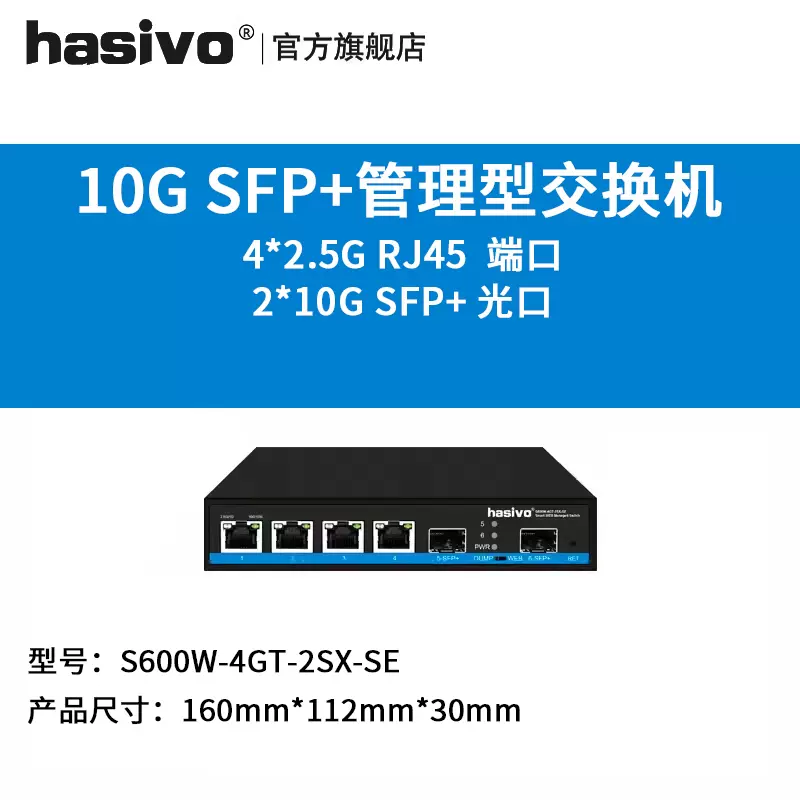
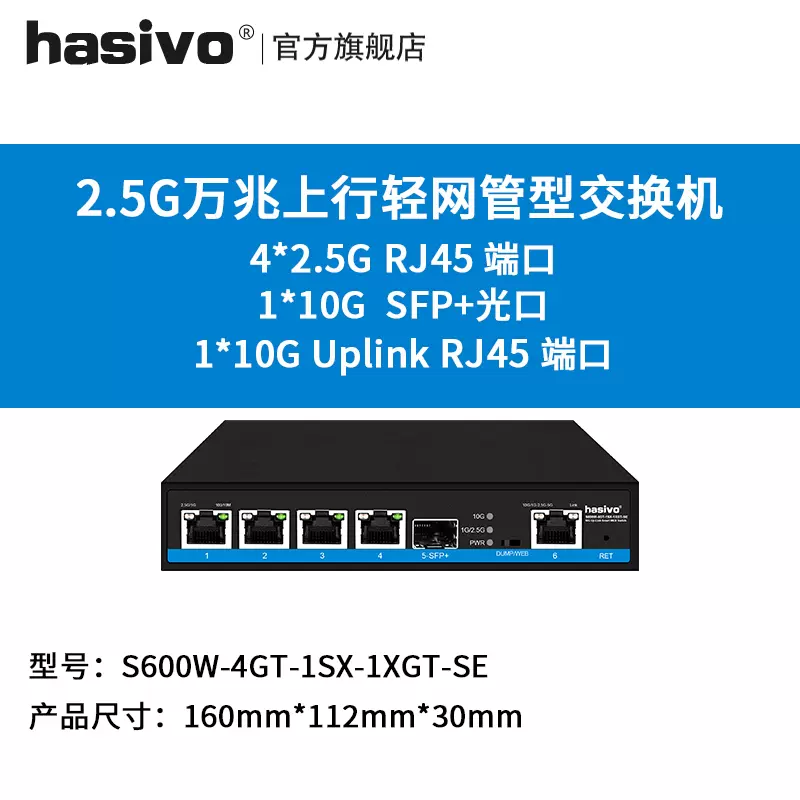
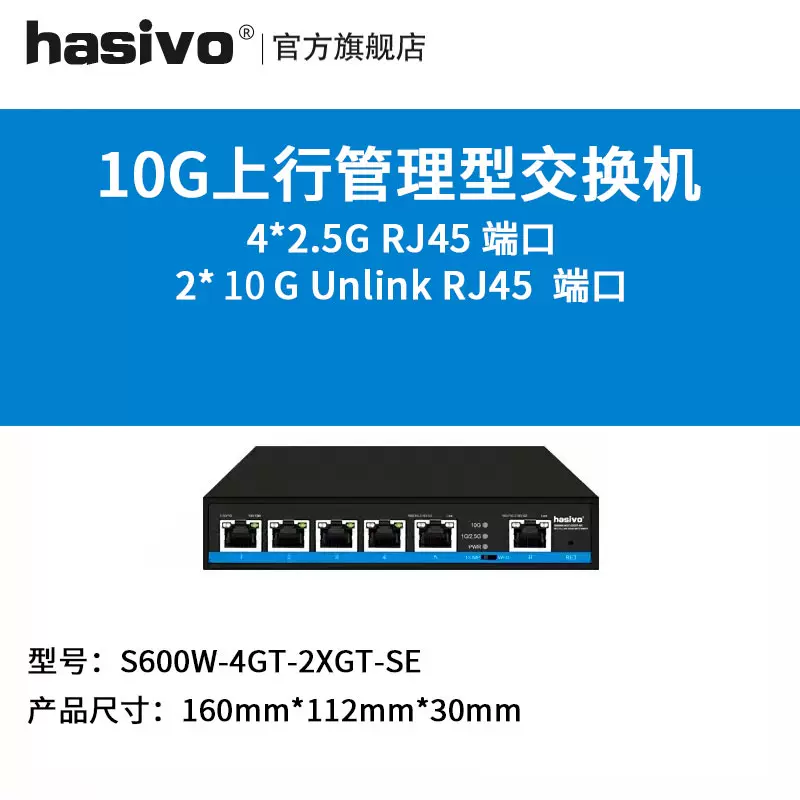
Example 2.5G switch from Hasivo.

O1CN01wyCfKN1ypg56YXi76_!!1774426628.jpg_Q75.jpg_.webp


O1CN01L2N86k1ypg5B7CKwG_!!1774426628.jpg_Q75.jpg_.webp


O1CN01VYgpXy1ypg5JSINOs_!!1774426628.jpg_Q75.jpg_.webp
 
Last edited:

Nefalrin

Banned
Joined
Dec 4, 2018
Messages
4,399
Reaction score
2,148
Got a noob question. If I use this type of 10GBE switch, I should plug either port 5 or 6 to WAN (ONT)?

Can I also use one of them to plug in LAN to get 10Gps speed? Or only can utilise 1-4 for LAN?

Because I am using ONT provided by M1 so I need a wireless router to connect to internet.

You said you have a ONR and it is already a router that provide internet.

So maybe this switch can connect directly to your ONR without purchasing another router ..
 

xiaofan

High Supremacy Member
Joined
Sep 16, 2018
Messages
36,669
Reaction score
12,415
1) Assume you have only one 10G capable wired device, the cheapest way to fully use SIMBA 10Gbps plan (not using it as 2.5Gbps plan or 1Gbps plan) is probably the following.

SIMBA XGS-PON ONT -- 10G capable router 10G WAN port

10G capable router 10G LAN port -- single 10G wired device

10G router 2.5G LAN ports or 1G LAN ports -- optional wireless AP and/or wired devices.

2) Relatively cheap 10G capable wireless router with dual 10G ports:

TP-Link Archer BE805 true WiFi 7 router, around S$400 BNIB from Carousell, no 2.5G LAN ports

Xiaomi BE10000 triband BE10000, but no 6GHz band, around S$300, need to add an SFP+ module, no local warranty, quad 2.5G LAN ports

Asus RT-BE88U dual band BE7200, no 6GHz band, around S$400, need to add an SFP+ module, no local warranty, quad 2.5G LAN ports, quad 1G LAN ports
 
Last edited:

Nefalrin

Banned
Joined
Dec 4, 2018
Messages
4,399
Reaction score
2,148
1) Assume you have only one 10G capable wired device, the cheapest way to fully use SIMBA 10Gbps plan (not using it as 2.5Gbps plan or 1Gbps plan) is probably the following.

SIMBA XGS-PON ONT -- 10G capable router 10G WAN port

10G capable router 10G LAN port -- single 10G wired device

10G router 2.5G LAN ports or 1G LAN ports -- optional wireless AP and/or wired devices.

2) Relatively cheap 10G capable wireless router with dual 10G ports:

TP-Link Archer BE805 true WiFi 7 router, around S$400 BNIB from Carousell, no 2.5G LAN ports

Xiaomi BE10000 triband BE10000, but no 6GHz band, around S$300, need to add an SFP+ module, no local warranty, quad 2.5G LAN ports

Asus RT-BE88U dual band BE7200, no 6GHz band, around S$400, need to add an SFP+ module, no local warranty, quad 2.5G LAN ports, quad 1G LAN ports
https://forums.hardwarezone.com.sg/...projects-include-10g-network-upgrade.6341518/

Super nice .. 😂
 

xiaofan

High Supremacy Member
Joined
Sep 16, 2018
Messages
36,669
Reaction score
12,415
1) Assume you have only one 10G capable wired device, the cheapest way to fully use SIMBA 10Gbps plan (not using it as 2.5Gbps plan or 1Gbps plan) is probably the following.

SIMBA XGS-PON ONT -- 10G capable router 10G WAN port

10G capable router 10G LAN port -- single 10G wired device

10G router 2.5G LAN ports or 1G LAN ports -- optional wireless AP and/or wired devices.

2) Relatively cheap 10G capable wireless router with dual 10G ports:

TP-Link Archer BE805 true WiFi 7 router, around S$400 BNIB from Carousell, no 2.5G LAN ports

Xiaomi BE10000 triband BE10000, but no 6GHz band, around S$300, need to add an SFP+ module, no local warranty, quad 2.5G LAN ports

Asus RT-BE88U dual band BE7200, no 6GHz band, around S$400, need to add an SFP+ module, no local warranty, quad 2.5G LAN ports, quad 1G LAN ports

Sample connection scheme for SIMBA 10Gbps plan, just for reference.
Some routers may have 2.5G LAN ports instead of 1G LAN ports.

ZNAkuc7.jpeg


The above diagram is modified from Starhub connection diagram
https://www.starhub.com/personal/support/article.html?id=kD5GRQtfxB3LxaEDMjuFm5

haeLkRj.jpeg
 

alex22

High Supremacy Member
Joined
Apr 29, 2001
Messages
26,563
Reaction score
7,669
Realised something. I'm currently using Whizcomms.
When I tried to click Simba broadband signup, the page won't load. Both Chrome and Firefox same.

Tried connecting via VPN it works, can go to sign up page. But will have issue using Singpass verification.

Tried mobile hotspot (Simba mobile) it works as well, can go to signup and proceed.

ISP purposely blocking competition website?
No such problem here on 8.8.8.8
 

slash

Senior Member
Joined
Jan 1, 2000
Messages
840
Reaction score
39
I'm able to get to simba signup page now. Miraculously.
Previously clear cache, restart, changed DNS all no use. Only when connected to VPN or using mobile hotspot works.

Now back to default ISP DNS.

Probably not signing up simba yet. See how others test their stability.
My equipement not able to fully utilise the bandwidth anyway.
When contract is near ending, I'll consider again...

Think latency is much more important than bandwidth. Playing games on US servers still 100+ to 200+ ms.
:whistle:
 

xiaofan

High Supremacy Member
Joined
Sep 16, 2018
Messages
36,669
Reaction score
12,415
Think latency is much more important than bandwidth. Playing games on US servers still 100+ to 200+ ms.

You can not run away from the high pings (about 200ms+) when it comes to US servers due to the sheer distance. All ISPs in Singapore are actually similar in this case (ST/WC slightly worse).

Reference: SIMBA routing is not too bad based on the below results -- bad to China and AU/NZ though.
https://forums.hardwarezone.com.sg/threads/fastest-isp.6996674/page-3#post-151182381

6ytH5mE.png


Another reference: light travles about 200,000 km / seconds in Fibre. But you need to consider all the intermediate equipment caused delays as well.
https://wondernetwork.com/pings/Singapore
 

Nefalrin

Banned
Joined
Dec 4, 2018
Messages
4,399
Reaction score
2,148
I'm able to get to simba signup page now. Miraculously.
Previously clear cache, restart, changed DNS all no use. Only when connected to VPN or using mobile hotspot works.

Now back to default ISP DNS.

Probably not signing up simba yet. See how others test their stability.
My equipement not able to fully utilise the bandwidth anyway.
When contract is near ending, I'll consider again...

Think latency is much more important than bandwidth. Playing games on US servers still 100+ to 200+ ms.
:whistle:
Maybe your DNS is flushed after changing back to the default isp dns ... that is why can work. 😂

To me any ISP connected to US game server is the same. Lag.

Unless you using gamer ISP connection with special routing or else will be above 150ms .. No horse run ..
 

slash

Senior Member
Joined
Jan 1, 2000
Messages
840
Reaction score
39
True.
Was on SH before, play War Thunder experienced 'network lost' in game, tank anyhow turned uncontrollably, maciam possessed.
On MR gamer, didn't experience this.
On WC now kena again....

MR gamer speedtest about the same, but latency slightly better.... price is too high...
 
Important Forum Advisory Note
This forum is moderated by volunteer moderators who will react only to members' feedback on posts. Moderators are not employees or representatives of HWZ Forums. Forum members and moderators are responsible for their own posts. Please refer to our Community Guidelines and Standards and Terms and Conditions for more information.
Top