Thermal Paste Specification Comparison

watzup_ken

High Supremacy Member
Joined
Nov 21, 2003
Messages
25,671
Reaction score
2,122
I felt more content and more comfortable using elmariachi method of spreading paste.

For example for cpu purposes, I find those preapplied thermal paste that come with aio like the ek aio basic was quite thin and when I lift up can easily see the CPU label like below (temperature also quite similar to my previous air cooler performance _idle temp mid 45c)

View attachment 30498

However if manually applied the paste the spread is better and can cover all the CPU wording like below (temperature performance are much better than air cooler, idle temp low 40c)

View attachment 30499
Pre-applied thermal paste is always going to be thin. But having said that, I don't think it will affect performance significantly unless the cold plate or the CPU IHS is not flat. If both are flat, then the thermal paste is really just to fill micro uneven surface. In this case, if the mounting pressure is good, it should squeeze all the paste to the side, regardless of how much thermal compound you applied.

The difference in temps you get can partially be attributed to the thermal compound used to some extend.
 

Yongkit

Supremacy Member
Joined
Oct 9, 2015
Messages
5,866
Reaction score
2,475
Pre-applied thermal paste is always going to be thin. But having said that, I don't think it will affect performance significantly unless the cold plate or the CPU IHS is not flat. If both are flat, then the thermal paste is really just to fill micro uneven surface. In this case, if the mounting pressure is good, it should squeeze all the paste to the side, regardless of how much thermal compound you applied.

The difference in temps you get can partially be attributed to the thermal compound used to some extend.

you are correct for the uneven surface which could cause in temp factor.

Nevertheless that is my first time fixing the AIO which I guess I do not get it right.

Initially my temp in cinebench R23 was max at 80c using ek pre-applied original paste

On my second attempt after manually apply the cryofuze paste my temp in cinebench R23 max at 75c never cross 80c.
 
Joined
Jun 8, 2021
Messages
331
Reaction score
335
Gaming Session Last Night

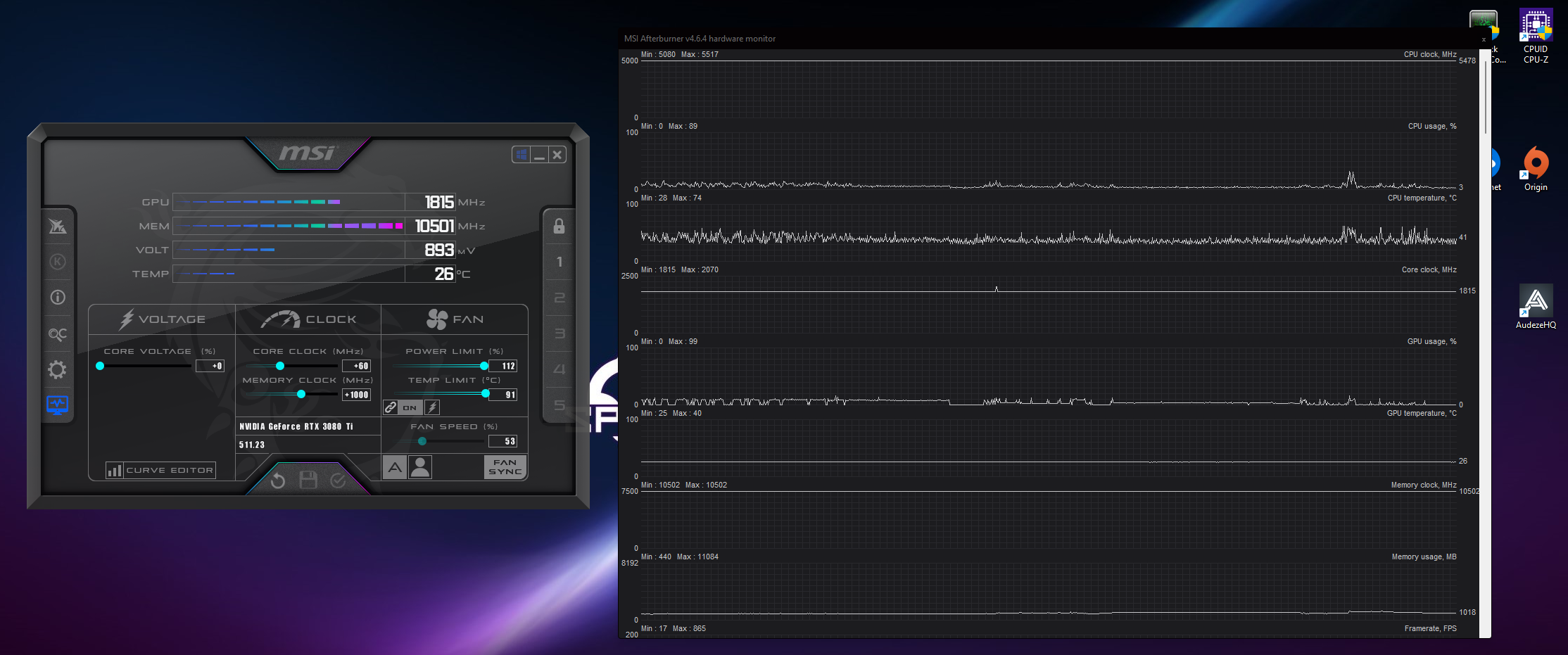
Took this screenshot right 5 mins after gaming to show the min/max values. CPU hit peak 74 but if you look average in game is around 60s only. Both CPU and GPU pasted with TFX (Nice and Even Spread) more than a month ago with no variance in degradation on either CPU or GPU.

Temps.png


Very nice temp you having there with 74℃ at 90% load.... (y). I guess it will not exceed 80℃ even at 100% load.

Your video gameplay is good, i like your crouching inside the container in the beginning as cover and take out your enemy. Hmmm..:unsure: Somehow i felt like that you are in advance CNY mode when playing the game, you turned into 肉干王 with your flamethrower when it's ready and grilling your enemy down the path for Bak Kwa...:ROFLMAO:
 
Joined
Jun 8, 2021
Messages
331
Reaction score
335
you are correct for the uneven surface which could cause in temp factor.

Nevertheless that is my first time fixing the AIO which I guess I do not get it right.

Initially my temp in cinebench R23 was max at 80c using ek pre-applied original paste

On my second attempt after manually apply the cryofuze paste my temp in cinebench R23 max at 75c never cross 80c.
You having a nice temp too bro, i remember my previous 3800X hovering around 85℃ in R23 with Noctua D15 and NT-H1. Your AIO + Cryofuze did a very good job to maintain it around 75℃ and not reaching 80℃... (y)
 

elmariachi

Supremacy Member
Joined
May 30, 2005
Messages
6,335
Reaction score
1,487
Very nice temp you having there with 74℃ at 90% load.... (y). I guess it will not exceed 80℃ even at 100% load.

Your video gameplay is good, i like your crouching inside the container in the beginning as cover and take out your enemy. Hmmm..:unsure: Somehow i felt like that you are in advance CNY mode when playing the game, you turned into 肉干王 with your flamethrower when it's ready and grilling your enemy down the path for Bak Kwa...:ROFLMAO:

Yeah in-game temps much lower around 60s only. Spikes are probably due to the frequency bump up and down but I've already minimised this with my custom LLC. So this is the absolute lowest and stable where VID is around Vcore which is very efficient for the CPU.

Ok la been an FPS freak all my life. Just got it in me. Love the flamethrower BBQing time lol. Yeah just in time for CNY! Wishing all my Chinese friends and acquaintances a HUAT CNY!! Enjoy and stay safe guys!!!
 
Last edited:

hg2

Supremacy Member
Joined
Jan 1, 2000
Messages
7,871
Reaction score
756
Looking for good thermal pad to transmit the heat of a 2T SSD inside Legion 7 laptop... any good recommendations/lobang ?
 
Joined
Oct 26, 2011
Messages
48,320
Reaction score
7,464
I found my old tube. Expiry Dec 2006! Apparently the shop (Kaichin electronics) no longer sells it already. can only buy from shopee and post from malaysia.

Mine also expired very long but I continue to use.
No issues for my Ryzen 7 2700.
 

Phen8210

High Supremacy Member
Joined
Jul 29, 2011
Messages
28,972
Reaction score
8,267
if I mention my thermal paste method here sure tio laughed :ROFLMAO:


For simple and good, x is the way to go, just don't spread until when pushed down go under the CPU and inside the socket :)
 
Last edited:

elmariachi

Supremacy Member
Joined
May 30, 2005
Messages
6,335
Reaction score
1,487
How do you get 30+ C for 98% GPU load :eek:

Using the Optimus Strix block. Only front is actively cooled and rear is passively cooled with their heatsink.
Temps are incredible with this block because the entire back of the backplate is essentially a Fujipoly thermalpad which cools down the back of the die as well.

I have not seen anything past 41 degrees on my setup so far with GPU maxing out at 437W during Vanguard.

optimus-strix-3090-4-2000x.png


optimus-strix-3090-3-2000x.png
 

Phen8210

High Supremacy Member
Joined
Jul 29, 2011
Messages
28,972
Reaction score
8,267
From my experience, the breakdown of pastes are more common with direct die. IHS usually won't have much of a temp degradation based on what I experienced. Exception being Kryonaut which does break down past 80 degrees and performance of paste is not consistent after that.

For ease of mind, I just whack TFX for both CPU and GPU as I could have applied maybe KPX for my CPU for slightly better temps but I decided to just do TFX all around and my CPU has no issues with 5.2-5.3Ghz in games with 5.5Ghz single core boost with spike temps barely hitting 75 degrees. Average is mid-high 60s only.

Hmm, mine is still holding up pretty well after 4 months, I think it has become slightly hotter, like 3-5c.

To verify, I will need to test with fixed ambient temp and fan speeds (for all fans), then reapply the paste with the same method and repeat to get an accurate comparison. If it's not good then I will probably get another thermal paste. Not sure if there is a review that has done exactly what I mentioned, nowadays it's all talk with many biased and flawed testing methodologies.


Using the Optimus Strix block. Only front is actively cooled and rear is passively cooled with their heatsink.
Temps are incredible with this block because the entire back of the backplate is essentially a Fujipoly thermalpad which cools down the back of the die as well.
dasd
I have not seen anything past 41 degrees on my setup so far with GPU maxing out at 437W during Vanguard.

optimus-strix-3090-4-2000x.png

Oh.. no wonder.. this is very ex.. i wonder how much you spent on your water cooling system :eek:. Peasants like me will never be able to afford it.
 

Phen8210

High Supremacy Member
Joined
Jul 29, 2011
Messages
28,972
Reaction score
8,267
Anyway, what thermal paste do you guys recommend? Thinking to get a new tube. Is MX5 any good? KPX? Kryonaut Extreme?


Edit: just found this video while researching KPX


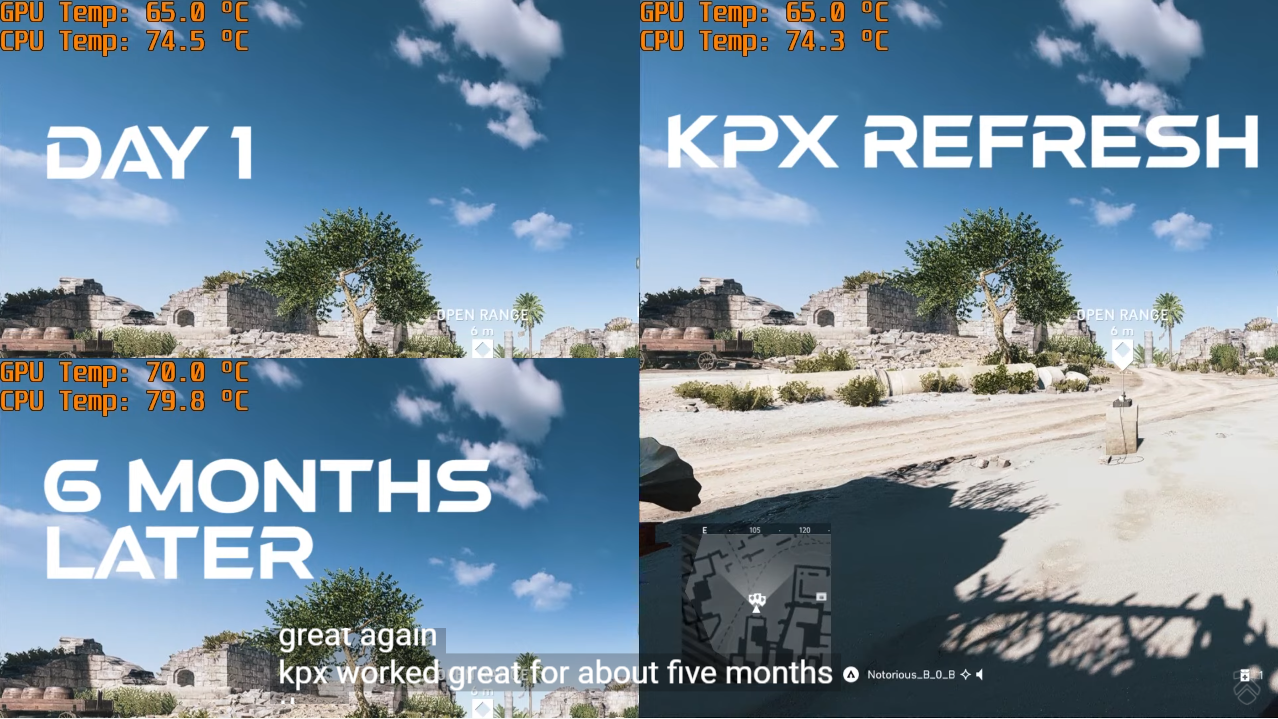
For testing Methodology, he uses the same values for ambient temps and fan speed in both before/after comparison. Even the game scenario was the same. With these factors in mind, his findings should be quite reliable.

The results show that the performance looks good at first, but later also suffers the same usual problems, double proven by reapplying thermal paste after that. See pic.
123.png
 
Last edited:

elmariachi

Supremacy Member
Joined
May 30, 2005
Messages
6,335
Reaction score
1,487
Hmm, mine is still holding up pretty well after 4 months, I think it has become slightly hotter, like 3-5c.

To verify, I will need to test with fixed ambient temp and fan speeds (for all fans), then reapply the paste with the same method and repeat to get an accurate comparison. If it's not good then I will probably get another thermal paste. Not sure if there is a review that has done exactly what I mentioned, nowadays it's all talk with many biased and flawed testing methodologies.


Oh.. no wonder.. this is very ex.. i wonder how much you spent on your water cooling system :eek:. Peasants like me will never be able to afford it.
Look at your GPU Core Temp and Hotspot. If the difference widens over 3 weeks with gaming, your thermal paste is not up to the task. Then you'll have to use SYY-157 OR Thermalright TFX.

I usually spend once properly and have OCD to get it done correctly. For the last few months everything has been tip top. Temperatures are the last of my worries right now pretty damn happy with it after countless hours of gaming my hotspot delta is 6.4-8.0 degrees depending on ambient.

Kpx and mx4 you're gonna have the same issue over time. Go for TFX one short and you don't need to keep opening up your card to change the paste. Been through that and it's not fun.
 
Last edited:
Joined
Jun 8, 2021
Messages
331
Reaction score
335
Yesterday i had replaced faulty parts on an old system with Mobo, CPU(Spare) and SSD at my workplace. Longtime no use Cooler Master paste liao, so giving it a try and used the same paste (CM Cryofuze) as Yongkit bro. CPU using back the old Noctua D15 dual fans with bracket changed. Tested this morning for 10 mins with OCCT all cores full load AVX2, Small FFTs and Extreme mode settings, CPU default stock setting in bios. So far so good, temp hovering around 77-78°C, Max spike 80°C.

Ambient 26-27°C
XiURJy8.png

ukr4wHJ.png

r7fx6W4.png
 

Yongkit

Supremacy Member
Joined
Oct 9, 2015
Messages
5,866
Reaction score
2,475
Yesterday i had replaced faulty parts on an old system with Mobo, CPU(Spare) and SSD at my workplace. Longtime no use Cooler Master paste liao, so giving it a try and used the same paste (CM Cryofuze) as Yongkit bro. CPU using back the old Noctua D15 dual fans with bracket changed. Tested this morning for 10 mins with OCCT all cores full load AVX2, Small FFTs and Extreme mode settings, CPU default stock setting in bios. So far so good, temp hovering around 77-78°C, Max spike 80°C.

Ambient 26-27°C
XiURJy8.png

ukr4wHJ.png

r7fx6W4.png
Nice (y)

I also curious how it perform in your R23 now?

how is your experience apply this paste compared to other CM paste?
 
Important Forum Advisory Note
This forum is moderated by volunteer moderators who will react only to members' feedback on posts. Moderators are not employees or representatives of HWZ Forums. Forum members and moderators are responsible for their own posts. Please refer to our Community Guidelines and Standards and Terms and Conditions for more information.
Top