
TP-Link EB810v - Quick overview

xiaofan

High Supremacy Member
Joined
Sep 16, 2018
Messages
34,924
Reaction score
11,624
When my laptop connect 2.4Ghz wifi, internet super slow. anyone else facing same issue?

Firmware version: 0.14.0 3.0.0 v608b.0 Build 240709 Rel.56868n
Hardware Version: EB810v v1.0 00000000

Me too. Always take longer time to connect the 2.4Ghz wifi

My recommendation is to forget about the 2.4GHz band for your main devices like laptops or mobile phones, use 5GHz or 6GHz.

Reserve 2.4GHz to be used for the legacy clients or IoT clients.

2.4GHz hand is also useful as part the MLO SSID (eg: 2.4GHz+6GHz, 2.4GHz+5GHz) to improve reliability and potentially reduce latency at far range, for WiFi 7 clients.

The 2.4GHz band of the newer generation WiFi 7 routers, often have lower coverage and worse compatibility to legacy devices or IoT devices, compared to older WiFi 6 routers and WiFi 5 routers.
 

froztheart

Supremacy Member
Joined
Aug 8, 2012
Messages
8,820
Reaction score
3,858
My recommendation is to forget about the 2.4GHz band for your main devices like laptops or mobile phones, use 5GHz or 6GHz.

Reserve 2.4GHz to be used for the legacy clients or IoT clients.

2.4GHz hand is also useful as part the MLO SSID (eg: 2.4GHz+6GHz, 2.4GHz+5GHz) to improve reliability and potentially reduce latency at far range, for WiFi 7 clients.

The 2.4GHz band of the newer generation WiFi 7 routers, often have lower coverage and worse compatibility to legacy devices or IoT devices, compared to older WiFi 6 routers and WiFi 5 routers.
Yes, reserve 2.4Ghz for those that need, otherwise 2.4Ghz almost unusable if all crowd on it.
 

Colaice

Junior Member
Joined
Aug 31, 2024
Messages
21
Reaction score
3
My recommendation is to forget about the 2.4GHz band for your main devices like laptops or mobile phones, use 5GHz or 6GHz.

Reserve 2.4GHz to be used for the legacy clients or IoT clients.

2.4GHz hand is also useful as part the MLO SSID (eg: 2.4GHz+6GHz, 2.4GHz+5GHz) to improve reliability and potentially reduce latency at far range, for WiFi 7 clients.

The 2.4GHz band of the newer generation WiFi 7 routers, often have lower coverage and worse compatibility to legacy devices or IoT devices, compared to older WiFi 6 routers and WiFi 5 routers.
Ya, I use for my smart device only
 

xiaofan

High Supremacy Member
Joined
Sep 16, 2018
Messages
34,924
Reaction score
11,624
Ya, I use for my smart device only

I see. Try to set up a 2.4GHz only IoT SSID for the the smart devices to see if that help, use WPA2 and not WPA3 for this SSID.

If not, then use an older but supported router in AP mode for the smart devices. I am not into Smart Devices but so I use my RT-AX86U's 2.4GHz SSID for legacy 2.4GHz clients. It is running in AP mode behind my OpenWRT router.

Super cheap one will be Linksys EA8100v1 (S$10 from Carousell) but I recommend flashing OpenWRT on it since Linksys/Starhub may no longer support it.
 

Colaice

Junior Member
Joined
Aug 31, 2024
Messages
21
Reaction score
3
My recommendation is to forget about the 2.4GHz band for your main devices like laptops or mobile phones, use 5GHz or 6GHz.

Reserve 2.4GHz to be used for the legacy clients or IoT clients.

2.4GHz hand is also useful as part the MLO SSID (eg: 2.4GHz+6GHz, 2.4GHz+5GHz) to improve reliability and potentially reduce latency at far range, for WiFi 7 clients.

The 2.4GHz band of the newer generation WiFi 7 routers, often have lower coverage and worse compatibility to legacy devices or IoT devices, compared to older WiFi 6 routers and WiFi 5 routers.
Ya,
I see. Try to set up a 2.4GHz only IoT SSID for the the smart devices to see if that help, use WPA2 and not WPA3 for this SSID.

If not, then use an older but supported router in AP mode for the smart devices. I am not into Smart Devices but so I use my RT-AX86U's 2.4GHz SSID for legacy 2.4GHz clients. It is running in AP mode behind my OpenWRT router.

Super cheap one will be Linksys EA8100v1 (S$10 from Carousell) but I recommend flashing OpenWRT on it since Linksys/Starhub may no longer support it.
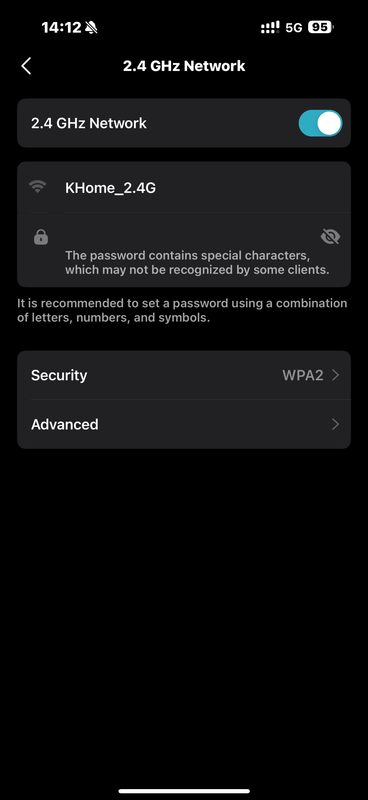
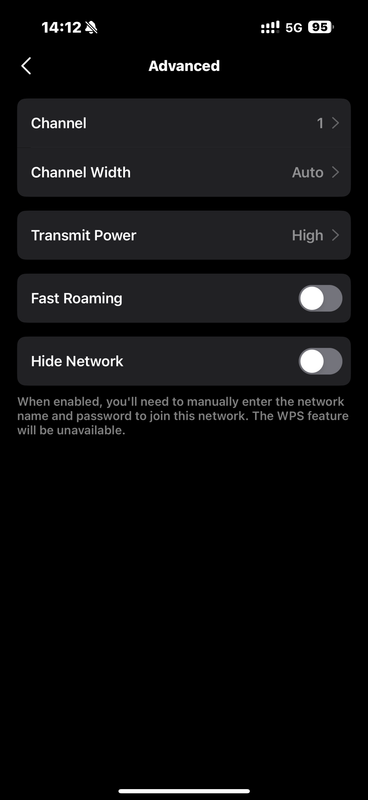
Okok, previous setting is WPA2/WPA3, I try change to WPA2, see if can improve. Thanks.
Other than this, is that dynamic IP or Static IP will affected?

https://i.postimg.cc/KcHNfxCB/IMG-1298.png
IMG-1298.png


https://i.postimg.cc/jqzB285G/IMG-1299.png
IMG-1299.png
 

xiaofan

High Supremacy Member
Joined
Sep 16, 2018
Messages
34,924
Reaction score
11,624
Ya,

Okok, previous setting is WPA2/WPA3, I try change to WPA2, see if can improve. Thanks.
Other than this, is that dynamic IP or Static IP will affected?

https://i.postimg.cc/KcHNfxCB/IMG-1298.png
IMG-1298.png


https://i.postimg.cc/jqzB285G/IMG-1299.png
IMG-1299.png

Not really into smart devices -- hopefully you will see improvements.

One change required -- use 20MHz channel bandwidth in Singapore. Do not use Auto or 40MHz.

You may also check whether CH1 is the better channel to use or not. But that may change from time to time so maybe it is easier to leave it as auto.

As for Static IP assignment for the wireless clients, not so sure about that. I tend to think it may help if you don't mind the trouble to do that. It can be a bit tedious if you have many such clients.
 
Last edited:

Henry Ng

Arch-Supremacy Member
Joined
Aug 9, 2011
Messages
17,163
Reaction score
1,004
My recommendation is to forget about the 2.4GHz band for your main devices like laptops or mobile phones, use 5GHz or 6GHz.

Reserve 2.4GHz to be used for the legacy clients or IoT clients.

2.4GHz hand is also useful as part the MLO SSID (eg: 2.4GHz+6GHz, 2.4GHz+5GHz) to improve reliability and potentially reduce latency at far range, for WiFi 7 clients.

The 2.4GHz band of the newer generation WiFi 7 routers, often have lower coverage and worse compatibility to legacy devices or IoT devices, compared to older WiFi 6 routers and WiFi 5 routers.
i notice i have to have the 2.4Ghz wifi alone without MLO because i need to connect my smart aircon and washer via 2.4Ghz wifi. When using MLO my smart washer and aircon can not connect to the 2.4G wifi so i no choice la.
 

willy792003

Member
Joined
Jan 11, 2004
Messages
289
Reaction score
16
I see. Try to set up a 2.4GHz only IoT SSID for the the smart devices to see if that help, use WPA2 and not WPA3 for this SSID.

If not, then use an older but supported router in AP mode for the smart devices. I am not into Smart Devices but so I use my RT-AX86U's 2.4GHz SSID for legacy 2.4GHz clients. It is running in AP mode behind my OpenWRT router.

Super cheap one will be Linksys EA8100v1 (S$10 from Carousell) but I recommend flashing OpenWRT on it since Linksys/Starhub may no longer support it.
Talking about OpenWRT, can we flash it to EB810v? Must be better support than Starhub. Such a shame for such a high-end hardware 😢
 

xiaofan

High Supremacy Member
Joined
Sep 16, 2018
Messages
34,924
Reaction score
11,624
Talking about OpenWRT, can we flash it to EB810v? Must be better support than Starhub. Such a shame for such a high-end hardware 😢

Unfortunately not.

My guess is that it will NEVER get the support from OpenWRT. Same for HB710 and HB410.

You can check OpenWRT support here. As of now OpenWRT does not have good support for WiFi 7.
https://openwrt.org/toh/start

TP-Link Consumer Wireless Router OpenWRT support -- the only two WiFi 6 routers supported seem to be Archer AX23 and EX220.

Deco --> no support for WiFi 6/7 routers
Archer -->no support for WiFi 7 routers, only Archer AX23 is supported
Service provider models --> only EX220 is supported.

TP-Link China WiFi 6 routers --> only TL-XTR8488, TL-XDR4288, TL-XDR6086 and TL-XDR6088 are supported.
 
Last edited:

Colaice

Junior Member
Joined
Aug 31, 2024
Messages
21
Reaction score
3
Not really into smart devices -- hopefully you will see improvements.

One change required -- use 20MHz channel bandwidth in Singapore. Do not use Auto or 40MHz.

You may also check whether CH1 is the better channel to use or not. But that may change from time to time so maybe it is easier to leave it as auto.

As for Static IP assignment for the wireless clients, not so sure about that. I tend to think it may help if you don't mind the trouble to do that. It can be a bit tedious if you have many such clients.
Will try the setting. Thanks(y)
 

hellamatrix

Member
Joined
Jul 9, 2006
Messages
338
Reaction score
10


Hi, can I check for this HDB 5 room floor plan, will one EB810V unit be enough or would 2x EB810V mesh be required?
And where is the ideal location for the router(s)?
 

xiaofan

High Supremacy Member
Joined
Sep 16, 2018
Messages
34,924
Reaction score
11,624
BTW, it is interesting that I don't see many issues reported by Starhub HB710 users.

And my tests also show that it did not have the common issues reported in this thread. It is used as a main router for the Starhub 5Gbps plan. But I keep an old Huawei AX3 Pro as an AP as well to cater for potential issues with legacy devices. The load is also rather light as well.

I can also see that other users seem to have no issues with EB810v. Like @Henry Ng.
 

xiaofan

High Supremacy Member
Joined
Sep 16, 2018
Messages
34,924
Reaction score
11,624


Hi, can I check for this HDB 5 room floor plan, will one EB810V unit be enough or would 2x EB810V mesh be required?
And where is the ideal location for the router(s)?


Looks like the floor plan is tough for single EB810v or any other router, because of the difficult position of the household shelter. BTW, I have seen many such floor plans in this forum.

Where is the FTP? Where are the LAN ports in the rooms?

On the other hand, there are some users who are creative in placing the router so maybe they have better ideas.
 

kindredSG

Member
Joined
Jun 3, 2024
Messages
194
Reaction score
196
Where is the FTP? Where are the LAN ports in the rooms?
Yeah this is probably one of the most important questions here, and maybe how many LAN ports in the rooms.

And where is the ideal location for the router(s)?
My EB810v has a decent signal strength but like most APs it won't sustain a high bandwidth connection through numerous walls - so you also need to think about what your expectations are for speed in each room. If you want high speed everywhere it's probably going to get complicated, and expensive, so factor cost into the equation as well.

Think about what devices are in which rooms - because if some can use ethernet instead of wifi, that can help with placement.
 

xiaofan

High Supremacy Member
Joined
Sep 16, 2018
Messages
34,924
Reaction score
11,624
can i know the reason why?

Congestion. This is the common recommendation for 20MHz nowadays, no matter for household or enterprise.

Common practice for channel bandwidth to use, for home and enterprise:

2.4GHz band -- 20MHz for home, 20MHz for enterprise
5GHz band -- 80MHz or 160MHz for home, 20MHz/40MHz for enterprise
6GHz band -- 160MHz or 320MHz for home, 40MHz/80MHz for enterprise (80MHz for US, 40MHz for Europe)

One reference (more from enterprice point of view, but the reason to use 20MHz channel bandwidth is the same for home users in Singapore).
https://www.cbtnuggets.com/blog/certifications/cisco/when-to-use-20mhz-vs-40mhz-vs-80mhz

2.4 Ghz WiFi: 20 MHz vs 40 MHz
If you're using 2.4 GHz, the answer is simple. The best bandwidth for 2.4 Ghz is 20 MHz.

In the majority of cases, using wide widths on 2.4 GHz isn't worthwhile.

The performance tradeoffs from interference on overlapping channels will likely outweigh the throughput benefits. One possible exception to this rule is remote areas where there are not many other Wi-Fi networks or devices.

Additionally, 2.4 GHz Wi-Fi and 20 MHz channel widths offer the broadest range of client device support. If you need to support legacy devices and Wi-Fi standards like 802.11b or 802.11g, you'll need 2.4 GHz and 20 MHz.
 
Last edited:

hellamatrix

Member
Joined
Jul 9, 2006
Messages
338
Reaction score
10
Looks like the floor plan is tough for single EB810v or any other router, because of the difficult position of the household shelter. BTW, I have seen many such floor plans in this forum.

Where is the FTP? Where are the LAN ports in the rooms?

On the other hand, there are some users who are creative in placing the router so maybe they have better ideas.
Thanks for the reply.
FTP is at the entrance of the house while every bedroom has a LAN port. Bedroom 3 will be the study room so I think I might actually place the router there for wired connection to my PCs actually.
 

xiaofan

High Supremacy Member
Joined
Sep 16, 2018
Messages
34,924
Reaction score
11,624


Hi, can I check for this HDB 5 room floor plan, will one EB810V unit be enough or would 2x EB810V mesh be required?
And where is the ideal location for the router(s)?


Looks like the floor plan is tough for single EB810v or any other router, because of the difficult position of the household shelter. BTW, I have seen many such floor plans in this forum.

Where is the FTP? Where are the LAN ports in the rooms?

On the other hand, there are some users who are creative in placing the router so maybe they have better ideas.

Thanks for the reply.
FTP is at the entrance of the house while every bedroom has a LAN port. Bedroom 3 will be the study room so I think I might actually place the router there for wired connection to my PCs actually.

A bit tough if you want to put a single EB810v router in Bedroom 3 but you can try. The worry is the coverage in the Kitchen area and even Main Bedroom.

Two router mesh solution may be better.

Main router EB810v in the DB box, second EB810v (or HB710) in the Bedroom 3. The worry is the coverage in the Main Bedroom but maybe it will be okay. Bedroom 2 or Main Bedroom is actually more suitable location for the mesh node but you put Bedroom 3 to be of higher priority.

As for whether to choose HB710 or EB810v as the mesh node, it will depend on the number of wired devices in Bedroom 3.

Still I will suggest you to get one EB810v first and place it in Bedroom 3 to see how it goes, as per your original plan. Most likely Kitchen area will have bad WiFi but the other areas may actually be okay. If not okay, get another EB810v or HB710 as mentioned earlier.
 
Last edited:
Important Forum Advisory Note
This forum is moderated by volunteer moderators who will react only to members' feedback on posts. Moderators are not employees or representatives of HWZ Forums. Forum members and moderators are responsible for their own posts. Please refer to our Community Guidelines and Standards and Terms and Conditions for more information.
Top
