Upgrading to Windows 10

jedi5diah

Supremacy Member
Joined
Feb 12, 2009
Messages
6,480
Reaction score
0
I don't use MS Account, not even when hell freezes over :s22:
Activation uses Hardware ID not Account

precisely it makes no sense when i change the the hardware it is still activated...i am sharing what my experiences not stating a statement as a fact...
 

ArcticCheetah

Banned
Joined
Apr 16, 2009
Messages
35,821
Reaction score
2,025
precisely it makes no sense when i change the the hardware it is still activated...i am sharing what my experiences not stating a statement as a fact...

But how would they know if it is a new computer?
To MS, new computer = new Motherboard
 

enenyi

Supremacy Member
Joined
Nov 22, 2011
Messages
5,927
Reaction score
5
But how would they know if it is a new computer?
To MS, new computer = new Motherboard
Clarification: To Microsoft, new comp = new motherboard model. Same motherboard model but different serial number (e.g. 1-1 exchange for new motherboard during RMA process), MS software seems to accept without question.
 

Techno Pride

Arch-Supremacy Member
Joined
Jan 1, 2000
Messages
20,793
Reaction score
1,425
Anyone has Renesas USB 3.0 card or chip? Drivers are auto detected and installed, but transfer speed is only 25MB/sec, which is USB2 speeds.
 

ArcticCheetah

Banned
Joined
Apr 16, 2009
Messages
35,821
Reaction score
2,025
Clarification: To Microsoft, new comp = new motherboard model. Same motherboard model but different serial number (e.g. 1-1 exchange for new motherboard during RMA process), MS software seems to accept without question.

Nope, that is a oversimplistic generalisation of their activation schemes.
There is OEM activation, KMS, MAK as well as Retail activation.
Your case 2 is because it is using OEM not retail.
I will not go into details as it is against forum rules.
 

koicafex

Great Supremacy Member
Joined
Jul 6, 2011
Messages
50,979
Reaction score
4
just go download kms**** la :s22:
i did clean install
use it to activate windows 10 + office pro 2013 :s13:
 

jedi5diah

Supremacy Member
Joined
Feb 12, 2009
Messages
6,480
Reaction score
0
Which OS and what Motherboard?

during win 8 i switch to H81M-DGS need to do phone activation

switch to b85 killer 2 months ago on 8.1 with same hdd attached n clone to ssd both no need activation

used the same hdd on z87 extreme4 for test bench also no need activation.
 

escksu

Banned
Joined
Nov 24, 2011
Messages
8,391
Reaction score
3
It depends on your changes. If HW change is big, its considered a new comp then need new key. I bought another key because I change from AMD to X99.
 

avsquare

Arch-Supremacy Member
Joined
Oct 27, 2011
Messages
11,314
Reaction score
42
But how would they know if it is a new computer?
To MS, new computer = new Motherboard

Actually hor like your newer post said, depends on what key you got.

I am pretty sure I have done one MB change before but the re-installation of the OS have its key auto-reactivated.

Not sure if can say anything more without tio infracted lol.
 

enenyi

Supremacy Member
Joined
Nov 22, 2011
Messages
5,927
Reaction score
5
Anyone knows how to increase size of taskbar icons:
1) still keeping the taskbar to a single line, and
2) still retaining DPI scaling (i.e. not changing the scaling)?
 

Alphina

Supremacy Member
Joined
Jan 10, 2014
Messages
5,182
Reaction score
0
Anyone knows how to increase size of taskbar icons:
1) still keeping the taskbar to a single line, and
2) still retaining DPI scaling (i.e. not changing the scaling)?

:eek: the standard one notch big enough?:s13:
 

enenyi

Supremacy Member
Joined
Nov 22, 2011
Messages
5,927
Reaction score
5
:eek: the standard one notch big enough?:s13:
The standard one so tiny...

Even if I increase taskbar height the icons remain so tiny...

Windows 7 was much larger (at the expense of how many icons u can squeeze into a single line).
 

Alphina

Supremacy Member
Joined
Jan 10, 2014
Messages
5,182
Reaction score
0
The standard one so tiny...

Even if I increase taskbar height the icons remain so tiny...

Windows 7 was much larger (at the expense of how many icons u can squeeze into a single line).

screen shot your taskbar icon:s13:
 

jedi5diah

Supremacy Member
Joined
Feb 12, 2009
Messages
6,480
Reaction score
0
The standard one so tiny...

Even if I increase taskbar height the icons remain so tiny...

Windows 7 was much larger (at the expense of how many icons u can squeeze into a single line).

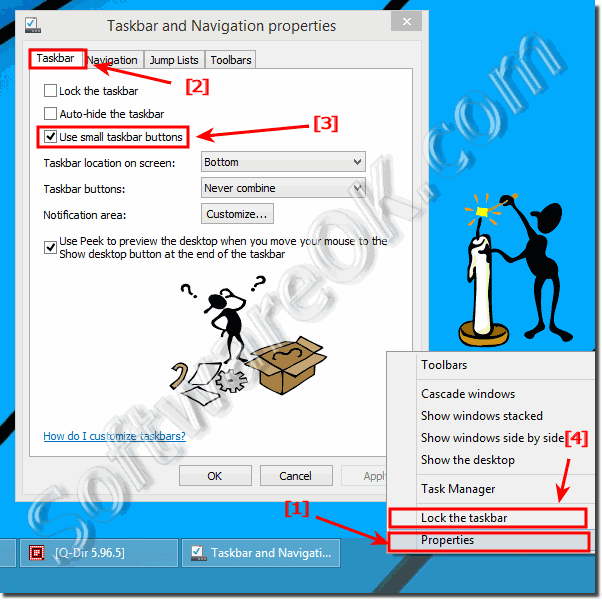
try this if can enlarge...not at home can't try for u

Use_small_taskbar_buttons_in_Windows_8.1_2014-03-06-23-02-40.png
 

Koenig168

Arch-Supremacy Member
Joined
Nov 4, 2007
Messages
10,029
Reaction score
1,741
Anyone knows how to increase size of taskbar icons:
1) still keeping the taskbar to a single line, and
2) still retaining DPI scaling (i.e. not changing the scaling)?

Go to "Taskbar and Start Menu Properties" - "Taskbar". Uncheck "Use small taskbar buttons". This will scale up the taskbar button size.

Something unrelated but quite useful - If you go to "Taskbar and Start Menu Properties" - "Toolbars" and check "Desktop", you will get a Desktop button on the taskbar. Click on the double arrows next to it and you can access the entire desktop + Control Panel + settings.
 

enenyi

Supremacy Member
Joined
Nov 22, 2011
Messages
5,927
Reaction score
5
Go to "Taskbar and Start Menu Properties" - "Taskbar". Uncheck "Use small taskbar buttons". This will scale up the taskbar button size.

Something unrelated but quite useful - If you go to "Taskbar and Start Menu Properties" - "Toolbars" and check "Desktop", you will get a Desktop button on the taskbar. Click on the double arrows next to it and you can access the entire desktop + Control Panel + settings.
My 'small taskbar buttons' was already unchecked.

Guess the only way to increase my taskbar icons size is to increase overall DPI scaling.
 
Important Forum Advisory Note
This forum is moderated by volunteer moderators who will react only to members' feedback on posts. Moderators are not employees or representatives of HWZ Forums. Forum members and moderators are responsible for their own posts. Please refer to our Community Guidelines and Standards and Terms and Conditions for more information.
Top