
You are using an out of date browser. It may not display this or other websites correctly.
You should upgrade or use an alternative browser.
You should upgrade or use an alternative browser.
Xiaomi's Routers!
- Thread starter galliano
- Start date
More options
Who Replied?
i1magic
Arch-Supremacy Member
- Joined
- Dec 11, 2002
- Messages
- 22,366
- Reaction score
- 117
According to this website :
https://en.techreviewer.de/xiaomi-r3p-test/
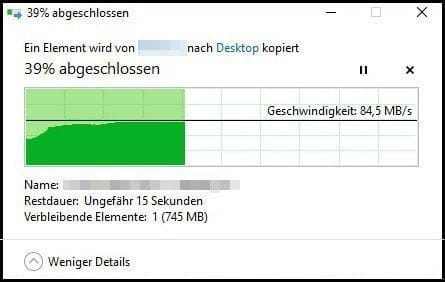
This is with USB 3.0 Enabled.
The Mi Router R3P with USB 3.0 Enabled, over Gigabit connection can hit >80MB/s transfer speed. I would consider that to be very decent.
https://en.techreviewer.de/xiaomi-r3p-test/
This is with USB 3.0 Enabled.
The Mi Router R3P with USB 3.0 Enabled, over Gigabit connection can hit >80MB/s transfer speed. I would consider that to be very decent.
i1magic
Arch-Supremacy Member
- Joined
- Dec 11, 2002
- Messages
- 22,366
- Reaction score
- 117
The bottleneck should be the HDD. Try connecting a SSD to the router. It should be faster.
Just found out that the USB port on my router is only USB 2.0.
Based on :
https://superuser.com/questions/317217/whats-the-maximum-typical-speed-possible-with-a-usb2-0-drive
Write speed for USB 2.0 is about 25-30MB/s. Which is about what I gotten. Guess I need to change my router if I want a faster transfer speed.

tckrto
Arch-Supremacy Member
- Joined
- Oct 21, 2001
- Messages
- 23,995
- Reaction score
- 1,318
Anybody using this Mi Router?
Am using this for like 2yrs already. Stable and good for my usage.
i1magic
Arch-Supremacy Member
- Joined
- Dec 11, 2002
- Messages
- 22,366
- Reaction score
- 117
Am using this for like 2yrs already. Stable and good for my usage.
Wow, nice. Do you happen to have a hard disk plug into the USB 3.0 port?

Devilsire
Arch-Supremacy Member
- Joined
- Jan 9, 2007
- Messages
- 11,716
- Reaction score
- 4,453
R3P user for several years. Just tested for u,Just found out that the USB port on my router is only USB 2.0.
Based on :
https://superuser.com/questions/317217/whats-the-maximum-typical-speed-possible-with-a-usb2-0-drive
Write speed for USB 2.0 is about 25-30MB/s. Which is about what I gotten. Guess I need to change my router if I want a faster transfer speed.
35MB/s from pc SSD to router portable HDD USB3.0
100MB/s from router to PC
Might be depending on the portable HDD specs
Sent from Xiaomi POCOPHONE F1 using GAGT
i1magic
Arch-Supremacy Member
- Joined
- Dec 11, 2002
- Messages
- 22,366
- Reaction score
- 117
R3P user for several years. Just tested for u,
35MB/s from pc SSD to router portable HDD USB3.0
100MB/s from router to PC
Might be depending on the portable HDD specs
Sent from Xiaomi POCOPHONE F1 using GAGT
Thank you so much!!
Just to confirm that your PC is linked to the router via Gigabit connection correct?
For the Mi Router 2 1TB that I am using, it only has USB 2.0. Copying files from my PC to a harddisk that is linked via the USB port :
PC to the harddisk (via USB port) - 25-30MB/s
Harddisk (via USB port) to my PC - 33-35MB/s
So the writing to the harddisk via the USB port is only about 5MB/s faster.
Last edited:
i1magic
Arch-Supremacy Member
- Joined
- Dec 11, 2002
- Messages
- 22,366
- Reaction score
- 117
R3P user for several years. Just tested for u,
35MB/s from pc SSD to router portable HDD USB3.0
100MB/s from router to PC
Might be depending on the portable HDD specs
Sent from Xiaomi POCOPHONE F1 using GAGT
Another question : Do you happen to have Xiaomi IP Camera? Are you able to push the video files from the IP camera to the harddisk connected via the USB port?
Devilsire
Arch-Supremacy Member
- Joined
- Jan 9, 2007
- Messages
- 11,716
- Reaction score
- 4,453
Yup connected via gigabit LAN. My guess is my particular HDD have limited written speed, as the read speed / transfer from HDD to pc can reach 100MB easily.
Thank you so much!!
Just to confirm that your PC is linked to the router via Gigabit connection correct?
For the Mi Router 2 1TB that I am using, it only has USB 2.0. Copying files from my PC to a harddisk that is linked via the USB port :
PC to the harddisk (via USB port) - 25-30MB/s
Harddisk (via USB port) to my PC - 33-35MB/s
So the writing to the harddisk via the USB port is only about 5MB/s faster.
Had both Xiaomi IP Cam (1 or 2 can't rem) and Dafang, able to push from sdcard to the NAS storage via WiFi (I believe on daily basis) However the IP cam/Xiaoyi software is quite buggy iirc
Sent from Xiaomi POCOPHONE F1 using GAGT
i1magic
Arch-Supremacy Member
- Joined
- Dec 11, 2002
- Messages
- 22,366
- Reaction score
- 117
Yup connected via gigabit LAN. My guess is my particular HDD have limited written speed, as the read speed / transfer from HDD to pc can reach 100MB easily.
Had both Xiaomi IP Cam (1 or 2 can't rem) and Dafang, able to push from sdcard to the NAS storage via WiFi (I believe on daily basis) However the IP cam/Xiaoyi software is quite buggy iirc
Sent from Xiaomi POCOPHONE F1 using GAGT
You mean when you plug the same harddisk (the one that you plug to the USB port of the router) to your PC directly, you can achieve read/write speed of 100MB/s, correct?
From this :
https://www.jayceooi.com/xiaomi-wireless-router-pro-review/
Quote :
Yeah… I am getting network-attached storage (NAS) alike performance with USB hard drive on Xiaomi Wireless Router Pro through USB 3.0. That’s for reading from USB SSD through Gigabit Ethernet. Writing is limited at 22MB/s on Ethernet. Don’t know why as I can achieve higher writing speed through wireless.
Seems like from the above review, read is 100MB/s but write is only 22MB/s. The reviewer says that he achieve higher writing speed through wireless. Maybe you can try transferring file from your notebook over wifi?
When you say "NAS Storage", are you referring to the NAS that you have or the harddisk that you plug to the Mi Router Pro via the USB port?
Last edited:
tckrto
Arch-Supremacy Member
- Joined
- Oct 21, 2001
- Messages
- 23,995
- Reaction score
- 1,318
Wow, nice. Do you happen to have a hard disk plug into the USB 3.0 port?
Forget about it. Is too slow. U better off storing your stuff in the clouds.
i1magic
Arch-Supremacy Member
- Joined
- Dec 11, 2002
- Messages
- 22,366
- Reaction score
- 117
Forget about it. Is too slow. U better off storing your stuff in the clouds.
Oic. Have you tried it yet?
Yah, storing on Cloud is good. Which Cloud provider are you using? How much does it cost to store say maybe 4TB of data?
i1magic
Arch-Supremacy Member
- Joined
- Dec 11, 2002
- Messages
- 22,366
- Reaction score
- 117
Yup connected via gigabit LAN. My guess is my particular HDD have limited written speed, as the read speed / transfer from HDD to pc can reach 100MB easily.
Had both Xiaomi IP Cam (1 or 2 can't rem) and Dafang, able to push from sdcard to the NAS storage via WiFi (I believe on daily basis) However the IP cam/Xiaoyi software is quite buggy iirc
Sent from Xiaomi POCOPHONE F1 using GAGT
Is this Mi Router Pro (R3P) IPV6 ready?
Devilsire
Arch-Supremacy Member
- Joined
- Jan 9, 2007
- Messages
- 11,716
- Reaction score
- 4,453
No, always plugged to router (write 35MB/s read 100MB/s). Didn't try plugging on pc yetYou mean when you plug the same harddisk (the one that you plug to the USB port of the router) to your PC directly, you can achieve read/write speed of 100MB/s, correct?
From this :
https://www.jayceooi.com/xiaomi-wireless-router-pro-review/
Quote :
Yeah… I am getting network-attached storage (NAS) alike performance with USB hard drive on Xiaomi Wireless Router Pro through USB 3.0. That’s for reading from USB SSD through Gigabit Ethernet. Writing is limited at 22MB/s on Ethernet. Don’t know why as I can achieve higher writing speed through wireless.
Seems like from the above review, read is 100MB/s but write is only 22MB/s. The reviewer says that he achieve higher writing speed through wireless. Maybe you can try transferring file from your notebook over wifi?
When you say "NAS Storage", are you referring to the NAS that you have or the harddisk that you plug to the Mi Router Pro via the USB port?
HDD plug via USB3.0
There's a IPV6 on/off on router setting, but I didn't use it. Care to share what's the use/advantage/feature of it in short? Haha
Sent from Xiaomi POCOPHONE F1 using GAGT
i1magic
Arch-Supremacy Member
- Joined
- Dec 11, 2002
- Messages
- 22,366
- Reaction score
- 117
Yup connected via gigabit LAN. My guess is my particular HDD have limited written speed, as the read speed / transfer from HDD to pc can reach 100MB easily.
Had both Xiaomi IP Cam (1 or 2 can't rem) and Dafang, able to push from sdcard to the NAS storage via WiFi (I believe on daily basis) However the IP cam/Xiaoyi software is quite buggy iirc
Sent from Xiaomi POCOPHONE F1 using GAGT
When you say "NAS Storage", are you referring to the NAS that you have or the harddisk that you plug to the Mi Router Pro via the USB port?
Devilsire
Arch-Supremacy Member
- Joined
- Jan 9, 2007
- Messages
- 11,716
- Reaction score
- 4,453
When you say "NAS Storage", are you referring to the NAS that you have or the harddisk that you plug to the Mi Router Pro via the USB port?
NAS i.e network attached storage referring to my hdd plugged to router via usb port, not those standalone NAS plugged via ethernet
i1magic
Arch-Supremacy Member
- Joined
- Dec 11, 2002
- Messages
- 22,366
- Reaction score
- 117
NAS i.e network attached storage referring to my hdd plugged to router via usb port, not those standalone NAS plugged via ethernet
Oic. That great to know. Currently, the Mi Router 2 1TB that I am using is quite good. But the Wifi signal seems a bit unstable. The good thing is that it got 1TB harddisk inside.
Devilsire
Arch-Supremacy Member
- Joined
- Jan 9, 2007
- Messages
- 11,716
- Reaction score
- 4,453
Oic. That great to know. Currently, the Mi Router 2 1TB that I am using is quite good. But the Wifi signal seems a bit unstable. The good thing is that it got 1TB harddisk inside.
Yeah am extremely satisfied with my R3P too. just checked that i purchased at $99 exactly 3 years ago, running 24/7 since then. Really good price for a AC2600, of which i sold both my Asus AC66U and also another free bundled asus router from m1. Cheaper better coverage faster
On the other hand, my Mi TV 2 is a missed though


Last edited:

MrAwesomeX
Banned
- Joined
- Sep 27, 2015
- Messages
- 13,912
- Reaction score
- 5,855
Yeah am extremely satisfied with my R3P too. just checked that i purchased at $99 exactly 3 years ago, running 24/7 since then. Really good price for a AC2600, of which i sold both my Asus AC66U and also another free bundled asus router from m1. Cheaper better coverage faster
On the other hand, my Mi TV 2 is a missed though
R3P is very solid router. Its performance still easily top the low-mid budget routers after 2-3 years int he market.
Definitely gonna stick to low budget high performance routers like this in the future

MrAwesomeX
Banned
- Joined
- Sep 27, 2015
- Messages
- 13,912
- Reaction score
- 5,855
Myth 1 : AX router is expensive
Price of AX router lazada : $139.00 - $155.00
Price of AC router lazada : $99.00 - $115.00
In this thread post #9 TP-Link Archer AX1500, starts at only $165.00
Only US$70 from Walmart
EXPENSIVE ???...............Hmmmmmm..............
Myth 2 : not proven
The main focus of AX is technology employed OFDMA
it is widely by mobile telecommunication equipment long before bringing it to wifi routers.
Myth 3 : no AX compatible client
There are already available AX client for laptop/desktop
Do a google search and you can find it easily
My contention is, there is a vendor already bring down the price to a affordable level for consumer to embrace this new technology. Why wait and spend money on outdated stuff ?
Enough said !!!
There are even cheaper wifi 6 routers like hwawei ax3 ard 50 sgd
Probably be more coming in the future .
No need invest in wifi6 asap since 2Gbp and wifi6 devices also not very affordable/mainstream yet.
Dun think we can tap into its full potential any time soon.
FYI Wifi 7 already announced

Important Forum Advisory Note
This forum is moderated by volunteer moderators who will react only to members' feedback on posts. Moderators are not employees or representatives of HWZ Forums. Forum members and moderators are responsible for their own posts.
Please refer to our Community Guidelines and Standards and Terms and Conditions for more information.
