Xiaomi's Routers!

galliano

Master Member
Joined
Sep 28, 2001
Messages
4,333
Reaction score
121
The Mi Router 3G is a AC1200, a budget router.
You are replacing which Asus 66U ?
If you replace the RT-N66U (N900), consider it as upgrade. Yeah !!!
If your replace the RT-AC66U (AC1750), then it is a downgrade.

As for the torrent thingy, it is best recommended you use a vpn and a pc/laptop to run the torrent client.

One thing to note, having a USB 3 connector on a router is not necessary a good thing.
The noise from USB 3.0 interferes with the 2.4 GHz band.
For this reason, my usb3 was always set disabled on my dir-868l previously .

Source : https://www.pcmag.com/article2/0,2817,2423604,00.asp

Opps. its a downgrade for me then.

And now i understand why my 2.4Ghz is always intermittent.
 

galliano

Master Member
Joined
Sep 28, 2001
Messages
4,333
Reaction score
121
Currently my Router 3G is latest firmware already 当前版本2.28.23

It cannot seem to verify the "English version of the firmware miwifi_r3_firmware_62cf9_2.10.38_INT.

Error message: 文件校验失败
 

tanchoo1

Master Member
Joined
Feb 12, 2008
Messages
3,135
Reaction score
687
Currently my Router 3G is latest firmware already 当前版本2.28.23

It cannot seem to verify the "English version of the firmware miwifi_r3_firmware_62cf9_2.10.38_INT.

Error message: 文件校验失败
Are you trying to install the firmware for the R3 or R3G router? Looks like it's the former.
 

ahwei91

Supremacy Member
Joined
Sep 27, 2006
Messages
6,550
Reaction score
496
is there local set for Mi Router 3 Pro???
or all china set???
thanks... :)
 

geckoSG

Master Member
Joined
Oct 16, 2006
Messages
3,040
Reaction score
5
Just to share my experience with xiaomi's router. Used 2 so far. The router will have no connection with all internal but still maintain external connection with internet, u can use app to link up via WAN, BUT NOT LAN nor internal WIFI. The router needs to b rebooted b4 it can work. Happen a few times in a month...
 

tanchoo1

Master Member
Joined
Feb 12, 2008
Messages
3,135
Reaction score
687
Just to share my experience with xiaomi's router. Used 2 so far. The router will have no connection with all internal but still maintain external connection with internet, u can use app to link up via WAN, BUT NOT LAN nor internal WIFI. The router needs to b rebooted b4 it can work. Happen a few times in a month...
Which models, please?
 

dest86

Member
Joined
Feb 1, 2004
Messages
164
Reaction score
4
hi guys. currently using m1 500mbps using starhub dir868 tower router ,i intend to get a router to improve wifi coverage. is xiaomi router an upgrade from it ?
 

tanchoo1

Master Member
Joined
Feb 12, 2008
Messages
3,135
Reaction score
687
hi guys. currently using m1 500mbps using starhub dir868 tower router ,i intend to get a router to improve wifi coverage. is xiaomi router an upgrade from it ?
Depends which model. You can go for the Mi Router 3G (R3G) at about SGD 45. That is rated at AC1200.

Or you could go for the Mi Router Pro (R3P) at about SGD 105. That is rated at AC2600.

My flat is fairly squarish so I do not notice much difference between the two. If your house is big or has long corridors, you'll probably need the Mi Router Pro.
 

xiaofan

High Supremacy Member
Joined
Sep 16, 2018
Messages
34,833
Reaction score
11,559
Depends which model. You can go for the Mi Router 3G (R3G) at about SGD 45. That is rated at AC1200.

Or you could go for the Mi Router Pro (R3P) at about SGD 105. That is rated at AC2600.

My flat is fairly squarish so I do not notice much difference between the two. If your house is big or has long corridors, you'll probably need the Mi Router Pro.

Coverage and speed rating may not be the same. I have the StarHub DIR-865L AC1750 router and the coverage is actually pretty okay. DIR-868L is supposed to be similar or slightly better than DIR-865L in terms of coverage and features even though the speed rating of AC1750 is the same.

Mi 3 Pro looks nice and the speed rating is higher. Not that sure about coverage though.

One of the cheaper solution is to keep the DIR-868L and buy one more from Carousell at around S$20 and configure that as AP (if got wire connection) or wireless repeater to improve the coverage.
 

tanchoo1

Master Member
Joined
Feb 12, 2008
Messages
3,135
Reaction score
687
The nice thing about Mi Routers is that they can be configured in three different modes (the first two is supported by any brand of router):

(1) NAT mode. Connect to the WAN port of the new router. New router has own subnet and DHCP server.

(2) Bridged mode. Connect to the LAN port of the new router. Disable DHCP server of new router, assign static IP address to new router. Uses DHCP and subnet settings from the main router. Can set own wireless SSID and password that's different to the main router.

(3) Wireless repeater. Basically it just relays the wireless signals to and from your main router. Same subnet and DHCP of the main router. Can set different wireless SSID and password to the main router.
 

Devilsire

Arch-Supremacy Member
Joined
Jan 9, 2007
Messages
11,476
Reaction score
4,218
Depends which model. You can go for the Mi Router 3G (R3G) at about SGD 45. That is rated at AC1200.

Or you could go for the Mi Router Pro (R3P) at about SGD 105. That is rated at AC2600.

My flat is fairly squarish so I do not notice much difference between the two. If your house is big or has long corridors, you'll probably need the Mi Router Pro.
My flat was the long type, router placed at living room. Using my old Asus ac66u, I wasn't able to get any signal (not even 2.4ghz) in my kitchen's & MBR toilets which are located on the far end. Switched to R3P, I'm able to get 2 bars on 5ghz.

What's really amazing is, router on 8th floor, I'm still able to get 1-2 bar (2.4ghz) at voiddeck outdoor

Sent from Xiaomi POCOPHONE F1 using GAGT
 

geckoSG

Master Member
Joined
Oct 16, 2006
Messages
3,040
Reaction score
5
Which models, please?

The HD model with 1TB storage & the PRO w/o storage. Both will stop working after a while and requires reboot (These are less than 4 months old)

Please avoid these products, its dirt cheap but super unreliable. Imaging you are gaming halfway and the router just stop working.

Comparison, ASUS AC66U has longer distance coverage compared to any of the xiaomi router for the same placement area in my house. I feel the router is over-rated on its performance. 3 bar vs 2 bar signal strength
 
Last edited:

tanchoo1

Master Member
Joined
Feb 12, 2008
Messages
3,135
Reaction score
687
The HD model with 1TB storage & the PRO w/o storage. Both will stop working after a while and requires reboot (These are less than 4 months old)

Please avoid these products, its dirt cheap but super unreliable. Imaging you are gaming halfway and the router just stop working.

Comparison, ASUS AC66U has longer distance coverage compared to any of the xiaomi router for the same placement area in my house. I feel the router is over-rated on its performance. 3 bar vs 2 bar signal strength
I used the Pro without any issues.

When you say "after a while" could you be more specific? A few minutes? Hours? Days? Weeks?
 

uncle_josh

Master Member
Joined
Jun 16, 2018
Messages
3,036
Reaction score
735
Refer to here post #2, Every settings can be set from the app ,QOS,firewall), Wi-Fi boost, photo backup.......etc
 

tanchoo1

Master Member
Joined
Feb 12, 2008
Messages
3,135
Reaction score
687
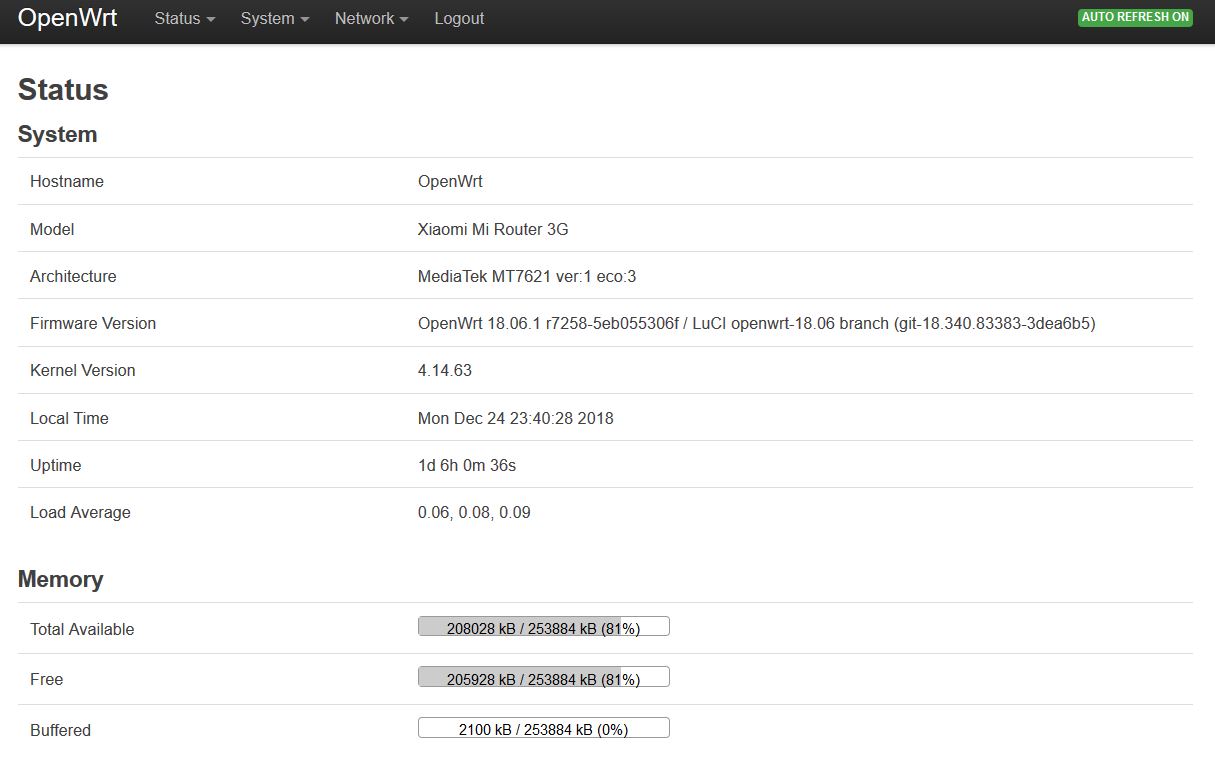
OpenWRT 18.06.1 on Mi Router 3G

openwrt01.jpg
 

uncle_josh

Master Member
Joined
Jun 16, 2018
Messages
3,036
Reaction score
735
What is the improvement and advantage of using OpenWRT over Xiaomi stock firmware ?
 
Important Forum Advisory Note
This forum is moderated by volunteer moderators who will react only to members' feedback on posts. Moderators are not employees or representatives of HWZ Forums. Forum members and moderators are responsible for their own posts. Please refer to our Community Guidelines and Standards and Terms and Conditions for more information.
Top