MyRepublic Big Launch

xRenol

Supremacy Member
Joined
Dec 27, 2011
Messages
7,216
Reaction score
186
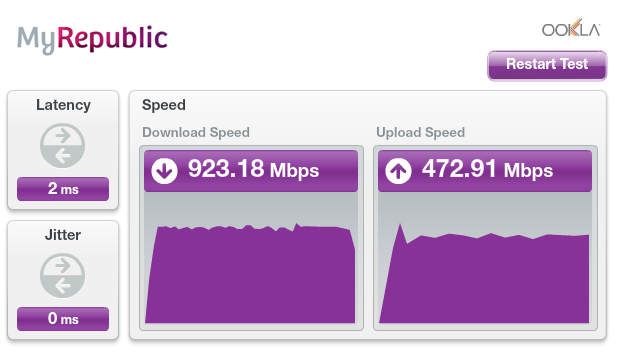
I just tried direct to ONT, disable antivirus and result are almost similar. I saw at the start of the test that the figure is at ~500+Mbps. It continued to drop till the final results.
Speedtest1.JPG

By the way, I did not disable my avast! antivirus when I was doing the speedtest.
 

SkatyBoy

Member
Joined
Apr 27, 2012
Messages
297
Reaction score
0
like i said , ppl have no idea what they are subscribing.

MR please add hardware requirement to your 1gbps plan..

I am not an MR staff, but I'm just going to list it down what I know.

Checklist to maximise your speed limit/average speed
  • Connection type: Wired (direct). There is no Gigabit Wireless as of yet (those pure ones, not the dual-band 160MHz 802.11ac crap that won't work in the very congested 2.4GHz/5GHz band in Singapore)

  • Ethernet Cable: CAT 5e (minimum, Gigabit capable). Recommended to use CAT 6 or 6a, since they are Gigabit certified.

  • Wireless:
    Maximum speed of wireless under lowest settings (One channel, one antenna, 400 ns guard interval)
    802.11n - 72mbps (Single 20 MHz channel)
    802.11ac - 433mbps (Single 80 Mhz channel)

    Find a channel that is not busy (use a wifi channel scanner, such as WiFi Channel Scanner) and does not overlap with other busy channels (it WILL overlap, try to minimise it). If your home is particularly small and free of obstacles, you may want to use the 5GHz frequency, as it is less congested and your weird non-WiFi wireless appliances (such as phones) won't interfere with the signal.

    If ALL of your devices support N or AC only, you may want to change the router to support N-only or AC-only.

    If your home is devoid of WiFi signals (ulu place), you may want to double the bandwidth to 40MHz or 160MHz for 2.4GHz or 5GHz respectively.

  • Network card: (the lobang on your PC that the cable connects to): Make sure that it supports Gigabit. Go to Device Manager, under Network adapters, see if there is "Gigabit" or "1000" in the name of the card. If there is no such phrasing/hint, do a Google search on that card's model. If it does not support Gigabit, you may only get up to 100 Mbps.

  • Harddrive: If you are still using mechanical hard drives (those that are noisy when they are busy), do a benchmark test (h2benchw and the likes) to see if your hard drive speed is at least above 125 MB/s (megabytes per second/~1000Mbps). If it is less than 125, your HDD may be a limiting factor, especially for downloads (save to disk). Heck, get a SSD if you are willing to spend.

  • RAM: Good to have more and faster (access speed) RAM. This ensures that your computer does not need to use your hard drive as RAM (pagefile), particularly for games.

  • Other parts of PC: Not really much to say here. Any PC will do, so long as it it 'modern enough' and it's not from the 1990's.

Disclaimer: This is an amateur-ish guide, based on my long (and occasionally bad) experience with networks. I am not liable if anything goes wrong, explodes or something goes wrong with the world, when you use this checklist.
 
Last edited:

xRenol

Supremacy Member
Joined
Dec 27, 2011
Messages
7,216
Reaction score
186
btw how to reset the ont? is switching off its power supply enough to reset it?

You have to use a pointed object to press and hold the button under Reset at the back of the ONT.

I STRONGLY ADVISE NOT TO RESET THE ONT.
 

leongws

Master Member
Joined
May 31, 2003
Messages
3,021
Reaction score
671
Ok guys, i roughly knows what goes wrong liao. My motherboard got comes with killer ethernet software. The software got bandwidth control settings and it was enabled. After i uncheck it, the speed for through router is down 300+, up 400+. Direct ont down 900+, up 400+. Still not sure why download drop to 300+ through router. Using wireless(HTC one m7), i got down 160+ and up 90+.
Thanks for all the advice given.
Direct ONT
Direct%20ONT.JPG


AC68U
AC68u.JPG
 

xRenol

Supremacy Member
Joined
Dec 27, 2011
Messages
7,216
Reaction score
186
ok noted.. will not itchy backside to reset then.

I am not sure if there are any settings pre-loaded into the ONT. So best is not tampered with the ONT.

Ok guys, i roughly knows what goes wrong liao. My motherboard got comes with killer ethernet software. The software got bandwidth control settings and it was enabled. After i uncheck it, the speed for through router is down 300+, up 400+. Direct ont down 900+, up 400+. Still not sure why download drop to 300+ through router. Using wireless(HTC one m7), i got down 160+ and up 90+.
Thanks for all the advice given.
Direct ONT
Direct%20ONT.JPG


AC68U
AC68u.JPG

Enjoy the speed!
 

Zeemax

Junior Member
Joined
Sep 29, 2008
Messages
62
Reaction score
0
Ok guys, i roughly knows what goes wrong liao. My motherboard got comes with killer ethernet software. The software got bandwidth control settings and it was enabled. After i uncheck it, the speed for through router is down 300+, up 400+. Direct ont down 900+, up 400+. Still not sure why download drop to 300+ through router. Using wireless(HTC one m7), i got down 160+ and up 90+.
Thanks for all the advice given.
Direct ONT
Direct%20ONT.JPG


AC68U
AC68u.JPG


How can I see this motherboard bandwidth control setting?
 

Zeemax

Junior Member
Joined
Sep 29, 2008
Messages
62
Reaction score
0
Are you also using the same MSI Gaming Motherboard as leongws?

I think is under Killer Network Manager.

ic... so paiseh i am just using a normal one which comes with my dell desktop system inspiron 660
 

Binaries

Member
Joined
Apr 1, 2011
Messages
418
Reaction score
0
For whoever that have been asking for instructions to change MTU settings to improve throughput. I will keep it short here with instruction extracted from the link itself for people that do not want to go through the paragraphs of text.

1) To check the optimal MTU settings for your connection.

My sweet spot is 1472 ( 1444 + 28 ) *add 28 bytes because 20 bytes for IP header and 8 bytes for ICMP Echo Request header

But do note that MTU may varies from Users to Users, mine just serve as a guidance.

2) To change MTU settings on Window Vista/7 using netsh

http://www.mydigitallife.info/how-to-set-and-change-mtu-in-windows-7-or-vista/ said:
Note that MTU is set on each of the network interfaces on the computer. Thus, it’s imperative to find out what network interfaces user has on the computer, and which interface is in used. Use the following command to show all network interfaces available:

netsh interface ipv4 show subinterfaces

To change or set a new MTU value, execute the following command:

netsh interface ipv4 set subinterface "Local Area Connection" mtu=nnnn store=persistent

Where “Local Area Connection” (including quotation marks as there is space in the name) is the name of the network connection on the computer, which is shown in the listing of network interfaces available. Common network connection name for Wi-Fi access is “Wireless Network Connection”.

In addition, nnnn should be replaced with numeric value of the preferred size of MTU, with minimum of 576 for IPv4 and 1280 for IPv6. Note that if a value greater than the dynamically-determined MTU, the system uses the value of the dynamically-determined MTU instead. Thus, change of MTU is normally to reduce and reduce, but not to increase, the size of the MTU.

MTU: 1472
a002e254e2c787230fd40ea6a6ce5bc9.png
 

Foodking545

Junior Member
Joined
Nov 17, 2005
Messages
16
Reaction score
0
the MR rep come my place yesterday afternoon to fix up my conncetion but until now,the connection icon is still blinking on the ONT,anybody can help o advise?:(
 

wilflare

Supremacy Member
Joined
Jun 1, 2002
Messages
9,897
Reaction score
24
cross posting from other thread

seems like some of my issues are getting fixed so i decided to post an update

Decided to update to latest beta firmware from ASUS for my AC68U
Reset to Factory Default.
Restarted ONT + Router as well

Wired, Direct to Router speeds returned to normal.
Except for the following error on Chrome (used to happen even on previous PURE + EnGenius)
"408 Request Time-out Your browser didn't send a complete request in time." - especially for NeoGAF.com - STILL happening

Issues with PlayStation 3 (Wired) - IP Fragmentation Issues FIXED but speeds reflect 100/100 on WIRED to Router
(1) Internet Connection Test: -/- Download and Upload. With error message that says "The router in use may not support IP fragments, and the communication features of some games may be restricted. For details, contact the router manufacturer"
*This did not happen with PURE + EnGenius

Still having issues with WiFi performance
On Note3 (connected via 5GHz) - ALL ISSUES FIXED - but speedtest reflects 225/115
(1) Instagram - News Feed does not load, loading spinner just keeps spinning. (News Feed works fine on 4G, NUS WiFi)
(2) OOKLA Speedtest.net (app) - 233 Download, 0 Upload (test just gets stuck at 0 Upload, test does not complete)
(3) WhatsApp - Cannot upload/send images but can receive

PlayStation Vita - Based on Internet Connection Test, 33.4 Mbps Download, 146.2 kbps Upload. - IP Fragmentation Issues FIXED but Internet Connection Test Reflects Poor Speeds 31/4
(1) Test says "The router in use may not support IP fragment packets, and some network features of your PS Vita system may be restricted. For details, contact the router manufacturer.

*all these WiFi issues did not occur during PURE + EnGenius setup
can't help but feel that these issues are all specific to the AC68U :/
wonder how long it'll take for Asus to fix the router :/

not sure if any backend fixes were applied but nonetheless some encouraging signs! hope to see things getting even better over the next few days
 

xRenol

Supremacy Member
Joined
Dec 27, 2011
Messages
7,216
Reaction score
186
For whoever that have been asking for instructions to change MTU settings to improve throughput. I will keep it short here with instruction extracted from the link itself for people that do not want to go through the paragraphs of text.

1) To check the optimal MTU settings for your connection.

My sweet spot is 1472 ( 1444 + 28 ) *add 28 bytes because 20 bytes for IP header and 8 bytes for ICMP Echo Request header

But do note that MTU may varies from Users to Users, mine just serve as a guidance.

2) To change MTU settings on Window Vista/7 using netsh


MTU: 1472
a002e254e2c787230fd40ea6a6ce5bc9.png

My optimal MTU is 1500 and by default set by Windows.

However, the download speed is still around 310Mbps on wired connection via ASUS RT-AC56U router. Upload speed is okay at 470Mbps.
 

aceseeker

Member
Joined
Jan 22, 2002
Messages
106
Reaction score
0
not sure if any backend fixes were applied, my upload speed has increased from less than 150Mbps to currently 464Mbps.

My Whatapp issue on uploading picture also solved.

Would like to say thanks to MyRepublic if you have done some fix at the backend.

jjs51u.jpg
 

imacbie

Supremacy Member
Joined
Jul 3, 2004
Messages
6,405
Reaction score
2
My optimal MTU is 1500 and by default set by Windows.

However, the download speed is still around 310Mbps on wired connection via ASUS RT-AC56U router. Upload speed is okay at 470Mbps.


@xRenol kindly factory reset your router and test again.
many of us had the same issue.
 

aCidz

Senior Member
Joined
Jan 1, 2000
Messages
1,308
Reaction score
4
It almost sounds like you need a few days to "season" your new connection to iron out issues like uploading :s13:
 
Important Forum Advisory Note
This forum is moderated by volunteer moderators who will react only to members' feedback on posts. Moderators are not employees or representatives of HWZ Forums. Forum members and moderators are responsible for their own posts. Please refer to our Community Guidelines and Standards and Terms and Conditions for more information.
Top