Singtel Mesh Router

xiaofan

High Supremacy Member
Joined
Sep 16, 2018
Messages
32,556
Reaction score
10,063
I have an ONR, and Singtel Mesh Router and poor coverage in my MBR. Backstory is here. https://forums.hardwarezone.com.sg/threads/singtel-onr-ap-issues.5778791/post-140653993

So I bought a Singtel Mesh Extender (V2) off carousell, and paired it with my Singtel Mesh router via WPS, as per the manual. After a brief wait, the SSID of the Mesh Extender changed to the SSID of my Singtel Mesh Router and it appears to have worked. This is because I could see the "Mesh" LED light up on the Singtel Mesh Router, and in the Network Topology section of the Singtel Mesh Router's admin portal, I can see that the Extender is connected to the Mesh Router.

So I tried to connect to see if wired backhaul could work with the Mesh Extender. So I plugged in power and an old Cat5E cable to the Extender to the MBR lan port, and switched it on. But it feels like I have 2 APs with the same SSID rather than a Mesh network. This is because with the Mesh Extender in the MBR, the Mesh LED is no longer lighted up on the Mesh Router, and the Mesh Extender disappeared from the Network Topology section of the Singtel Mesh Router's admin portal.

In the Singtel Mesh Extender's admin portal, in the Network Status section, I can see a graphic that the Extender is connected to Mesh Router as below.
Screenshot-2022-04-17-110622.jpg


But in the log section, there is a line that says "Backhaul Ethernet being used for uplink mode." See screenshot below.
Screenshot-2022-04-17-111104.jpg


So do I have Mesh? or 2 APs with the same SSID?

Thanks for the updates.

I tend to think the Mesh LED on the Singtel Mesh Router is the right now.

Your results seem to indicate that wireless backhaul works but not Ethernet backhaul.

Hopefully more people will report their experiment with the Ethernet backhaul. Yours is the first case and it seems to say Ethernet backhaul does not really work in the first case.

1) Singtel ONT or ONR -- Singtel Mesh Router --wired -- Singtel Mesh Extender
2) Singtel ONR -- Singtel Mesh Extender (main node)
Singtel ONR -- Singtel Mesh Extender (mesh node)
 

coldfreeze

Supremacy Member
Deluxe Member
Joined
Nov 28, 2001
Messages
9,915
Reaction score
30
I have an update. I think wired backhaul works now. I just had to restart the Singtel Mesh Router, after I had connected wired backhaul to the Singtel Mesh Extender. And after both devices have fully booted, the "Mesh" LED on the Mesh Router was switched on.

I also found out how I can tell it whether it is 2 APs with the same SSID, or a single Mesh network. When the mesh network is working, you won't be able to login to the extender's login page on its IP address. You will be forwarded to the main Mesh Router's IP address when you try to login to the extender's IP address. But in dual AP mode, you can independently login to either the mesh router or the mesh extender separately.
 

coldfreeze

Supremacy Member
Deluxe Member
Joined
Nov 28, 2001
Messages
9,915
Reaction score
30
This is how it looks like when the Singtel Mesh Extender is connected via wired backhaul.

1653138715792.png

And below screenshot is when the extender is connected via wireless backhaul.

1653138742815.png
 

xiaofan

High Supremacy Member
Joined
Sep 16, 2018
Messages
32,556
Reaction score
10,063
SIngtel has added the Arcadyan Wifi 6 Mesh Extender (free with 2Gbps Mesh plan). I believe it will also work with the SIngtel Mesh router. The good thing is that it has Wifi 6 and two GbE LAN ports. This should help for people with want to use wired device along with Ethernet backhaul. The existing Wifi 6 Mesh Extender only has one GbE LAN port.
https://www.singtel.com/personal/support/broadband/routers-ont
Tech Specs:
Wireless Technology
  • Wi-Fi 6 AX5400
  • Dual-band MU-MIMO
  • IEEE 802.11 a/b/g/n/ac/ax
  • Wi-Fi Mesh Ready
  • EasyMesh R2
Processor and Memory
  • 256MB RAM and 128MB Flash
Wired Ports
  • 2 x GbE LAN
Security
  • WPA/WPA2/WPA3
  • WPS
Dimensions
  • 140 x 55 x 140 mm
 

Outcast

Senior Member
Joined
Dec 19, 2006
Messages
680
Reaction score
6
Can anyone confirm that the LAN ports are disabled when the Singtel mesh router is operating in AP mode?
 

xiaofan

High Supremacy Member
Joined
Sep 16, 2018
Messages
32,556
Reaction score
10,063
Can anyone confirm that the LAN ports are disabled when the Singtel mesh router is operating in AP mode?

That is NOT TRUE. LAN ports are fully functional in AP mode.

BTW, Singtel Mesh Router will automatically run in AP mode when connected to Singtel ONR (or third party routers).
 

Outcast

Senior Member
Joined
Dec 19, 2006
Messages
680
Reaction score
6
That is NOT TRUE. LAN ports are fully functional in AP mode.

BTW, Singtel Mesh Router will automatically run in AP mode when connected to Singtel ONR (or third party routers).
Hmm is it? I cannot access the mesh router configuration page while it is in AP mode either via Ethernet or WiFi. Probably I need to do more testing.

I connected it to an EdgeRouter Lite.
 

xiaofan

High Supremacy Member
Joined
Sep 16, 2018
Messages
32,556
Reaction score
10,063
Hmm is it? I cannot access the mesh router configuration page while it is in AP mode either via Ethernet or WiFi. Probably I need to do more testing.

I connected it to an EdgeRouter Lite.

Do you have some VLAN settings on the EdgeRouter Lite? Be careful that Singtel Mesh Router has special treatment for VLAN ID 10 (Singtel Fibre Internet VLAN) and VLAN ID 20 (Singtel TV VLAN). When connected to Singtel ONR, it will support SIngtel TV box in AP mode (3rd party routers like Asus and TP-Link can not do that).

I have no issues connecting the Singtel Mesh Router to OpenWRT or pfSense. Other then initial testing using it as a router, I have always used it as an AP after OpenWRT/pfSense. I also tested it after my Asus RT-AX82U.
 
Last edited:

Outcast

Senior Member
Joined
Dec 19, 2006
Messages
680
Reaction score
6
Do you have some VLAN settings on the EdgeRouter Lite? Be careful that Singtel Mesh Router has special treatment for VLAN ID 10 (Singtel Fibre Internet VLAN) and VLAN ID 20 (Singtel TV VLAN). When connected to Singtel ONR, it will support SIngtel TV box in AP mode (3rd party routers like Asus and TP-Link can not do that).

I have no issues connecting the Singtel Mesh Router to OpenWRT or pfSense. Other then initial testing using it as a router, I have always used it as an AP after OpenWRT/pfSense. I also tested it after my Asus RT-AX82U.
There is only VLAN setting on the EdgeRouter Lite "WAN" port to get internet connection. I do not have Singtel TV subscription.

I already have a Asus RT-AC86U and RT-AC66U functioning as APs. Just wanted to add the mesh router as another AP to cover the last bit of WiFi blindspot.
 

xiaofan

High Supremacy Member
Joined
Sep 16, 2018
Messages
32,556
Reaction score
10,063
There is only VLAN setting on the EdgeRouter Lite "WAN" port to get internet connection. I do not have Singtel TV subscription.
I already have a Asus RT-AC86U and RT-AC66U functioning as APs. Just wanted to add the mesh router as another AP to cover the last bit of WiFi blindspot.

Once you have Singtel VLAN settings on the edge router, it might affect the function of SingTel Mesh Router function.

By right it should work as well. You may want to try again. I remember I have done similar things: put the SingTel Mesh Router after Asus RT-AX82U (with SingTel VLAN profile).

If still not working, not so sure if miloaisdino or others can help you or not.

Or it may have something to do with your Edge Router Lite VLAN settings. You may play with IGMP settings to see if that helps.

You can also test whether it works after the two Asus APs.
 
Last edited:

yingyingg

Junior Member
Joined
Jun 15, 2011
Messages
8
Reaction score
0
Hi xiaofan! I am going to relocate to a bigger place, and I have to relocate my Singtel Mesh router (AC1900) together with ONT.

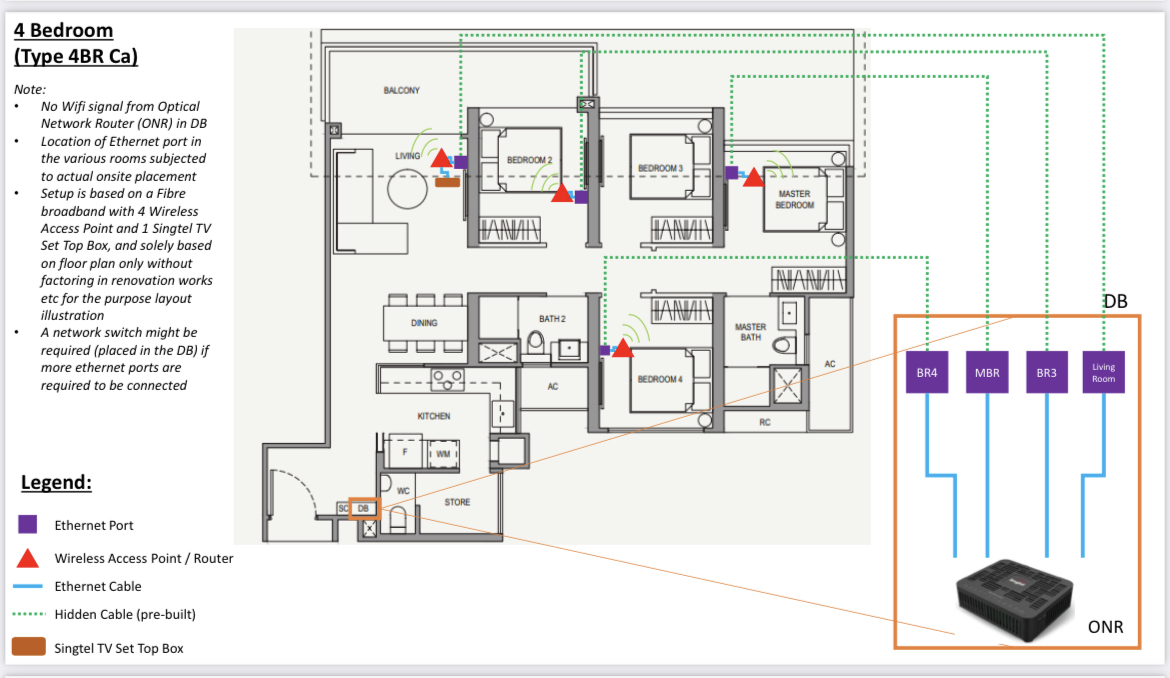
I understand I will have to mesh/ extend as the bedrooms sure cannot get the connection from DB box.

this is the plan given by singtel using ONR for new signups (but i cannot follow as i need to transfer current plan over)

41-FFBDF6-AD32-4408-B3-C0-DA359-C8-B2142.jpg


So, should I purchase other AC2600 mesh extenders? (Or which brands can support the singtel mesh router?)

I also have an old Asus router RT-AC68U (AC1900 too). Is there any way to use this as part of the extender systems?
 

xiaofan

High Supremacy Member
Joined
Sep 16, 2018
Messages
32,556
Reaction score
10,063
Hi xiaofan! I am going to relocate to a bigger place, and I have to relocate my Singtel Mesh router (AC1900) together with ONT.

I understand I will have to mesh/ extend as the bedrooms sure cannot get the connection from DB box.

this is the plan given by singtel using ONR for new signups (but i cannot follow as i need to transfer current plan over)

41-FFBDF6-AD32-4408-B3-C0-DA359-C8-B2142.jpg


So, should I purchase other AC2600 mesh extenders? (Or which brands can support the singtel mesh router?)

I also have an old Asus router RT-AC68U (AC1900 too). Is there any way to use this as part of the extender systems?

Sorry but your floor plan is not clear at all and I have no idea where the ONT, router and LAN ports locations are. Please repost.

When you relocate, you will get the Singtel ONR, your current Singtel ONT will become no use. So you can just put the new Singtel ONR in the DB Box.

No cost option -- put the Singtel Mesh Router in the living room. and the RT-AC68U in the last room (the master bedroom) as AP, assuming you have LAN port there. You can try to use the same SSID and same password to see if it works for you or not.

If you want better performance, then that will depend on your budget. But please post a clear version of the floor plan and state your budget.
 

yingyingg

Junior Member
Joined
Jun 15, 2011
Messages
8
Reaction score
0
Sorry but your floor plan is not clear at all and I have no idea where the ONT, router and LAN ports locations are. Please repost.

When you relocate, you will get the Singtel ONR, your current Singtel ONT will become no use. So you can just put the new Singtel ONR in the DB Box.

No cost option -- put the Singtel Mesh Router in the living room. and the RT-AC68U in the last room (the master bedroom) as AP, assuming you have LAN port there. You can try to use the same SSID and same password to see if it works for you or not.

If you want better performance, then that will depend on your budget. But please post a clear version of the floor plan and state your budget.

7-A105475-9-DC7-4244-9-A22-7625-AFFF6581.jpg


Does this pic work better? Yes i think all bedrooms have LAN ports.
 

xiaofan

High Supremacy Member
Joined
Sep 16, 2018
Messages
32,556
Reaction score
10,063
7-A105475-9-DC7-4244-9-A22-7625-AFFF6581.jpg


Does this pic work better? Yes i think all bedrooms have LAN ports.

Yes now it is very clear. You can follow my previous reply for no cost option. Then you can see if it is good enough for you already or not. If not then you can upgrade.

Singtel Mesh Router -- living room
Asus RT-AC68U -- master room or bedroom 4, depends on which room is more important for you.

BTW, do you have Singtel TV box in the living room? If yes, it may affect your future upgrade option. The above configuration works with Singtel TV box in the liviing room.
 

yingyingg

Junior Member
Joined
Jun 15, 2011
Messages
8
Reaction score
0
Yes now it is very clear. You can follow my previous reply for no cost option. Then you can see if it is good enough for you already or not. If not then you can upgrade.

Singtel Mesh Router -- living room
Asus RT-AC68U -- master room or bedroom 4, depends on which room is more important for you.

BTW, do you have Singtel TV box in the living room? If yes, it may affect your future upgrade option. The above configuration works with Singtel TV box in the liviing room.
My circle plan does have the Singtel TV. But tbh it has not been used at all at old house. Is just to enjoy yearly recontract
 

guile

High Supremacy Member
Joined
Jan 1, 2000
Messages
26,076
Reaction score
2,400
Can the new Wifi 6 Mesh Router work with the old Mesh Router if i use the old Mesh Router as extender?
 

xiaofan

High Supremacy Member
Joined
Sep 16, 2018
Messages
32,556
Reaction score
10,063
Can the new Wifi 6 Mesh Router work with the old Mesh Router if i use the old Mesh Router as extender?

The Singtel Mesh Router (AC1900, from Arcadyan) can not work as an extender. So you are out of luck.

The existing Singtel Mesh Extender (AC2600, from Arcadyan) works with either Singtel Mesh Router or itself to form a mesh.

The new Wifi 6 router (for ONT users) is Airties 4960R and it does not work any other Singtel stuff to form a mesh. There is an Airties 4960 Mesh Extender but it is not available from Singtel.

The new Wifi 6 extender for Singtel 1Gbps plan is Askey AX5400 Mesh Extender and I believe it does not work any other Singtel stuff to form a mesh, other than itself. You may want to confirm with Singtel.

The new Wifi 6 extender for Singtel 2Gbps plan is Arcadyan AX5400 Mesh Extender and I believe it does not work any other Singtel stuff to form a mesh, other than itself. You may want to confirm with Singtel.
 

guile

High Supremacy Member
Joined
Jan 1, 2000
Messages
26,076
Reaction score
2,400
The Singtel Mesh Router (AC1900, from Arcadyan) can not work as an extender. So you are out of luck.

The existing Singtel Mesh Extender (AC2600, from Arcadyan) works with either Singtel Mesh Router or itself to form a mesh.

The new Wifi 6 router (for ONT users) is Airties 4960R and it does not work any other Singtel stuff to form a mesh. There is an Airties 4960 Mesh Extender but it is not available from Singtel.

The new Wifi 6 extender for Singtel 1Gbps plan is Askey AX5400 Mesh Extender and I believe it does not work any other Singtel stuff to form a mesh, other than itself. You may want to confirm with Singtel.

The new Wifi 6 extender for Singtel 2Gbps plan is Arcadyan AX5400 Mesh Extender and I believe it does not work any other Singtel stuff to form a mesh, other than itself. You may want to confirm with Singtel.
OK thanks.
Guess I'll jus stick to the Singtel Mesh Router as my main wifi and the older Elite as a separate AP.
 

lcheetec

Senior Member
Joined
Jan 1, 2000
Messages
1,482
Reaction score
2
My notes/post refer to this model: https://www.singtel.com/personal/support/broadband/routers-ont/Wi-Fi-6-Mesh-Extender

This is the Arcadyan Wifi 6 Mesh Extender that was given to me ("paid for in plan") when I recontracted 30 Dec 2022.

I installed 4 of these yesterday, so far so good. The one thing I wasn't sure of, was whether it supports wired/ethernet backhaul. So I tested it by connecting port 1 of one of the extenders to a switch (that goes back to the ONR). It installed changed the Connection Type from "5GHz" (the default wireless backhaul) to "Ethernet". Easy!
 

xiaofan

High Supremacy Member
Joined
Sep 16, 2018
Messages
32,556
Reaction score
10,063
My notes/post refer to this model: https://www.singtel.com/personal/support/broadband/routers-ont/Wi-Fi-6-Mesh-Extender

This is the Arcadyan Wifi 6 Mesh Extender that was given to me ("paid for in plan") when I recontracted 30 Dec 2022.

I installed 4 of these yesterday, so far so good. The one thing I wasn't sure of, was whether it supports wired/ethernet backhaul. So I tested it by connecting port 1 of one of the extenders to a switch (that goes back to the ONR). It installed changed the Connection Type from "5GHz" (the default wireless backhaul) to "Ethernet". Easy!

Nice one. Thanks for the sharing.
 
Important Forum Advisory Note
This forum is moderated by volunteer moderators who will react only to members' feedback on posts. Moderators are not employees or representatives of HWZ. Forum members and moderators are responsible for their own posts.

Please refer to our Community Guidelines and Standards, Terms of Service and Member T&Cs for more information.
Top