
TP-Link EB810v - Quick overview

Apparatus

Great Supremacy Member
Joined
May 27, 2005
Messages
55,777
Reaction score
12,495
Hi, can I kndies EB810v comes with Homeshield for network protection?

Hi, can I know does EB810v comes with homeshield for network protection?

If I'm not wrong it does NOT have the free HomeShield protection

 

vodaboy

Senior Member
Joined
Mar 9, 2001
Messages
1,424
Reaction score
6
Not allow by Starhub. I already requested. Maybe Starhub sign contract with nokia to provided troubleshooting by ONR remote setting by back end for 2 years on your contract. So cannot change to ONT which different brand of ONT.
Oops sorry if I wasn't clear. I meant to request to change my recontract based on the current deal with the ONT + TP-link router instead. I called just now and they said they need to cancel the current recontract's contract, change the contract terms then will call back to arrange for a new appointment date.

I did try my luck to ask whether they could stick with the current appointment date, give me the ONR to use for time being and then come over another day to swap to ONT, thereafter start to bill me at $110.97... they said unable to do so (too complex for them I think). Haha.
 

vodaboy

Senior Member
Joined
Mar 9, 2001
Messages
1,424
Reaction score
6
So I cancelled the initial appointment, Starhub cancelled the initial recontract, visited the Starhub store to have them issue a new one based on the current Wifi 7 bundle and scheduled a new appointment date. The waiting time is not as long now, less than 2 weeks.
 

kimsix

Arch-Supremacy Member
Joined
Jan 6, 2009
Messages
19,468
Reaction score
9,453
wireless setting no mu-mimo options? can set ap isolation. saw 240mhz DFS but unusable here, keeps falling back to 80mhz. 160mhz DFS works though

what is psc channels??

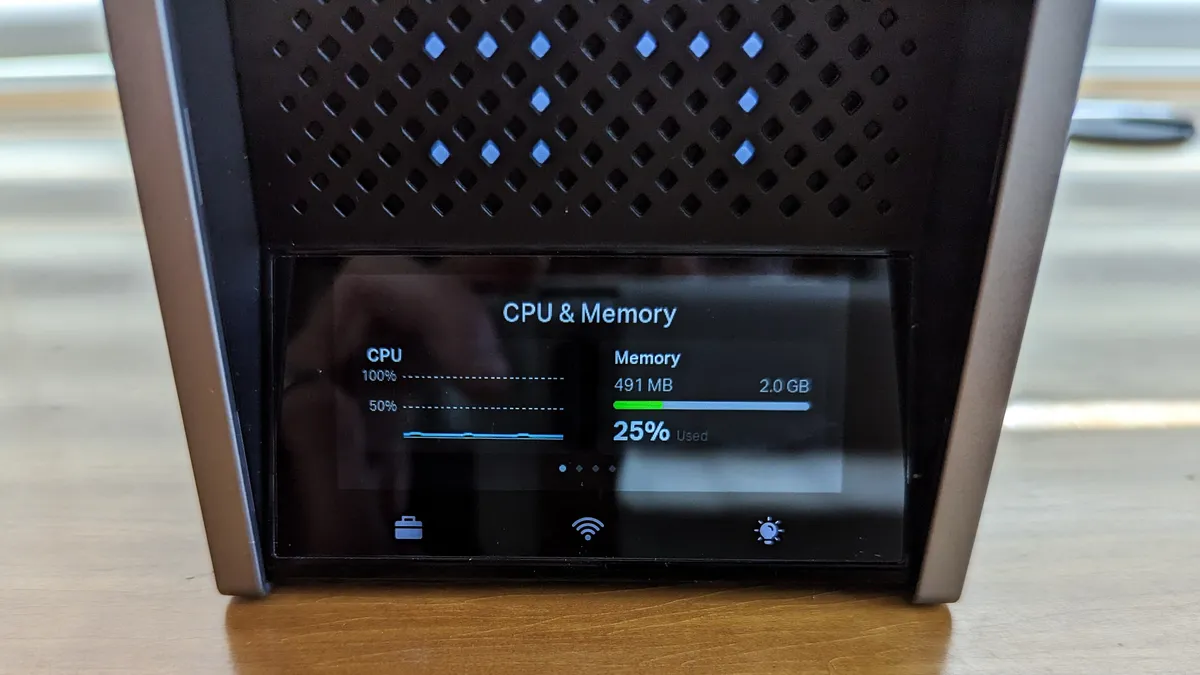
59% memory usuage seems same as hkepc review, so 2GB? :o

Chrome google speed test can do 6.8gbps download?!

H6Onmtl.png

quLWVg7.png

l8IMAOT.png
 

SojIrOu

Member
Joined
May 23, 2005
Messages
180
Reaction score
67
It's kind of contradictory that Starhub mentions to use EasyMesh only with TP-Link when it's supposed to be universal.

For those running 2 or more EB810v, can I check if you're able to use ethernet backhaul?
 

Apparatus

Great Supremacy Member
Joined
May 27, 2005
Messages
55,777
Reaction score
12,495
It's kind of contradictory that Starhub mentions to use EasyMesh only with TP-Link when it's supposed to be universal.

For those running 2 or more EB810v, can I check if you're able to use ethernet backhaul?
There are 4 types of mesh with TP LINK routers

OneMesh
EasyMesh
DecoMesh
Omada Mesh

If I'm not wrong the eb810v don't support ethernet backhaul

List of EasyMesh routers which support ethernet backhaul

https://community.tp-link.com/en/home/forum/topic/593722
 
Last edited:

SojIrOu

Member
Joined
May 23, 2005
Messages
180
Reaction score
67
There are 4 types of mesh with TP LINK routers

OneMesh
EasyMesh
DecoMesh
Omada Mesh

If I'm not wrong the eb810v don't support ethernet backhaul
Yup but weirdly EB810v is supposed to be EasyMesh which is meant to be "universal" across brands but in Starhub FAQ page it states other brands not supported.
*Mesh nodes that are available from other brands would not be compatible with the TP-Link EB810V. We strongly recommend using another TP-Link EB810v for best performance.
Regardless, I doubt many will mix brands but is it safe to assume that BE550/800/900 will also mesh with EB810v?
 

Apparatus

Great Supremacy Member
Joined
May 27, 2005
Messages
55,777
Reaction score
12,495
Yup but weirdly EB810v is supposed to be EasyMesh which is meant to be "universal" across brands but in Starhub FAQ page it states other brands not supported.

Regardless, I doubt many will mix brands but is it safe to assume that BE550/800/900 will also mesh with EB810v?

I belive easymesh with wireless backhaul should not be an issue. With ethernet backhaul will depend on support by TP LINK

Just don't combine different mesh types

You can always check with TP LINK for confirmation
 

xiaofan

High Supremacy Member
Joined
Sep 16, 2018
Messages
32,740
Reaction score
10,245
It's kind of contradictory that Starhub mentions to use EasyMesh only with TP-Link when it's supposed to be universal.

For those running 2 or more EB810v, can I check if you're able to use ethernet backhaul?

That is normal. EasyMesh is supposed to be cross-vendor. However, due to support issues, all the vendors will recommend to use their own EasyMesh solution. It is the same for Linksys (E series) and Netgear (Nighthawk mesh system) even thy use EasyMesh as well.

As for whether EB810v supports Ethernet Backhaul or not, you have to confirm with Starhub/TP-Link as it is an operator model and not listed in the TP-Link FAQ page.
https://www.tp-link.com/sg/support/faq/3529/
https://community.tp-link.com/en/home/forum/topic/593722

You can read DongKnows' article about TP-Link EasyMesh here and his rational to use the same vendor's EasyMesh system. Just take not that at that time Ethernet Backhaul was not supported.

https://dongknows.com/tp-link-easymesh-wi-fi-system-review/
Generally, we need the hardware of at least two vendors working together to know Wi-Fi EasyMesh is universal. But then, things can get complicated in terms of liability or tech support. If a mixed Wi-Fi EasyMesh system is not working as expected, it's hard to know which hardware vendor is at fault, and consumers might be stuck between two networking companies that point fingers at each other.

Generally, the details of a system change depending on the hardware mix, and we'll have to wait to find out. However, judging from my experience with existing hardware, there's a price—in performance, features, or settings—to pay for this simplicity. So, in the end, for a certain level of predictability, EasyMesh or not, it's best to use hardware from the same vendor.
 

SojIrOu

Member
Joined
May 23, 2005
Messages
180
Reaction score
67
That is normal. EasyMesh is supposed to be cross-vendor. However, due to support issues, all the vendors will recommend to use their own EasyMesh solution. It is the same for Linksys (E series) and Netgear (Nighthawk mesh system) even thy use EasyMesh as well.

As for whether EB810v supports Ethernet Backhaul or not, you have to confirm with Starhub/TP-Link as it is an operator model and not listed in the TP-Link FAQ page.
https://www.tp-link.com/sg/support/faq/3529/
https://community.tp-link.com/en/home/forum/topic/593722

You can read DongKnows' article about TP-Link EasyMesh here and his rational to use the same vendor's EasyMesh system. Just take not that at that time Ethernet Backhaul was not supported.

https://dongknows.com/tp-link-easymesh-wi-fi-system-review/
Generally, we need the hardware of at least two vendors working together to know Wi-Fi EasyMesh is universal. But then, things can get complicated in terms of liability or tech support. If a mixed Wi-Fi EasyMesh system is not working as expected, it's hard to know which hardware vendor is at fault, and consumers might be stuck between two networking companies that point fingers at each other.

Generally, the details of a system change depending on the hardware mix, and we'll have to wait to find out. However, judging from my experience with existing hardware, there's a price—in performance, features, or settings—to pay for this simplicity. So, in the end, for a certain level of predictability, EasyMesh or not, it's best to use hardware from the same vendor.
Great info to know I guess I might give it a shot instead of selling off as my house is using Decos so I can still use them as AP while the EB810v serves as the router then add on another unit down the line.
 

xiaofan

High Supremacy Member
Joined
Sep 16, 2018
Messages
32,740
Reaction score
10,245
wireless setting no mu-mimo options? can set ap isolation. saw 240mhz DFS but unusable here, keeps falling back to 80mhz. 160mhz DFS works though

what is psc channels??

59% memory usuage seems same as hkepc review, so 2GB? :o

Chrome google speed test can do 6.8gbps download?!

H6Onmtl.png

quLWVg7.png

l8IMAOT.png

160MHz channel band on 5GHz band is easier but still subject to the interferences from the neighbors.
5GHz 240MHz channel bandwidth is probably difficult here in Singapore due to interferences. 160MHz channel bandwidth on 6GHz band should be quite feasible now since the penetration power is less and there are not many devices using 6GHz now. 320MHz channel bandwidth on the 6GHz band may be possible as well now. Not so sure in the future.

It may be more useful for those quad-band WiFi 7 routers with dual 5GHz band and then use MLO to get equivalent to 240MHz channel bandwidth. For Chinese triband WiFi 7 routers (dual 5GHz band, no 6GHz band), that is the best hope because neither 6GHz nor 320MHz channel bandwidth is available.

Not so sure what you mean by PSC channels. You can read about WiFi frequency bands and DFS channels from Wikipedia. I tend to use DFS channels myself. But if you live near to the airport you may want to avoid DFS channels. Take note there are no DFS channels on the 6GHz band.
https://en.wikipedia.org/wiki/List_of_WLAN_channels
https://en.wikipedia.org/wiki/Dynamic_frequency_selection

As for the amount of RAM, since the router has limited features, I believe it has only 1GB RAM and 59% means 590MB RAM.

Take note TP-Link Archer BE800 also has 1GB RAM based on the reviews.
https://www.tomsguide.com/reviews/tp-link-archer-be800

The BE800 uses Qualcomm’s Networking Pro 1220 Wi-Fi chip along with 1GB RAM and 256MB flash storage space for the router’s firmware and settings. Its 2.2GHz quad-core processor runs the operation.

Edit to add:
PSC channels = Preferred Scanning Channels
https://www.asus.com/sg/support/faq/1044625/
https://kb.netgear.com/000063519/What-are-Preferred-Scanning-Channels-in-the-6-GHz-band
 
Last edited:

kimsix

Arch-Supremacy Member
Joined
Jan 6, 2009
Messages
19,468
Reaction score
9,453
160MHz channel band on 5GHz band is easier but still subject to the interferences from the neighbors.
5GHz 240MHz channel bandwidth is probably difficult here in Singapore due to interferences. 160MHz channel bandwidth on 6GHz band should be quite feasible now since the penetration power is less and there are not many devices using 6GHz now. 320MHz channel bandwidth on the 6GHz band may be possible as well now. Not so sure in the future.

It may be more useful for those quad-band WiFi 7 routers with dual 5GHz band and then use MLO to get equivalent to 240MHz channel bandwidth. For Chinese triband WiFi 7 routers (dual 5GHz band, no 6GHz band), that is the best hope because neither 6GHz nor 320MHz channel bandwidth is available.

Not so sure what you mean by PSC channels. You can read about WiFi frequency bands and DFS channels from Wikipedia. I tend to use DFS channels myself. But if you live near to the airport you may want to avoid DFS channels. Take note there are no DFS channels on the 6GHz band.
https://en.wikipedia.org/wiki/List_of_WLAN_channels
https://en.wikipedia.org/wiki/Dynamic_frequency_selection

As for the amount of RAM, since the router has limited features, I believe it has only 1GB RAM and 59% means 590MB RAM.

Take note TP-Link Archer BE800 also has 1GB RAM based on the reviews.
https://www.tomsguide.com/reviews/tp-link-archer-be800

The BE800 uses Qualcomm’s Networking Pro 1220 Wi-Fi chip along with 1GB RAM and 256MB flash storage space for the router’s firmware and settings. Its 2.2GHz quad-core processor runs the operation.

Edit to add:
PSC channels = Preferred Scanning Channels
https://www.asus.com/sg/support/faq/1044625/
https://kb.netgear.com/000063519/What-are-Preferred-Scanning-Channels-in-the-6-GHz-band

The disassembly of be800 and de85 on hkepc shows both have 2gb, they are eb810v and hb810 non isp models :o
 

xiaofan

High Supremacy Member
Joined
Sep 16, 2018
Messages
32,740
Reaction score
10,245
The disassembly of be800 and de85 on hkepc shows both have 2gb, they are eb810v and hb810 non isp models :o

The problem is that TP-Link does not publish the CPU, RAM and Flash size info for their WiFi 7 routers, so we seem to get different number from different sources.

TP-Link is known to have different HW revisions which change the HW components.
 

xiaofan

High Supremacy Member
Joined
Sep 16, 2018
Messages
32,740
Reaction score
10,245
The problem is that TP-Link does not publish the CPU, RAM and Flash size info for their WiFi 7 routers, so we seem to get different number from different sources.

TP-Link is known to have different HW revisions which change the HW components.

For WiFi 6/6E routers, they at least publish the CPU spec. No RAM/Flash info.
https://www.tp-link.com/sg/home-networking/wifi-router/archer-ax11000/#specifications
https://www.tp-link.com/sg/home-networking/wifi-router/archer-ax72/#specifications
https://www.tp-link.com/sg/home-networking/wifi-router/archer-axe300/#specifications

For WiFi 7 routers, even CPU spec is gone.
https://www.tp-link.com/sg/home-networking/wifi-router/archer-be800/#specifications
 

xiaofan

High Supremacy Member
Joined
Sep 16, 2018
Messages
32,740
Reaction score
10,245
The disassembly of be800 and de85 on hkepc shows both have 2gb, they are eb810v and hb810 non isp models :o

Google info shows at least articles saying 1GB RAM for Archer BE800.

1. https://www.tomsguide.com/reviews/tp-link-archer-be800
The BE800 uses Qualcomm’s Networking Pro 1220 Wi-Fi chip along with 1GB RAM and 256MB flash storage space for the router’s firmware and settings. Its 2.2GHz quad-core processor runs the operation.

2. https://einfoldtech.com/2023/11/tp-link-archer-be800-be19000-tri-band-wi-fi-7-router/

According to TP-Link, the Archer BE800 is powered by a Qualcomm 1200 Pro 2.2 GHz quad-core processor, supported by 1GB of RAM and 256MB of flash storage.
 

trenzterra

Arch-Supremacy Member
Joined
Sep 18, 2002
Messages
20,611
Reaction score
513
It's kind of contradictory that Starhub mentions to use EasyMesh only with TP-Link when it's supposed to be universal.

For those running 2 or more EB810v, can I check if you're able to use ethernet backhaul?
I have two EB810v connected with Ethernet backhaul with no issues. Only problem is that I can only have my backhaul at 2.5gbps as my 10gbps port already occupied by my desktop (although 10gbps is also possible if you have no other use for the port)
 

kimsix

Arch-Supremacy Member
Joined
Jan 6, 2009
Messages
19,468
Reaction score
9,453
Google info shows at least articles saying 1GB RAM for Archer BE800.

1. https://www.tomsguide.com/reviews/tp-link-archer-be800
The BE800 uses Qualcomm’s Networking Pro 1220 Wi-Fi chip along with 1GB RAM and 256MB flash storage space for the router’s firmware and settings. Its 2.2GHz quad-core processor runs the operation.

2. https://einfoldtech.com/2023/11/tp-link-archer-be800-be19000-tri-band-wi-fi-7-router/

According to TP-Link, the Archer BE800 is powered by a Qualcomm 1200 Pro 2.2 GHz quad-core processor, supported by 1GB of RAM and 256MB of flash storage.

dont know what’s tplink thinking
The sexposed hardware shows 2x1gb memory but webos reading as 1gb? Going to write to tplink why they ewaste to disable one memory channel

The be900 got show more details like asus.

FqYDn2wQyptRACzbM8q5MS-1200-80.jpg.webp
 

SojIrOu

Member
Joined
May 23, 2005
Messages
180
Reaction score
67
I have two EB810v connected with Ethernet backhaul with no issues. Only problem is that I can only have my backhaul at 2.5gbps as my 10gbps port already occupied by my desktop (although 10gbps is also possible if you have no other use for the port)
Great to know! I think for the most part 2.5Gbps is enough for wireless clients but I suppose I can add a 10Gbps switch in between for full speed backhaul.
 

kimsix

Arch-Supremacy Member
Joined
Jan 6, 2009
Messages
19,468
Reaction score
9,453
wols news but seems tplink is partially a singapore company now similar to tiktok ceo is singaporean

2023
• TP-Link Global Inc. officially launched operations in Irvine, California, with TP-Link maintaining dual headquarters in Singapore and the United States to enhance its global operations.
• TP-Link Corporation PTE. Ltd., a Singapore company, formerly known as Big Field Global PTE. Ltd., announced the global acquisition of TP-Link affiliated companies. This transaction united under one roof some of the world’s top brands in smart home and networking products, including TP-Link®, Kasa®, Tapo®, TP-Link Omada®, Aginet®, and VIGI®.
 

xiaofan

High Supremacy Member
Joined
Sep 16, 2018
Messages
32,740
Reaction score
10,245
Important Forum Advisory Note
This forum is moderated by volunteer moderators who will react only to members' feedback on posts. Moderators are not employees or representatives of HWZ Forums. Forum members and moderators are responsible for their own posts. Please refer to our Community Guidelines and Standards and Terms and Conditions for more information.
Top