TP-Link EB810v - Quick overview

xiaofan

High Supremacy Member
Joined
Sep 16, 2018
Messages
35,504
Reaction score
11,920
wols news but seems tplink is partially a singapore company now similar to tiktok ceo is singaporean

2023
• TP-Link Global Inc. officially launched operations in Irvine, California, with TP-Link maintaining dual headquarters in Singapore and the United States to enhance its global operations.
• TP-Link Corporation PTE. Ltd., a Singapore company, formerly known as Big Field Global PTE. Ltd., announced the global acquisition of TP-Link affiliated companies. This transaction united under one roof some of the world’s top brands in smart home and networking products, including TP-Link®, Kasa®, Tapo®, TP-Link Omada®, Aginet®, and VIGI®.

Interesting. Looks like they split the company into two. One is TP-Link China (TP-Link普联技术有限公司) and the other is TP-Link Global Inc. (TP-Link联洲国际有限公司).

TP-Link China (TP-Link普联技术有限公司)
https://www.tp-link.com.cn/introduce

TP-LinK Global (TP-Link普联技术有限公司)
https://www.tp-link.com/en/choose-your-location/
https://www.tp-link.com/us/about/about-us/
https://www.tp-link.com/sg/about/about-us/

TP-Link Global Inc.
Product, Marketing, and R&D

TP-Link Corporation PTE. Ltd.
Operations
 
Last edited:

kimsix

Arch-Supremacy Member
Joined
Jan 6, 2009
Messages
20,257
Reaction score
10,134
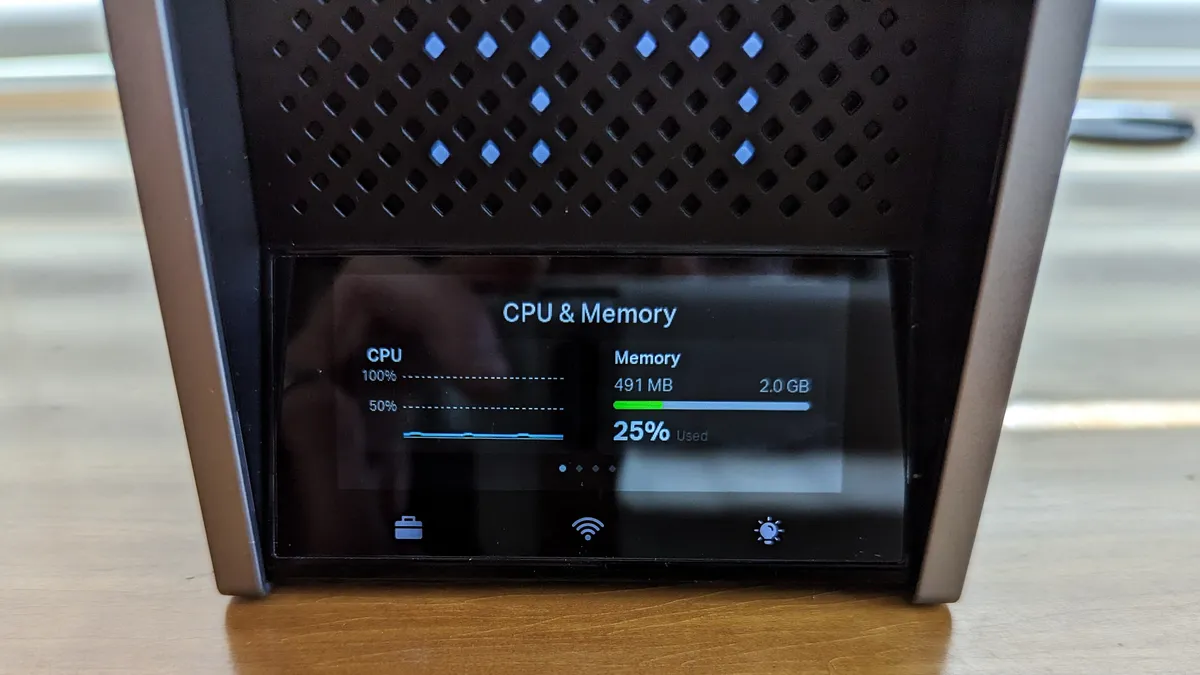
Just want to double check, is this display from EB810v or from Archer BE800 ?

BTW, TP-Link does not show CPU or RAM/Flash spec for Archer BE900 either.
https://www.tp-link.com/sg/home-networking/wifi-router/archer-be900/#specifications

display is for be900 :o

shows tplink have the software written already.

i believe be800, hb810, de85, eb810v all use the same qualcomm 1220 pro board, 2 disassembled models show the same thing

https://www.hkepc.com/22223/雙_10GbEBE22000_三頻_TP-Link_Deco_BE85_Mesh_Router_實測

https://www.hkepc.com/21653/Wi-Fi_7_實測直迫_4.4Gbps_TP-Link_Archer_BE800_路由器拆機開箱
 

kimsix

Arch-Supremacy Member
Joined
Jan 6, 2009
Messages
20,257
Reaction score
10,134
Interesting. Looks like they split the company into two. One is TP-Link China (TP-Link普联技术有限公司) and the other is TP-Link Global Inc. (TP-Link联洲国际有限公司).

TP-Link China (TP-Link普联技术有限公司)
https://www.tp-link.com.cn/introduce

TP-LinK Global (TP-Link普联技术有限公司)
https://www.tp-link.com/en/choose-your-location/
https://www.tp-link.com/us/about/about-us/
https://www.tp-link.com/sg/about/about-us/

TP-Link Global Inc.
Product, Marketing, and R&D

TP-Link Corporation PTE. Ltd.
Operations

can explain why our ISP bundling higher end consumer routers, sponsored by tplink!
 

SojIrOu

Member
Joined
May 23, 2005
Messages
183
Reaction score
70
Does the Deco BE85 comes with 2x2.5G ports support LAN aggregation?

The website didn't mention this but according to the below

https://www.hkepc.com/22223/雙_10GbEBE22000_三頻_TP-Link_Deco_BE85_Mesh_Router_實測

Quote

並內建 4 組 2.5GbE 及 2 組 5GbE / 10GbE Switch 功能

Unquote
I don’t think it does. I haven’t seen anywhere in my Deco app that supports it.

That is just stating the specs of the Qualcomm SoC which they used. If you check Networking Pro 1220 and 1620 they have that listed for their switch capability. Most likely they are combining 2x2.5gbe+5gbe to give you 1x10gbe LAN that’s why BE85/95 has only 2x2.5gbe, 1x10gbe lan, 1x10gbe wan/lan.

https://www.qualcomm.com/content/da...rking-Pro-1620-product-brief_87-PW325-1-B.pdf
 

xiaofan

High Supremacy Member
Joined
Sep 16, 2018
Messages
35,504
Reaction score
11,920
dont know what’s tplink thinking
The sexposed hardware shows 2x1gb memory but webos reading as 1gb? Going to write to tplink why they ewaste to disable one memory channel

The be900 got show more details like asus.

FqYDn2wQyptRACzbM8q5MS-1200-80.jpg.webp

Where do you get this picture?

I just checked Starhub UltraSpeed FAQ, and it clearly mentions 1GB RAM for the EB810v.
https://www.starhub.com/personal/support/article.html?id=kD5GRQtfxB3LxaEDMjuFm5

What is the TP-Link EB810v router?
The TP-Link EB810v is one of TP-Link’s latest and fastest WiFi 7 ready router to date, with up to 22Gbps combined WiFi bandwidth for faster browsing, streaming and downloading all at the same time. It features two (1 WAN and 1 LAN) 10Gbps ports allowing for true, up to 10Gbps speed on our UltraSpeed plan with a generous amount of LAN ports for your speed-hungry devices.

The TP-Link EB810v is designed with a powerful 2.2GHz quad core processor and 1GB of RAM to ensure fast transmission speeds. It features 8 high performance antennas that boost WiFi signals throughout your home for an all-encompassing, fluent 4K/8K streaming, immersive AR/VR gaming, and lightning-fast downloads. The EB810v features WiFi 7 with the latest 6 GHz band, 320MHz bandwidth, 4K-QAM, MLO and Multi-RU for a combined speed of up to 22Gbps, covering the whole home with multi-gigabit coverage.
 

kimsix

Arch-Supremacy Member
Joined
Jan 6, 2009
Messages
20,257
Reaction score
10,134
Where do you get this picture?

I just checked Starhub UltraSpeed FAQ, and it clearly mentions 1GB RAM for the EB810v.
https://www.starhub.com/personal/support/article.html?id=kD5GRQtfxB3LxaEDMjuFm5

What is the TP-Link EB810v router?
The TP-Link EB810v is one of TP-Link’s latest and fastest WiFi 7 ready router to date, with up to 22Gbps combined WiFi bandwidth for faster browsing, streaming and downloading all at the same time. It features two (1 WAN and 1 LAN) 10Gbps ports allowing for true, up to 10Gbps speed on our UltraSpeed plan with a generous amount of LAN ports for your speed-hungry devices.

The TP-Link EB810v is designed with a powerful 2.2GHz quad core processor and 1GB of RAM to ensure fast transmission speeds. It features 8 high performance antennas that boost WiFi signals throughout your home for an all-encompassing, fluent 4K/8K streaming, immersive AR/VR gaming, and lightning-fast downloads. The EB810v features WiFi 7 with the latest 6 GHz band, 320MHz bandwidth, 4K-QAM, MLO and Multi-RU for a combined speed of up to 22Gbps, covering the whole home with multi-gigabit coverage.

from tomguide https://www.tomsguide.com/face-off/tp-link-archer-be800-vs-archer-be900
 

xiaofan

High Supremacy Member
Joined
Sep 16, 2018
Messages
35,504
Reaction score
11,920

Hmm, I can not find the picture you mentioned. Rather it has a link to their review of Archer BE900 which has the picture you mentioned.
https://www.tomsguide.com/opinion/i...-with-dual-screens-and-its-surprisingly-great
Therefore we can conclude that TP-Link Archer BE900 has 2GB RAM.

The above article also has the linked to their review of Archer BE800. It clearly says that TP-Link Archer BE800 has 1GB RAM. I actually mention this article in my previous post.
https://www.tomsguide.com/reviews/tp-link-archer-be800

All in all, we can conclude that TP-Link Archer BE800 has 1GB RAM, Starhub TP-Link EB810v also has 1GB RAM. I do not see this as an issue since TP-Link FW features are limited and 1GB RAM is good enough.
 

kimsix

Arch-Supremacy Member
Joined
Jan 6, 2009
Messages
20,257
Reaction score
10,134
Hmm, I can not find the picture you mentioned. Rather it has a link to their review of Archer BE900 which has the picture you mentioned.
https://www.tomsguide.com/opinion/i...-with-dual-screens-and-its-surprisingly-great
Therefore we can conclude that TP-Link Archer BE900 has 2GB RAM.

The above article also has the linked to their review of Archer BE800. It clearly says that TP-Link Archer BE800 has 1GB RAM. I actually mention this article in my previous post.
https://www.tomsguide.com/reviews/tp-link-archer-be800

All in all, we can conclude that TP-Link Archer BE800 has 1GB RAM, Starhub TP-Link EB810v also has 1GB RAM. I do not see this as an issue since TP-Link FW features are limited and 1GB RAM is good enough.

very sad. another project for SH users, write to them about the speeds and EB810v ram unlock! Suspect they just exposed 1GB to the OS

actually EB810v firmware quite ok, their spanish site got give user manual!

https://www.tp-link.com/es/support/download/eb810v/

certified for wifi7 last week only, same with singtel hb810

https://api.cert.wi-fi.org/api/certificate/download/public?variantId=132391

https://api.cert.wi-fi.org/api/certificate/download/public?variantId=131774
 

Apparatus

Great Supremacy Member
Joined
May 27, 2005
Messages
57,857
Reaction score
13,656
very sad. another project for SH users, write to them about the speeds and EB810v ram unlock! Suspect they just exposed 1GB to the OS

actually EB810v firmware quite ok, their spanish site got give user manual!

https://www.tp-link.com/es/support/download/eb810v/

certified for wifi7 last week only, same with singtel hb810

https://api.cert.wi-fi.org/api/certificate/download/public?variantId=132391

https://api.cert.wi-fi.org/api/certificate/download/public?variantId=131774

The user manual for the eb810v looks wrong. It's more for a Tri-band router e.g. nothing on MLO
 
Last edited:

xiaofan

High Supremacy Member
Joined
Sep 16, 2018
Messages
35,504
Reaction score
11,920
very sad. another project for SH users, write to them about the speeds and EB810v ram unlock! Suspect they just exposed 1GB to the OS

actually EB810v firmware quite ok, their spanish site got give user manual!

https://www.tp-link.com/es/support/download/eb810v/

certified for wifi7 last week only, same with singtel hb810

https://api.cert.wi-fi.org/api/certificate/download/public?variantId=132391

https://api.cert.wi-fi.org/api/certificate/download/public?variantId=131774

I am not so sure about the RAM Unlock. It could be that earlier version got 2GB RAM but the official spec is 1GB RAM -- so I would not think they will entertain your request.

As for WiFi 7 certifications, that is good and expected anyway.

Wi-Fi CERTIFIED 7™
BSS critical update
DL MU-MIMO
DL OFDMA
Dynamic MU SMPS
EMLSR (Enhanced Multilink Single-Radio)
LDPC Rx
LDPC Tx
MCS 8-9 Rx
MCS 8-9 Tx
Multi-RU
Operating Mode indication
Static puncturing
STR (Simultaneous Transmit and Receive)
SU-MIMO
Triggered uplink access optimization
UL MU-MIMO
UL OFDMA
 

Mycrus

Senior Member
Joined
Nov 29, 2011
Messages
1,584
Reaction score
0
i have 2 latops with Intel Wifi 6E AX211 160mhz & Rog Ally with Mediatek wifi 6E mt7922 160mhz

above networking devices can connect to 6G of EB810v?
 

Apparatus

Great Supremacy Member
Joined
May 27, 2005
Messages
57,857
Reaction score
13,656
i have 2 latops with Intel Wifi 6E AX211 160mhz & Rog Ally with Mediatek wifi 6E mt7922 160mhz

above networking devices can connect to 6G of EB810v?

Just take note there's no MLO support since your laptops use WiFi 6E adapters
 

kimsix

Arch-Supremacy Member
Joined
Jan 6, 2009
Messages
20,257
Reaction score
10,134
I am not so sure about the RAM Unlock. It could be that earlier version got 2GB RAM but the official spec is 1GB RAM -- so I would not think they will entertain your request.

As for WiFi 7 certifications, that is good and expected anyway.

sorry now got OCD on the ram :o

tplink mod shows 28% usage only. some thing smells like armpits on hot day.

https://community.tp-link.com/en/home/forum/topic/658188
 

kimsix

Arch-Supremacy Member
Joined
Jan 6, 2009
Messages
20,257
Reaction score
10,134
i have 2 latops with Intel Wifi 6E AX211 160mhz & Rog Ally with Mediatek wifi 6E mt7922 160mhz

above networking devices can connect to 6G of EB810v?

i set both 5G and 6G on eb810v with same ssid and password. Your devices should auto select which band. At least on ip15pm, no need do extra settings on the phone, it locks to 6G when near router and auto fallback to 5G in toilet :o
 

IceWater_

Junior Member
Joined
Nov 12, 2015
Messages
62
Reaction score
10
I have two EB810v connected with Ethernet backhaul with no issues. Only problem is that I can only have my backhaul at 2.5gbps as my 10gbps port already occupied by my desktop (although 10gbps is also possible if you have no other use for the port)
Hi does it show a RJ45 port icon in the EasyMesh page under the connection column? Want to confirm before subscribing to their 10Gbps plan. Thanks!
 

Mycrus

Senior Member
Joined
Nov 29, 2011
Messages
1,584
Reaction score
0


my devices can't seem to detect the 6ghz SSID (i switched off band steering as well)

i reached out to tp link support and they mentioned - "Prior to now, we had comparable feedback. Our router's 6G Wi-Fi was also unavailable on one Singapore customer's Intel AX211 wireless adaptor. By altering the AX211 adapter's country code, the issue was resolved. As a result, we advise you to modify the country code by contacting Intel support."

can u guys check if you are connected to the 6Ghz band pls?
 

trenzterra

Arch-Supremacy Member
Joined
Sep 18, 2002
Messages
20,625
Reaction score
516


my devices can't seem to detect the 6ghz SSID (i switched off band steering as well)

i reached out to tp link support and they mentioned - "Prior to now, we had comparable feedback. Our router's 6G Wi-Fi was also unavailable on one Singapore customer's Intel AX211 wireless adaptor. By altering the AX211 adapter's country code, the issue was resolved. As a result, we advise you to modify the country code by contacting Intel support."

can u guys check if you are connected to the 6Ghz band pls?

My AX210 works fine on my ThinkPad X13 Gen 1 but my laptop originally came with AX200. Now that you mention it, I tried the Yoga Pro 7 on RZ616 6E chipset and it does not detect 6Ghz band. Seems like there is a country whitelist and perhaps if the laptop was designed before Singapore approved the 6Ghz band and the manufacturer didn't update the support list, you may not be able to see 6Ghz networks...

What laptop are you using?
 
Important Forum Advisory Note
This forum is moderated by volunteer moderators who will react only to members' feedback on posts. Moderators are not employees or representatives of HWZ Forums. Forum members and moderators are responsible for their own posts. Please refer to our Community Guidelines and Standards and Terms and Conditions for more information.
Top