WIFI Mesh VS AP

xiaofan

High Supremacy Member
Joined
Sep 16, 2018
Messages
32,550
Reaction score
10,104
I’m using wired backhaul. Did exactly what the two FAQs said and the video too.

What is the possible cause?

Turning off the RT-AX57 and then test again.

And try to test when no other users are using the internet.

Another thing, you need to use a laptop/desktop to test the wired speed first (on both the RT-AX89X and RT-AX57) -- you should hit above 900Mbps. Make sure you disable all the QoS settings.

Reference: with Asus router QoS on, wired speed dropped to 656Mbps.
https://forums.hardwarezone.com.sg/threads/singapore-isp-comparisons.6665380/page-23#post-150215023
 
Last edited:

chiu2000

Member
Joined
May 12, 2006
Messages
458
Reaction score
237
I’m using wired backhaul. Did exactly what the two FAQs said and the video too.

What is the possible cause?
Plug a LAN cable into the RT-AX57 to test the speed.

I can easily achieve 800Mbps on wireless backhaul, 4x4 80MHz channel width.

200-300 Mbps is just normal 802.11ac speed.
 

ckjie00

Junior Member
Joined
Feb 23, 2021
Messages
16
Reaction score
0
Hi all, I’m moving to new house with 1250sqf, currently using RT AX-82U, shall I buy asus mesh or just buy another router to cover it?
 

ss2000

Member
Joined
Oct 30, 2007
Messages
154
Reaction score
50
Yes something seems to be very wrong and I don't know what. I've rebooted both the main router and the two nodes. Both nodes are wired backhaul to the main router. I used my MSI laptop, turned off the wifi on my laptop, plugged in a LAN cable to the AX57 node in my MBR.

Did the Ookla test and ! I'm looking at 430 Mbps / 4 Mbps! :eek: (I changed the LAN cable)

I already went to System Settings and turned on Ethernet Backhaul Mode. Don't know why.

On the Asus Router app on the iPhone, there is one setting that is not in the browser version, at least, i couldn't locate it. When you tap on the node, there is this Management page and it has the following settings:
1) Backhaul Connection Priority: I set both nodes to Auto
2) Preferred WiFi Uplink AP: for the MBR, I set it to "RX-AX89X (Living Room)" which is the main router; for the other node in the bedroom, I set it to Auto.

I tried to change the MBR to Auto as well but I can no longer do it. Whenever I try to change it, there's this message: "Your RT-AX57 (MBR) is connecting to the uplink AP with an ethernet backhaul. To optimize your connection, Preferable Backhaul rule will temporarily disabled. This rule will be enabled automatically when using a wireless backhaul."

I don't think this is affecting my speed test thought. Why am I getting such low readings with LAN connection???

 
Last edited:

ss2000

Member
Joined
Oct 30, 2007
Messages
154
Reaction score
50
Hi all, I’m moving to new house with 1250sqf, currently using RT AX-82U, shall I buy asus mesh or just buy another router to cover it?

You have not used a mesh system before? My painful experience tells me it's better to (1) lay cables to the bedrooms, (2) put a mesh node in each of the rooms and (3) connect the nodes to the main routers using the laid cables.

I got an expensive but powerful main router, RT-AX89X because it is performing router functions like NAT, but for the nodes in the bedroom, I got the cheaper RT-AX57 since they are just dummy APs.

But I'm having problems now getting the best speeds. Still troubleshooting.
 

ckjie00

Junior Member
Joined
Feb 23, 2021
Messages
16
Reaction score
0
Hi, never use the mesh before. Am going to use lan cable back haul. Since the bedroom just use as AP, advisable to use xiaomi router? Or all need to use asus
 

ss2000

Member
Joined
Oct 30, 2007
Messages
154
Reaction score
50
Xiaofan is the expert here. My previous set up was Linksys main router with Nokia Beacon as nodes in the bedroom. It worked well: good speeds and all, except that it created 2 SSID networks, and there was no seamless handoff as I roam around the house. So may be better to get the same brand throughout the house. I know Asus has their AiMesh system which promises that their AiMesh routers can be mixed and matched without useful as a mesh system. You will need to hear from someone who has actually used the same combo as you are asking about.
 

limcc

Supremacy Member
Joined
Jan 1, 2000
Messages
6,561
Reaction score
203
Yes something seems to be very wrong and I don't know what. I've rebooted both the main router and the two nodes. Both nodes are wired backhaul to the main router. I used my MSI laptop, turned off the wifi on my laptop, plugged in a LAN cable to the AX57 node in my MBR.

Did the Ookla test and ! I'm looking at 430 Mbps / 4 Mbps! :eek: (I changed the LAN cable)

I already went to System Settings and turned on Ethernet Backhaul Mode. Don't know why.

On the Asus Router app on the iPhone, there is one setting that is not in the browser version, at least, i couldn't locate it. When you tap on the node, there is this Management page and it has the following settings:
1) Backhaul Connection Priority: I set both nodes to Auto
2) Preferred WiFi Uplink AP: for the MBR, I set it to "RX-AX89X (Living Room)" which is the main router; for the other node in the bedroom, I set it to Auto.

I tried to change the MBR to Auto as well but I can no longer do it. Whenever I try to change it, there's this message: "Your RT-AX57 (MBR) is connecting to the uplink AP with an ethernet backhaul. To optimize your connection, Preferable Backhaul rule will temporarily disabled. This rule will be enabled automatically when using a wireless backhaul."

I don't think this is affecting my speed test thought. Why am I getting such low readings with LAN connection???
Make sure your connection is "2 Green Bars"

zi1SQhKr_o.png
 

ss2000

Member
Joined
Oct 30, 2007
Messages
154
Reaction score
50
Make sure your connection is "2 Green Bars"

zi1SQhKr_o.png
The node is definitely connected online with 2 green bars. And the quality is "Great".

It finally worked. The Ookla test now registers 942/915 Mbps with the LAN connection from my MSI Laptop to the RX57 node! Yippee! I don't know what happened.

I tried using other speed test websites. I went to
http://www.speedtest.com.sg/ and I got 912/842 Mbps
https://fast.com/ and I got 1.0 Gpbs / 650 Mbps
https://fiber.google.com/speedtest/ and I got 943/865 Mbps
http://speedtestsg.speedtestcustom.com/ and I got 943/841 Mbps

All pretty consistent and similar to what I get when speed testing using Asus router speed test.

So it was very strange to me. Then I went again to Ookla and voila, it's ok now. In between, I did go to the Asus router settings and I think the only change I did was to disable QoS. I actually disabled it before but don't know what I did to turn it back on. Anyway, I only manage to recall I made this change in the last hour. Don't know what else I changed.

Now I’ll let sleeping dogs lie.
 
Last edited:

ss2000

Member
Joined
Oct 30, 2007
Messages
154
Reaction score
50
Thanks @limcc. I was testing using my MSI Stealth G66 laptop which I believe should be AX capable. In fact in the network page of the laptop it says it even supports 160MHz so should be AX capable.

I also run speed tests on my iPhone 13 Pro but iPhone 11 and above should also support AX speeds right? The support page also says so. It’s just that iPhones are 2x2 MIMO.
 

xiaofan

High Supremacy Member
Joined
Sep 16, 2018
Messages
32,550
Reaction score
10,104
Hi, never use the mesh before. Am going to use lan cable back haul. Since the bedroom just use as AP, advisable to use xiaomi router? Or all need to use asus
Hi all, I’m moving to new house with 1250sqf, currently using RT AX-82U, shall I buy asus mesh or just buy another router to cover it?

You may have to post the floor plan with details of the location of the ONT and LAN ports in the rooms.

SInce you already have a RT-AX82U, it is easy to add another Asus router to form AImesh. It is not a good idea to go with Xiaomi in this case.

What is your budegt? For low cost option, you can consider sign-up with M1 1Gbps plan and then get the free RT-AX3000P as mesh node (using RT-AX82U as main router). For higher cost option, consider sign-up with M1 and then top up for GT-AX6000 (using as main router and then RT-AX82U as mesh node).
 

chiu2000

Member
Joined
May 12, 2006
Messages
458
Reaction score
237

Hi, never use the mesh before. Am going to use lan cable back haul. Since the bedroom just use as AP, advisable to use xiaomi router? Or all need to use asus
AiMesh is basically repeater and AP mixed together with a simplified UI to set up and manage, and the fine options related to mesh hidden away

Same or different brand doesn't really matter, the end result is still the same.

Personally i would suggest sticking to the same brand since you are already familiar with the UI, unless you are looking to change to another brand.
 

chiu2000

Member
Joined
May 12, 2006
Messages
458
Reaction score
237
The node is definitely connected online with 2 green bars. And the quality is "Great".

It finally worked. The Ookla test now registers 942/915 Mbps with the LAN connection from my MSI Laptop to the RX57 node! Yippee! I don't know what happened.

I tried using other speed test websites. I went to
http://www.speedtest.com.sg/ and I got 912/842 Mbps
https://fast.com/ and I got 1.0 Gpbs / 650 Mbps
https://fiber.google.com/speedtest/ and I got 943/865 Mbps
http://speedtestsg.speedtestcustom.com/ and I got 943/841 Mbps

All pretty consistent and similar to what I get when speed testing using Asus router speed test.

So it was very strange to me. Then I went again to Ookla and voila, it's ok now. In between, I did go to the Asus router settings and I think the only change I did was to disable QoS. I actually disabled it before but don't know what I did to turn it back on. Anyway, I only manage to recall I made this change in thel ast hour. Don't know what else I changed. Now I’ll let sleeping dogs lie.
I find SingTel server gives the best result on speedtest.net, somehow others are always at least 100Mbps less.

MR 1Gbps non-gamer plan, GT-AX6000, Galaxy S23 about 1.5m away

Singtel: https://www.speedtest.net/my-result/a/9713069015

MR: https://www.speedtest.net/my-result/a/9713065683

Starhub: https://www.speedtest.net/my-result/a/9713066883
 

xiaofan

High Supremacy Member
Joined
Sep 16, 2018
Messages
32,550
Reaction score
10,104
Thanks @limcc. I was testing using my MSI Stealth G66 laptop which I believe should be AX capable. In fact in the network page of the laptop it says it even supports 160MHz so should be AX capable.

I also run speed tests on my iPhone 13 Pro but iPhone 11 and above should also support AX speeds right? The support page also says so. It’s just that iPhones are 2x2 MIMO.

iPhone 11 and iPhone 13 Pro (or even iPhone 14 Pro or Pro Max) will only support 2x2 AX 80MHz channel bandwidth. Only latest iPhone 15 Pro and Pro Max support 160MHz channel bandwidth.

You have totally confused me with your previous post.
https://forums.hardwarezone.com.sg/threads/wifi-mesh-vs-ap.6417690/page-6#post-150227489

But never mind, you may want to forget about the OOkla test inside your Asus router, rather use your MSI laptop and OOkla SpeedTest App (and forget about other websites) to carry out the test, using LAN and using wireless. After than perform test using the iPhones.

When you carry out the test from your MSI laptop, it will test the speed from the laptop to the OOkla SpeedTest server. Make sure you disable QoS before the tests.

1) Testing from MSI Laptop using LAN to the main RT-AX89X and the RT-AX57 -- you should get above 900Mbps for both results. As you mentioned you get 942/915 Mbps with the LAN connection from the MSI Laptop to the RX57 node. That is good and prove that AImesh Ethernet Backhaul is working.

2) Testing from MSI Laptop using wireless to the main RT-AX89X and the RT-AX57 and then post both results here. It should be above 600Mbps (more likley above 700Mbps to the RT-AX89X).

3) Testing from iPhone 11 and iPhone 13 Pro using wireless to the main RT-AX89X and the RT-AX57 and then post both results here. It should be above 500Mbps (more likely above 600Mbps to the RT-AX89X)
 

xiaofan

High Supremacy Member
Joined
Sep 16, 2018
Messages
32,550
Reaction score
10,104
I find SingTel server gives the best result on speedtest.net, somehow others are always at least 100Mbps less.

MR 1Gbps non-gamer plan, GT-AX6000, Galaxy S23 about 1.5m away

Singtel: https://www.speedtest.net/my-result/a/9713069015

MR: https://www.speedtest.net/my-result/a/9713065683

Starhub: https://www.speedtest.net/my-result/a/9713066883

This is a good point. Nowadays Singtel OOkla SpeedTest server seems to give the best results. Last time it was slow and I needed to use VQ or other servers. But later VQ became slower.
 

ss2000

Member
Joined
Oct 30, 2007
Messages
154
Reaction score
50
iPhone 11 and iPhone 13 Pro (or even iPhone 14 Pro or Pro Max) will only support 2x2 AX 80MHz channel bandwidth. Only latest iPhone 15 Pro and Pro Max support 160MHz channel bandwidth.

You have totally confused me with your previous post.
https://forums.hardwarezone.com.sg/threads/wifi-mesh-vs-ap.6417690/page-6#post-150227489

But never mind, you may want to forget about the OOkla test inside your Asus router, rather use your MSI laptop and OOkla SpeedTest App (and forget about other websites) to carry out the test, using LAN and using wireless. After than perform test using the iPhones.

When you carry out the test from your MSI laptop, it will test the speed from the laptop to the OOkla SpeedTest server. Make sure you disable QoS before the tests.

1) Testing from MSI Laptop using LAN to the main RT-AX89X and the RT-AX57 -- you should get above 900Mbps for both results. As you mentioned you get 942/915 Mbps with the LAN connection from the MSI Laptop to the RX57 node. That is good and prove that AImesh Ethernet Backhaul is working.

2) Testing from MSI Laptop using wireless to the main RT-AX89X and the RT-AX57 and then post both results here. It should be above 600Mbps (more likley above 700Mbps to the RT-AX89X).

3) Testing from iPhone 11 and iPhone 13 Pro using wireless to the main RT-AX89X and the RT-AX57 and then post both results here. It should be above 500Mbps (more likely above 600Mbps to the RT-AX89X)
Thanks @xiaofan! Always so helpful! 🙏

All is well now! I’m able to get above 950 Mbps with my LAN connection on the MSI laptop. Problem solved. I think it was the QoS causing the problem. I actually turned it off from the start. Then I itchy hand and went to label the devices as WFH, or Streaming, etc. I thought it’s just labelling what the devices are predominantly used for only. I don’t realise that by labelling them I had turned on QoS. I found out as I went through each setting again. After turning QoS off, all was well.

My iPhone 13 Pro speed is also fine now.

6kCfNS.jpg


pnFtj4B5j


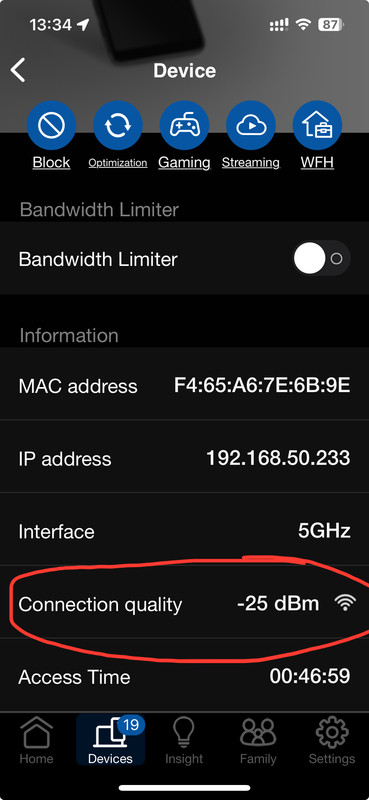
I’m just waiting to buy the final node from Carousell for my middle room and I’ll be done. In my opinion, I prefer that each room has their own node. I notice now the middle bedroom is sometimes connected to the room on the left and sometimes on the right but the RSSI is not ideal, around -66 dBm which is closed to the drop off point of -70dBm.

I’ve got a couple of other queries:
1) The AX3000P is exactly the same as the AX57? I used Asus website to do the comparison and they have zero difference.
2) Do you know of any free image sharing website? I’m using imageshack but I think very soon, my free access will be gone.
 

ss2000

Member
Joined
Oct 30, 2007
Messages
154
Reaction score
50
I found postimage.org. I think it’s free unlimited photos. But capped at 32MB.

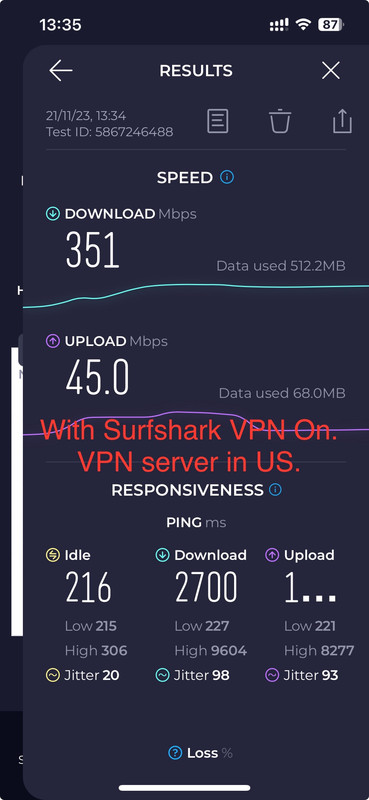
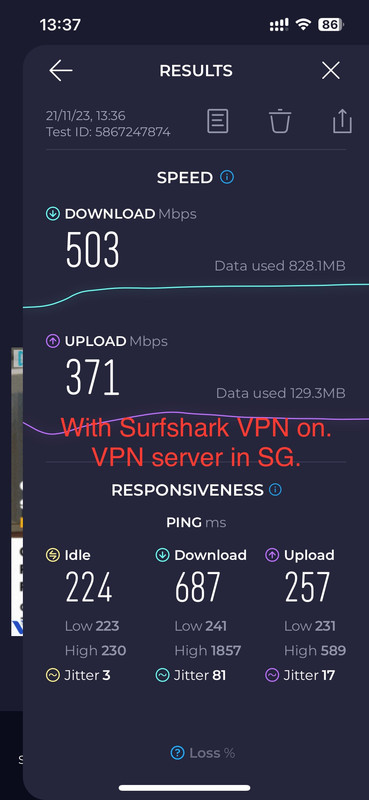
I also tested my iPhone 13 Pro speed with Surfshark VPN on for comparison. I tested both US and SG server. SG server performed much better as expected? Also at 0.5 m from the main router AX89X. Definitely a drop from speed without VPN but I guess still decent.

IMG-9355.jpg


IMG-9356.jpg

IMG-9357.jpg
 

xiaofan

High Supremacy Member
Joined
Sep 16, 2018
Messages
32,550
Reaction score
10,104
I’ve got a couple of other queries:
1) The AX3000P is exactly the same as the AX57? I used Asus website to do the comparison and they have zero difference.
2) Do you know of any free image sharing website? I’m using imageshack but I think very soon, my free access will be gone.

1) Most likely they are the same product. RT-AX3000P can be bought cheaper from Carousell (around S$80 BNIB).
Previously RT-AX3000 is the same as RT-AX58U.
2) I use imgur.com.
 

ss2000

Member
Joined
Oct 30, 2007
Messages
154
Reaction score
50
1) Most likely they are the same product. RT-AX3000P can be bought cheaper from Carousell (around S$80 BNIB).
Previously RT-AX3000 is the same as RT-AX58U.
2) I use imgur.com.

According to Asus, they are exactly the same. Makes one wonders why Asus sell the same product under different model number, and at different price. It's confusing.

Anyway, I just installed the final node AX3000P and it was a breeze. I got it from Carousell at $70. Just needed to update the firmware.

Let's see how the entire mesh system perform in the next few months. Hopefully the overheating issue of AX89X won't happen to me. In any case, I have a small but powerful table fan blowing at the router and modem with a timer.
 
Last edited:
Important Forum Advisory Note
This forum is moderated by volunteer moderators who will react only to members' feedback on posts. Moderators are not employees or representatives of HWZ. Forum members and moderators are responsible for their own posts.

Please refer to our Community Guidelines and Standards, Terms of Service and Member T&Cs for more information.
Top