AX router recommendations?

lycanboy

Arch-Supremacy Member
Joined
Jan 7, 2005
Messages
24,720
Reaction score
6,043
Hello experts, I am trying to get a better coverage for my house by either changing to a better router(ROG GT-AX6000/TP-link archer AX11000) or get another AX 55 to form a Mesh (as I am currently using 1 as my main router)

Which router is better in terms of coverage? TP-link Archer ax11000 or rog gt-ax6000? I do game once in a blue moon but most of the time the network is supporting my smart home/devices and for media consumption.

I am currently using AX55 as main and using a Huawei Ax3(old router) as wired backhaul in my master room.

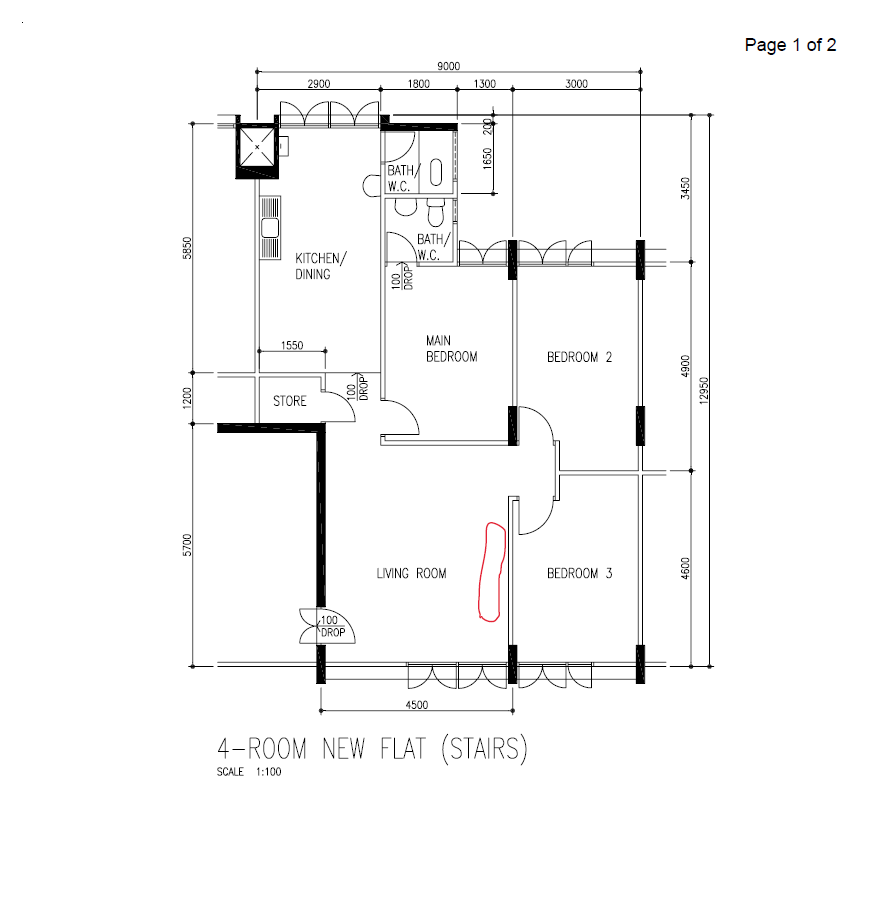
Here's my floor plan

Screenshot-20231017-090215-Brave.jpg


Looking forward to your input! Thank you

Please post the floor plan, with details of the location of the current ONR, LAN ports in the rooms and locations of the Deco M5.

And please state your total budget. For better experiences you may have to replace your two TP-Link Deco M5 as well.
Hello xiaofan, can I also get your input?

Possible to use one asus ax6000 or tp-link ax11000 in place of my Asus ax55 to cover the whole house? :o

Thank you
 

babusang

Junior Member
Joined
May 23, 2012
Messages
65
Reaction score
1
floor-plan.png


Highlighted in RED is my Fibre point/tv console/power point

all rooms have cat 6 internet port installed

$ ~ 1k

if can use m5 would be good, but if it makes alot of difference, happy to change.
 

xiaofan

High Supremacy Member
Joined
Sep 16, 2018
Messages
35,581
Reaction score
11,956
floor-plan.png


Highlighted in RED is my Fibre point/tv console/power point

all rooms have cat 6 internet port installed

$ ~ 1k

if can use m5 would be good, but if it makes alot of difference, happy to change.

As you have LAN ports in the rooms, S$1k budget is more than enough.

It is better using the same brand of mesh solution to have better roaming performance. Asus router can not form proper mesh system with the Deco M5.

1) Low cost option which utilize the TP-Link Deco M5.

TP-Link Deco X90 (around S$339) + existing 2 x Deco M5 ==> S$339

2) Pure Asus AImesh option.
You can buy the GT-AX6000 first before buying the mesh node. It is possible single GT-AX6000 already provides good coverage for your flat. Asus GT-AX6000 is around S$450 to S$480 BNIB from Carousell.

If you do not like to buy from Carousell, then RT-AX86U Pro is also a good option (around S$429). TUF-AX6000 is also a good option, even though not as good as the other two.

If not good enough for the far end of the kitchen area and common bathroom, you can get RT-AX55 BNIB from Carousell at around S$75 to form Asus AImesh with the main router to provide the coverage. You can also reuse your Deco M5 if those areas are not so important.

3) BTW, you may want consider M1 as a better option compared to Starhub, as it provides good offer for GT-AX6000.
https://www.m1.com.sg/home-broadband/devices/asus-rog-rapture-gt-ax6000
 

xiaofan

High Supremacy Member
Joined
Sep 16, 2018
Messages
35,581
Reaction score
11,956
Hello xiaofan, can I also get your input?

Possible to use one asus ax6000 or tp-link ax11000 in place of my Asus ax55 to cover the whole house? :o

Thank you

Yes I think it is a good option to go with GT-AX6000 as the may router to replace your existing RT-AX55. GT-AX6000 may well provide good coverage to your flat.

In case GT-AX6000 is not good enough in the far end of the master bedroom, you can use your existing RT-AX55 as the AIMesh mesh node.

TP-Link Archer AX11000 is not as good as GT-AX6000 in terms of wireless performance and it can not form proper mesh with existing RT-AX55.
 

babusang

Junior Member
Joined
May 23, 2012
Messages
65
Reaction score
1
i read that for singtel new users, they are unable to request bridging, for m1 is it necessary or its the default?

for my setup with m1 and GT-AX6000, do i need to make bridging request with M1?
 

loganrunning

Master Member
Joined
May 12, 2017
Messages
3,824
Reaction score
2,346
i read that for singtel new users, they are unable to request bridging, for m1 is it necessary or its the default?

for my setup with m1 and GT-AX6000, do i need to make bridging request with M1?

you only get ONT, so no need to request.

if you want a bridged singtel network, you can try whizcomms - request bridging before installation. I had a positive experience during covid, but my requirements are low.
 

lycanboy

Arch-Supremacy Member
Joined
Jan 7, 2005
Messages
24,720
Reaction score
6,043
Yes I think it is a good option to go with GT-AX6000 as the may router to replace your existing RT-AX55. GT-AX6000 may well provide good coverage to your flat.

In case GT-AX6000 is not good enough in the far end of the master bedroom, you can use your existing RT-AX55 as the AIMesh mesh node.

TP-Link Archer AX11000 is not as good as GT-AX6000 in terms of wireless performance and it can not form proper mesh with existing RT-AX55.
Thank you!
 

babusang

Junior Member
Joined
May 23, 2012
Messages
65
Reaction score
1
floor-plan.png


Highlighted in RED is my Fibre point/tv console/power point

all rooms have cat 6 internet port installed

$ ~ 1k

if can use m5 would be good, but if it makes alot of difference, happy to change.
Thanks for the advice,

Considering the information shared,

i'm planning to go for m1 1gb with GT-AX6000 top up and will monitoring and buy ax55 if necessary.

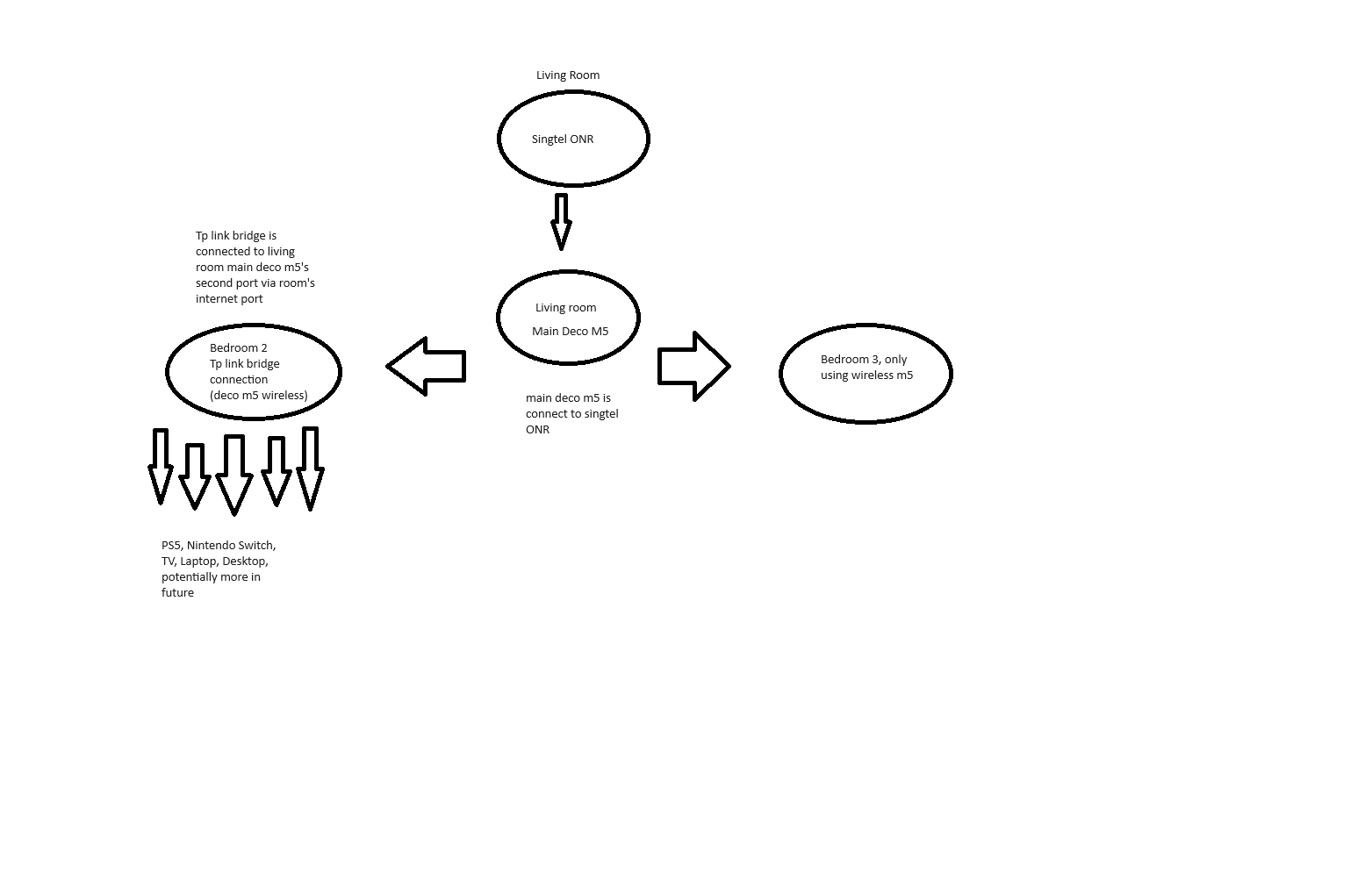
I forgot to mention in bedroom 2 , there are multiple needs for a few internet port,
What I have currently done is adding a tplink bridge in bedroom 2. The bridge connection is coming from Mesh setup, perhaps the picture will explain more. I believe my current setup is wrong and moving forward when i use m1, May I seek advise what is the proper way to include multiple internet port in both bedroom 2 and 3 if i want to?


current-setup.png
 

tyjtht

Arch-Supremacy Member
Joined
Oct 28, 2011
Messages
11,123
Reaction score
1,136
Floor-plan.jpg


Hi, this is my floor plan and the wifi point is in red. Any good routers / mesh to recommend to reach the main bedroom (in blue)? My budget is around $600-$700. Thank you.
 
Last edited:

xiaofan

High Supremacy Member
Joined
Sep 16, 2018
Messages
35,581
Reaction score
11,956
Thanks for the advice,

Considering the information shared,

i'm planning to go for m1 1gb with GT-AX6000 top up and will monitoring and buy ax55 if necessary.

I forgot to mention in bedroom 2 , there are multiple needs for a few internet port,
What I have currently done is adding a tplink bridge in bedroom 2. The bridge connection is coming from Mesh setup, perhaps the picture will explain more. I believe my current setup is wrong and moving forward when i use m1, May I seek advise what is the proper way to include multiple internet port in both bedroom 2 and 3 if i want to?


current-setup.png

What do you mean by TP-Link bridge? Is it a swtch since your Deco M5 does not have enought ports?

So you have three Deco M5 units, main Deco in the living room and two more Deco mesh node in Bedroom 2 and 3, right?

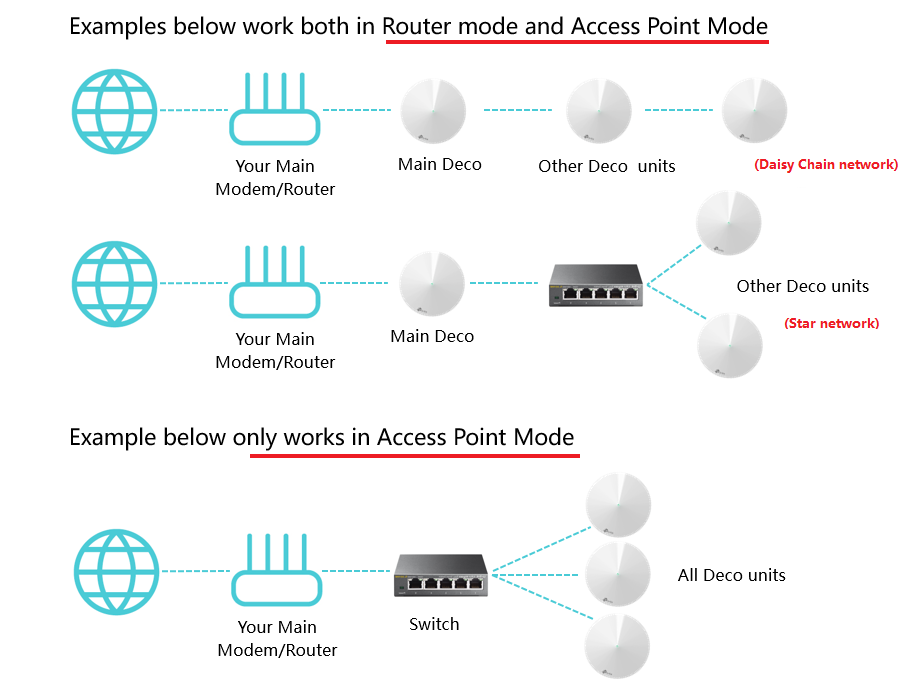
Make sure you use Ethernet backhaul, which means the two Deco mesh nodes are connecting to the LAN port in the room. And make sure your main Deco is configured in AP mode. If not you are not using Ethernet backhaul proplery and are still using wireless backhaul. That may be your main problem.


Reference:
https://community.tp-link.com/en/home/forum/topic/98898

d3e552c0ec0e4b6fba6f87668108f9f0.png
 

xiaofan

High Supremacy Member
Joined
Sep 16, 2018
Messages
35,581
Reaction score
11,956
Floor-plan.jpg


Hi, this is my floor plan and the wifi point is in red. Any good routers / mesh to recommend to reach the main bedroom (in blue)? My budget is around $600-$700. Thank you.

So you do not have LAN ports in the rooms and you are not willing to pull cables to the rooms, right?

It is good to use triband AX mesh in this case and I think your budget should be good enough.

Asus ZenWiFi XT8 should be a good choice. Listed price is about S$699 but you may be able to find good lobangs.

Reference: read the first post of the following two threads.
https://forums.hardwarezone.com.sg/threads/how-to-choose-a-mesh-router.6452151/
https://forums.hardwarezone.com.sg/...flats-without-lan-ports-in-the-rooms.6646066/
 

tyjtht

Arch-Supremacy Member
Joined
Oct 28, 2011
Messages
11,123
Reaction score
1,136
So you do not have LAN ports in the rooms and you are not willing to pull cables to the rooms, right?

It is good to use triband AX mesh in this case and I think your budget should be good enough.

Asus ZenWiFi XT8 should be a good choice. Listed price is about S$699 but you may be able to find good lobangs.

Reference: read the first post of the following two threads.
https://forums.hardwarezone.com.sg/threads/how-to-choose-a-mesh-router.6452151/
https://forums.hardwarezone.com.sg/...flats-without-lan-ports-in-the-rooms.6646066/
Yes. Thank you for your advice.
 

free2d

Member
Joined
Nov 1, 2008
Messages
196
Reaction score
13
Have a couple of questions about my 3 pack Deco X20 units. Main Deco connected to router the other 2 are wireless backhaul.
1. So, the Deco should set to Router or AP mode?
2. Since Deco are wireless, TV and PC etc are better connect to Deco via LAN cable, or use the tv and PC direct wifi feature?
Thanks.
 

xiaofan

High Supremacy Member
Joined
Sep 16, 2018
Messages
35,581
Reaction score
11,956
Have a couple of questions about my 3 pack Deco X20 units. Main Deco connected to router the other 2 are wireless backhaul.
1. So, the Deco should set to Router or AP mode?
2. Since Deco are wireless, TV and PC etc are better connect to Deco via LAN cable, or use the tv and PC direct wifi feature?
Thanks.

What is your main router?

1) Better to use AP mode to avoid Double NAT. But if you need some features of the Deco, it is still okay to set it up in router mode. Double NAT will not affect normal internet browsing or streaming.
https://kb.netgear.com/30186/What-is-double-NAT-and-why-is-it-bad

2) Better to connect to the LAN port of the Deco, no matter for the main unit or the other two mesh nodes.
 

free2d

Member
Joined
Nov 1, 2008
Messages
196
Reaction score
13
My router is Times fiber in Penang.
1. Ok.
2. Even thot the TV Deco is not LAN wired with the Main Deco? All 3 Deco are wireless connected.

My IP CCTV wireless outside the main door entrance like to disconnect. Is it bcos of concrete wall and fireproof door?

Thank you very much.
 

xiaofan

High Supremacy Member
Joined
Sep 16, 2018
Messages
35,581
Reaction score
11,956
My router is Times fiber in Penang.
1. Ok.
2. Even thot the TV Deco is not LAN wired with the Main Deco? All 3 Deco are wireless connected.

My IP CCTV wireless outside the main door entrance like to disconnect. Is it bcos of concrete wall and fireproof door?

Thank you very much.

2) Yes.

Main Deco -- wireless -- TV Deco -- wired -- TV
is better than
Main Deco -- wireless -- TV Deco -- wireless -- TV.

30 IP CCTV outside the main door, yes it is most likely because of weak WiFi signal.

You may need to add one more Deco near to the main door entrance.
 

free2d

Member
Joined
Nov 1, 2008
Messages
196
Reaction score
13
Hmmm...
Instead of buying 1-2 more Deco for 2000sqft apartment, should i bite the bullet go straight to Asus AImesh or single AX86U for better coverage and penetration?
Thanks again.
 

xiaofan

High Supremacy Member
Joined
Sep 16, 2018
Messages
35,581
Reaction score
11,956
Hmmm...
Instead of buying 1-2 more Deco for 2000sqft apartment, should i bite the bullet go straight to Asus AImesh or single AX86U for better coverage and penetration?
Thanks again.

I see. Please post the floor plan then, with details of the location of the current ONT and theee Deco units.

Single unit will usually not be able to cover the flat. In your case, you may have to go with triband AX mesh solution (which are not cheap) since you have to use wireless backhaul. Cheapest is to use TP-Link Deco X68/X75. Then there are more expensive solution like Asus ZenWiFi XT8 and Netgear Orbi RBK75x/85x.

Please refer to the first post of the following thread.
https://forums.hardwarezone.com.sg/...flats-without-lan-ports-in-the-rooms.6646066/

+++++++
What about older HDB flats without LAN ports in the rooms?

Summary

1) All in all, the best is still to lay out Ethernet cables to the rooms (living room and the bed rooms). It may not be necessary to have LAN ports in every room, rather selected location may be good enough.

2) For some older flats, the ONT is in a relatively central location and they may be served by just one powerful wireless router if the expectation is not too high. This is especially true with powerful wireless router like Asus RT-AX86U Pro, GT-AX6000, GT-AX11000 Pro, etc.

3) Using Moca adapters are another good option if Cable infrastructure is available at home.
https://forums.hardwarezone.com.sg/threads/moca-network-setup-ethernet-over-tv-cable.5675388/
4) If the above two are not an option, then triband mesh solution can be a good one. Usually two pack or three pack will be good enough for the flat. Triband AX routers are still pretty expensive too, eg, Netgear Orbi RBK752/753, RBK852/853, Asus Zenwifi XT8 and Linksys Velop MX4200. Cheap option includes TP-Link Deco X68 and X75.

Dual band mesh solution may be used if the placement of the second node (and/or the 3rd node) can be accommodated.

No matter it is triband or dual band mesh solution, the mesh node needs to have good connection to the main node. The best is to have line of sight. If not, at most one wall in between.
+++++++
 
Important Forum Advisory Note
This forum is moderated by volunteer moderators who will react only to members' feedback on posts. Moderators are not employees or representatives of HWZ Forums. Forum members and moderators are responsible for their own posts. Please refer to our Community Guidelines and Standards and Terms and Conditions for more information.
Top