
Singtel Mesh Router

xiaofan

High Supremacy Member
Joined
Sep 16, 2018
Messages
32,818
Reaction score
10,277
Hi Guys,
I'd like to check for any reviews of this router which my friend wants to pass over to me:
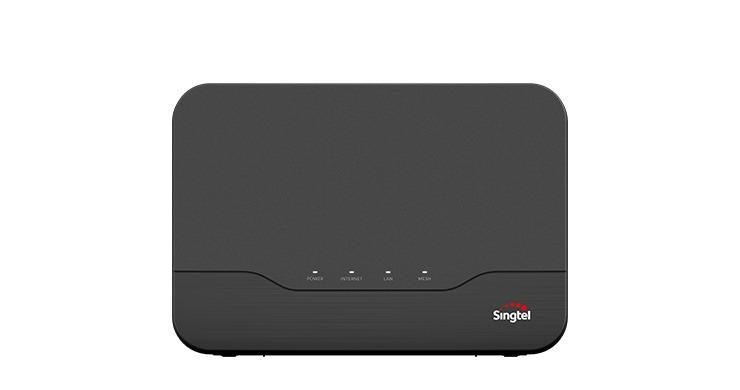
singtel_mesh_router_for_sale_1611050700_126dea2e_progressive

I'm currently on their 500MB plan with IPTV bundle, Using their old ALU ONT and FG7003GR Aztech router with Nokia Beacon 1 in Bridge Mode to get better coverage. Recently, the router started giving problems, it's like choking every morning and my download speeds are reduced to less than 40kBps, always have to reset the router very often. Called Singtel tech support and they insist that I sign a new plan and they will be able to upgrade my ONT and Router, hence my friend offered to pass me this router for me to replace the Aztech FG7003GR
Anyone knows if this router works decently well with similar default Singtel configuration to the FG7003? I believe it's just the VLAN tagging entry. And there's an indicator 'Mesh', so is this a real mesh router? Thanks.

Singtel Mesh Router is rated at AC1900. It should be plug and play with your ALU ONT. It should also work better than FG7003GR in terms of wireless speed and coverage. Read Page 2 and 3 of this thread to get more info.

It can mesh with Singtel Mesh Extender AC2600 but no point to get that.
 
Last edited:

boobip

Senior Member
Joined
May 8, 2003
Messages
1,348
Reaction score
92
Thank you Xiaofan.

My colleague just passed me the Singtel-Huawei HG8244-H ONR, and I tried to configure it as a replacement to my ALU ONT earlier. Called Singtel tech support to obtain my FTTH ID. I changed the entry in the ONR admin page, followed all instructions but the unit failed to obtain an IP address. Power, PON lights were solid green, LAN, IPTV lights were flashing green throughout. I made 3 additional calls to Singtel tech support, and had to tell each technician a the long story why I decided to change my ALU ONT and Aztech Router to Huawei ONR and they don't seem to understand what is going on. Half the time they were harping on my using 3rd party Nokia Beacon Mesh.... which I had to tell them over and over and over again that it's configured as a BRIDGE and NOT a router plus the fact that it worked with my earlier setup.

Got myself frustrated and ran the diagnostics, saw that the OLT registered the Huawei ONR, but some parameter mismatch prevented an update on their end. Hmmm.... anyone can suggest what could possibly be the cause?

Also, does Singtel need to register the ONR details on their end for it to work? I didn't buy their explanation that it's because the previous user of the Huawei ONR has services configured that differs from mine. After all, I did a factory reset on the ONR before updating the FTTH ID.
 

xiaofan

High Supremacy Member
Joined
Sep 16, 2018
Messages
32,818
Reaction score
10,277
Thank you Xiaofan.
My colleague just passed me the Singtel-Huawei HG8244-H ONR, and I tried to configure it as a replacement to my ALU ONT earlier. Called Singtel tech support to obtain my FTTH ID. I changed the entry in the ONR admin page, followed all instructions but the unit failed to obtain an IP address. Power, PON lights were solid green, LAN, IPTV lights were flashing green throughout. I made 3 additional calls to Singtel tech support, and had to tell each technician a the long story why I decided to change my ALU ONT and Aztech Router to Huawei ONR and they don't seem to understand what is going on. Half the time they were harping on my using 3rd party Nokia Beacon Mesh.... which I had to tell them over and over and over again that it's configured as a BRIDGE and NOT a router plus the fact that it worked with my earlier setup.
Got myself frustrated and ran the diagnostics, saw that the OLT registered the Huawei ONR, but some parameter mismatch prevented an update on their end. Hmmm.... anyone can suggest what could possibly be the cause?
Also, does Singtel need to register the ONR details on their end for it to work? I didn't buy their explanation that it's because the previous user of the Huawei ONR has services configured that differs from mine. After all, I did a factory reset on the ONR before updating the FTTH ID.

Sorry but this is not SingTel Mesh Router but SingTel ONR. It is not a wireless router and it is useless for you (or anyone). You can not replace the ONT by yourself to the ONR or another ONT. It is locked to your subscription. Only SingTel can do it.

You can buy SingTel Mesh Router from Carousell at around S$30. It will work with your ALU ONT. And it also works well with SingTel TV box.

BTW, the life span of the ONT is very long, your wireless issue is with the Aztech wireless router. SingTel Mesh router will be better than the Aztech.
 
Last edited:

xiaofan

High Supremacy Member
Joined
Sep 16, 2018
Messages
32,818
Reaction score
10,277
BTW, how much do you pay for the 500Mbps plan plus the SingTel TV bundle?

I was using the 500Mbps plan plus the SingTel TV Family Plus bundle (so called SingTel Entertainment Plus bundle at S$69.9 per month, from 100Mbps initially in Feb 2012, and upgraded to 500Mbps later) and I was out of contract for quite a while but they increased the price by charging me extra S$5 per month for the SingTel TV box -- so it became S$74.9 per month.

In September I upgraded to the 1Gbps plan but downgraded my SingTel TV to Family Favorite plan. The total price became S$39.9 (1Gbps plan) plus S$11.95 (50% off for SingTel TV Family packs). So in the end, this was a significant cost saving for me.
 

tuntun

Senior Member
Joined
Jan 1, 2000
Messages
863
Reaction score
46
Thank you Xiaofan.

My colleague just passed me the Singtel-Huawei HG8244-H ONR, and I tried to configure it as a replacement to my ALU ONT earlier. Called Singtel tech support to obtain my FTTH ID. I changed the entry in the ONR admin page, followed all instructions but the unit failed to obtain an IP address. Power, PON lights were solid green, LAN, IPTV lights were flashing green throughout. I made 3 additional calls to Singtel tech support, and had to tell each technician a the long story why I decided to change my ALU ONT and Aztech Router to Huawei ONR and they don't seem to understand what is going on. Half the time they were harping on my using 3rd party Nokia Beacon Mesh.... which I had to tell them over and over and over again that it's configured as a BRIDGE and NOT a router plus the fact that it worked with my earlier setup.

Got myself frustrated and ran the diagnostics, saw that the OLT registered the Huawei ONR, but some parameter mismatch prevented an update on their end. Hmmm.... anyone can suggest what could possibly be the cause?

Also, does Singtel need to register the ONR details on their end for it to work? I didn't buy their explanation that it's because the previous user of the Huawei ONR has services configured that differs from mine. After all, I did a factory reset on the ONR before updating the FTTH ID.
May I know what is the FTTH ID format in general? Is it a xx@singnet.com.sg or ? Thanks
 

boobip

Senior Member
Joined
May 8, 2003
Messages
1,348
Reaction score
92
@tuntun, it's a string of numbers 9 to 10 digits long. I was a long time subscriber hence mine is 9 digits. 'FTTH' means Fibre To The Home. Something like a unique ID of your fiber terminal point assigned to your home
 

boobip

Senior Member
Joined
May 8, 2003
Messages
1,348
Reaction score
92
Yes I'm paying the higher premium as you, xiaofan. It's co-covered by my company for my work, and if I were to change to another department in future, this component will no longer be covered by my company, hence I did not go for any recontracts
 

renfred89

Arch-Supremacy Member
Joined
Nov 11, 2007
Messages
17,520
Reaction score
19
Thank you Xiaofan.

My colleague just passed me the Singtel-Huawei HG8244-H ONR, and I tried to configure it as a replacement to my ALU ONT earlier. Called Singtel tech support to obtain my FTTH ID. I changed the entry in the ONR admin page, followed all instructions but the unit failed to obtain an IP address. Power, PON lights were solid green, LAN, IPTV lights were flashing green throughout. I made 3 additional calls to Singtel tech support, and had to tell each technician a the long story why I decided to change my ALU ONT and Aztech Router to Huawei ONR and they don't seem to understand what is going on. Half the time they were harping on my using 3rd party Nokia Beacon Mesh.... which I had to tell them over and over and over again that it's configured as a BRIDGE and NOT a router plus the fact that it worked with my earlier setup.

Got myself frustrated and ran the diagnostics, saw that the OLT registered the Huawei ONR, but some parameter mismatch prevented an update on their end. Hmmm.... anyone can suggest what could possibly be the cause?

Also, does Singtel need to register the ONR details on their end for it to work? I didn't buy their explanation that it's because the previous user of the Huawei ONR has services configured that differs from mine. After all, I did a factory reset on the ONR before updating the FTTH ID.
xiaofan is right, ONR/ONT cannot be replaced off shelf like this. Both the OLT backend and the ONT/ONR must be of the same level before replacement. Whats usable for your colleague may not be the same for you since you don't know what's the backend physical equipment be like.

You definitely need singtel's side to provision a working device for you and i don't think you can choose which brand you want though..
 

boobip

Senior Member
Joined
May 8, 2003
Messages
1,348
Reaction score
92
Sorry but this is not SingTel Mesh Router but SingTel ONR. It is not a wireless router and it is useless for you (or anyone). You can not replace the ONT by yourself to the ONR or another ONT. It is locked to your subscription. Only SingTel can do it.

You can buy SingTel Mesh Router from Carousell at around S$30. It will work with your ALU ONT. And it also works well with SingTel TV box.

BTW, the life span of the ONT is very long, your wireless issue is with the Aztech wireless router. SingTel Mesh router will be better than the Aztech.
Ahhh, my bad for not explaining... I mean to say my friend will pass me the Singtel Mesh router previously pictured in my first query post only next week. Another colleague who changed service provider, passed me the Huawei ONR last evening, hence I was tinkering around with it, oblivious to the knowledge that the ONR is tied to a subscription. Singtel is sending down a service tech to help setup (but I believe it's just a simple process on their end, just that the support staff on the phone with me were clueless how to do it)

I read from your post that the Singtel mesh router seems pretty intelligent to detect what it's connected to? i.e. if connected to ONR it will operate in bridgemode or as a AP and if it detects there is no router, it will assume full wireless router capability? How's the coverage? My ONT/Router has always been placed in the living room and my room has always been the one with bad wifi coverage (due to an intermediary room blocking) and it's just 15m from where the router is placed.

Actually, if anyone has got their friends' unused Starhub Nokia Beacon 1 mesh router units from their subscriptions, just 1 unit will be able to cover a 1,200sqft flat nicely (set it to bridge mode and attach to your router ethernet port). Starhub did a customisation on their firmware andthe IPTV option is permanently greyed out and inaccessible. Else I would've been able to see how effective it is as a mesh router to the ONT.
 
Last edited:

boobip

Senior Member
Joined
May 8, 2003
Messages
1,348
Reaction score
92
@renfred89, I see.... Ok, I shall wait for the Singtel guy to come see if they're able to make it work, else... I'll just wait for next week when I get the wireless mesh router. Thanks.
 

tuntun

Senior Member
Joined
Jan 1, 2000
Messages
863
Reaction score
46
@tuntun, it's a string of numbers 9 to 10 digits long. I was a long time subscriber hence mine is 9 digits. 'FTTH' means Fibre To The Home. Something like a unique ID of your fiber terminal point assigned to your home
I just check on my modem and it is ***. so must ask singtel to get if needed? no info on subscriber's letter or ?
 

boobip

Senior Member
Joined
May 8, 2003
Messages
1,348
Reaction score
92
Usually the service provider will input the FTTH ID into your ONT or ONR so most of the time u'll be clueless about what it is. In doubt, if it's not given, just call your service provider tech support to obtain.
 

xiaofan

High Supremacy Member
Joined
Sep 16, 2018
Messages
32,818
Reaction score
10,277
Ahhh, my bad for not explaining... I mean to say my friend will pass me the Singtel Mesh router previously pictured in my first query post only next week. Another colleague who changed service provider, passed me the Huawei ONR last evening, hence I was tinkering around with it, oblivious to the knowledge that the ONR is tied to a subscription. Singtel is sending down a service tech to help setup (but I believe it's just a simple process on their end, just that the support staff on the phone with me were clueless how to do it)

I read from your post that the Singtel mesh router seems pretty intelligent to detect what it's connected to? i.e. if connected to ONR it will operate in bridgemode or as a AP and if it detects there is no router, it will assume full wireless router capability? How's the coverage? My ONT/Router has always been placed in the living room and my room has always been the one with bad wifi coverage (due to an intermediary room blocking) and it's just 15m from where the router is placed.

Actually, if anyone has got their friends' unused Starhub Nokia Beacon 1 mesh router units from their subscriptions, just 1 unit will be able to cover a 1,200sqft flat nicely (set it to bridge mode and attach to your router ethernet port). Starhub did a customisation on their firmware andthe IPTV option is permanently greyed out and inaccessible. Else I would've been able to see how effective it is as a mesh router to the ONT.
Thanks for the clarifications.

Singtel Mesh Router is intelligent, it will run as AP if connected to Singtel ONR, and run as router if connected to Singtel ONT.

Interestingly you like Nokia Beacon 1, it is one of the worst router provided by ISPs as per feedbacks in this forum.

Singtel Mesh Router is not too bad but definitely not so good either in terms of wireless coverage. It is much better than the lousy Singtel AC Plus. Still it can not provide sufficient coverage for 5GHz for my 106 sqm flat. I bought an Asus RT-AX82U China version instead.
 

xiaofan

High Supremacy Member
Joined
Sep 16, 2018
Messages
32,818
Reaction score
10,277
@renfred89, I see.... Ok, I shall wait for the Singtel guy to come see if they're able to make it work, else... I'll just wait for next week when I get the wireless mesh router. Thanks.
I am still confused that why you want to change the ONT? If the ONT is spoiled, then make sure they replace with another ONT (usually ZTE brand) and not to Singtel ONR. With Singtel ONR as the main router, you lose the flexibility of using your own router (just need to support Singtel VLAN).

Most of the ONT users want to stick to ONT and not to change to Singtel ONR.
 

boobip

Senior Member
Joined
May 8, 2003
Messages
1,348
Reaction score
92
Yes I know, I too was reluctant about using the Nokia Beacon at first after reading tons of bad reviews from Starhub users, but once I used it, it sure solved my wifi connectivity problems from my room. Such strong signal from that little device. From weak wifi signal fluctuating between 0 to 2 bars, to a full 5 bars for 5GHz signal even with my room doors closed (2.5Ghz in my block of flats is totally unusable no matter which channel I use, way too congested), no complaints using it as a Wifi access bridge.

Hmm.... if the Singtel mesh router signal isn't as strong as what the Beacon emits, I think the ONR solution might probably be better for me. Either way, I'll be happy to be rid of the Aztech router lol.
 

xiaofan

High Supremacy Member
Joined
Sep 16, 2018
Messages
32,818
Reaction score
10,277
Yes I know, I too was reluctant about using the Nokia Beacon at first after reading tons of bad reviews from Starhub users, but once I used it, it sure solved my wifi connectivity problems from my room. Such strong signal from that little device. From weak wifi signal fluctuating between 0 to 2 bars, to a full 5 bars for 5GHz signal even with my room doors closed (2.5Ghz in my block of flats is totally unusable no matter which channel I use, way too congested), no complaints using it as a Wifi access bridge.

Hmm.... if the Singtel mesh router signal isn't as strong as what the Beacon emits, I think the ONR solution might probably be better for me. Either way, I'll be happy to be rid of the Aztech router lol.

I have the Singtel Mesh Router myself but I do not have the Nokia Beacon 1. Still I tend to think that Singtel Mesh router will be better than Nokia Beacon 1.

Among ISP issued free router recently (say from 2017), Singtel AC Plus is the worst, then probably followed by Nokia Beacon 1 based on the feedbacks. It is said that Linksys EA7500 V2 beats Nokia Beacon 1 out of the windows in slightly far range performance. I happen to have the EA7500 v2 as well and SIngtel Mesh router is equivalent to Linksys EA7500 v2 in terms of coverage based on my testing. None of them are good enough for me though for my flat (old HDB flat with thick walls).

You do not want to switch to SIngtel ONR. Using the Singtel ONT will enable you to use higher end router with full features when you are ready to upgrade to a better router, not low end device like Nokia Beacon 1 or Singtel Mesh router. This is especially true now that Wifi 6 devices are becoming popular.
 
Last edited:

boobip

Senior Member
Joined
May 8, 2003
Messages
1,348
Reaction score
92
Hmm... Off hand I was just thinking of maintaining just an ok setup that does away with signal drops, until changes in my job takes out the broadband provision, and then I'll recontract/change service providers when wifi6 devices are more advanced. But u definitely have a point there, the Huawei ONR will be stuck in time no matter what. Great pointers! Thank you xiaofan!
 
Last edited:

boobip

Senior Member
Joined
May 8, 2003
Messages
1,348
Reaction score
92
@xiaofan, I notice the Singtel Mesh Router does not come with IPTV signal lights, so my guess is that it has to work as just an AP with the Nokia ONR (set top box connected directly to ONR port) that's usually supplied together by Singtel? Or can it be configured to work with my ALU ONT?

*Ohhh.... just found this, it works with ONT out of the box as well, silly me :p

JPcmeux.jpg
 
Last edited:

boobip

Senior Member
Joined
May 8, 2003
Messages
1,348
Reaction score
92
Just set up the Singtel Mesh Router late last night. Indeed the problems I had with the Aztech 7003 router are gone (will have to monitor further along the week). 5Ghz signal in all rooms are significantly stronger, but once I close my room door or bathroom doors, signal strength drops to 1-2 bars and devices switch over to the bridged Nokia Beacon 1. Surprise surprise... the Nokia Beacon 1, still gives me the stronger signal in my room with doors closed.

I'll monitor the setup along the week, but my guess is I'll have 2 SSIDs. Not the most ideal setup, but I see folks on Carousell hawking their Arcadyan mesh extenders for $60 to $80 a pop. Heh....
 

xiaofan

High Supremacy Member
Joined
Sep 16, 2018
Messages
32,818
Reaction score
10,277
Just set up the Singtel Mesh Router late last night. Indeed the problems I had with the Aztech 7003 router are gone (will have to monitor further along the week). 5Ghz signal in all rooms are significantly stronger, but once I close my room door or bathroom doors, signal strength drops to 1-2 bars and devices switch over to the bridged Nokia Beacon 1. Surprise surprise... the Nokia Beacon 1, still gives me the stronger signal in my room with doors closed.

I'll monitor the setup along the week, but my guess is I'll have 2 SSIDs. Not the most ideal setup, but I see folks on Carousell hawking their Arcadyan mesh extenders for $60 to $80 a pop. Heh....

Interesting. So your Nokia Beacon 1 seems to be good. In this case, I will actually suggest you to get another Nokia Beacon 1 to form the mesh with the first one. You can even disable the Wifi of the Singtel Mesh router.

Please understand that Singtel Mesh Router is still a low end router. It is much better than the existing Singtel AC Plus or AC1900 and probably most of the older Singtel Aztech as well (probably except the 7009 which I do not know much about), but still you will get better result with things like Asus RT-AX86U/58U/etc.

Having two SSIDs is not an issue to me. I actually use two SSIDs myself. I use 5GHz band with the stronger main router Asus RT-AX82U (with 2.4GHz band disabled). Then I use 2.4GHz band from the Singtel Mesh Router in AP mode (only a few legacy clients).
 
Important Forum Advisory Note
This forum is moderated by volunteer moderators who will react only to members' feedback on posts. Moderators are not employees or representatives of HWZ Forums. Forum members and moderators are responsible for their own posts. Please refer to our Community Guidelines and Standards and Terms and Conditions for more information.
Top
