
You are using an out of date browser. It may not display this or other websites correctly.
You should upgrade or use an alternative browser.
You should upgrade or use an alternative browser.
[Temperature] CPU & GPU idle & load running temp - Please share here!!
- Thread starter i1magic
- Start date
More options
Who Replied?

garfield82
Master Member
- Joined
- Nov 18, 2007
- Messages
- 3,094
- Reaction score
- 0
My recent temps... I myself find it hard to get Max Temps so uniform so screenshot it down 


NewNew
Member
- Joined
- Apr 25, 2002
- Messages
- 204
- Reaction score
- 0

10Mins after boot up~
Not sure if why the core#2 always running slightly warmer
Mine different. My core#0 always warmer.

DavidTan84
Senior Member
- Joined
- Oct 27, 2007
- Messages
- 1,100
- Reaction score
- 0
Hi guys how are the temps for the ssd like in typical setups. HW monitor only seems to show the temp for hard drive. I am also curious how you guys manage to reduce your cpu temp to be less than 40 degrees. I noticed most of the posts come with high cpu fan speed. Does that do much improvement?

NewNew
Member
- Joined
- Apr 25, 2002
- Messages
- 204
- Reaction score
- 0

Taken with a/c on
Taken awhile ago.
Just realised my earlier post already have weird reading..

i1magic
Arch-Supremacy Member
- Joined
- Dec 11, 2002
- Messages
- 22,366
- Reaction score
- 117
help IcyNuttY post pic (and crop)...


@i1magic - Mine is Gigabyte GTX 670 2GB Windforce
@hlots123 - Thanks for helpingdidn't know how to do it.
Wow ... not bad. GTX 670 temp is quite good leh.
My Evga GTX 680 usually 46 degC to 50+degC.
Wow ... not bad. GTX 670 temp is quite good leh.
My Evga GTX 680 usually 46 degC to 50+degC.
Maybe cause new ba? Waiting a month or two to see how.
i1magic
Arch-Supremacy Member
- Joined
- Dec 11, 2002
- Messages
- 22,366
- Reaction score
- 117
My recent temps... I myself find it hard to get Max Temps so uniform so screenshot it down
What was the ambient temperature when the above readings are taken? Aircon room or non aircon?
i1magic
Arch-Supremacy Member
- Joined
- Dec 11, 2002
- Messages
- 22,366
- Reaction score
- 117
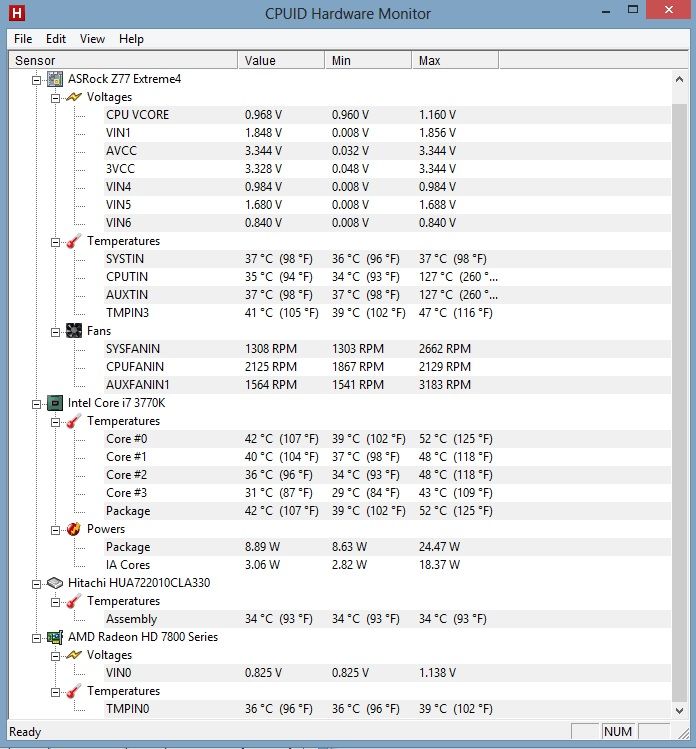
Got this weird reading. Restart my com and still get same result.
Any advise? Over 100deg and weird fan rpm.Should I try remount my hsf?

What is "CPUTIN"? How come 127degC? Anybody can advice what's wrong?
NewNew
Member
- Joined
- Apr 25, 2002
- Messages
- 204
- Reaction score
- 0
What is "CPUTIN"? How come 127degC? Anybody can advice what's wrong?
Thanks i1magic for help.
After some trial and error, I think I found the problem:- Software Conflict. Using only HWMonitor now, normal reading, but when I on 2nd software like speedfan or asrock tuner, those errors return.
Sharing my experience:
Tried remount hsf, replugging all cables, didn't work. Think I didn't mount well cause core temp went up abit.
Gathered from some reading, it's either:
- Faulty sensors and suggest to live with it or RMA.
- Wrong reading with HWMonitor. Seems normal/common to have wrong reading on SYSTIN, CPUTIN, AUXTIN and TEMPIN1/2/3/4.
- Might be software conflict. Got this information from this thread. Post#2853
[Official] ASUS SABERTOOTH Z77 Owners Thread/Club
Most importantly, as long as your Core, GPU and HDD temperature are normal/healthy, you are fine!
Will monitor for few days and update again.
Last edited:
i1magic
Arch-Supremacy Member
- Joined
- Dec 11, 2002
- Messages
- 22,366
- Reaction score
- 117
Thanks i1magic for help.
After some trial and error, I think I found the problem:- Software Conflict. Using only HWMonitor now, normal reading, but when I on 2nd software like speedfan or asrock tuner, those errors return.
Sharing my experience:
Tried remount hsf, replugging all cables, didn't work. Think I didn't mount well cause core temp went up abit.
Gathered from some reading, it's either:
- Faulty sensors and suggest to live with it or RMA.
- Wrong reading with HWMonitor. Seems normal/common to have wrong reading on SYSTIN, CPUTIN, AUXTIN and TEMPIN1/2/3/4.
- Might be software conflict. Got this information from this thread. Post#2853
[Official] ASUS SABERTOOTH Z77 Owners Thread/Club
Most importantly, as long as your Core, GPU and HDD temperature are normal/healthy, you are fine!
Will monitor for few days and update again.
I was thinking of reseating my HSF ... but it'll be alot of work man ... that's why keep postponing ... LOL!!
Currently, I think my cpu temp are quite ok ... but I really hope to find the time to clean and clear the HSF dust and reseat it.
My Evga GTX680 temp is usually 15-25 degC above room temp. I think the only way to reduce the temperature is to modify the cooling.

haylui
High Supremacy Member
- Joined
- Jul 18, 2006
- Messages
- 29,769
- Reaction score
- 91
May I know what is your CPU? i7 Extreme?
And your GPU?
should be Phenom II

i1magic
Arch-Supremacy Member
- Joined
- Dec 11, 2002
- Messages
- 22,366
- Reaction score
- 117
I was thinking of reseating my HSF ... but it'll be alot of work man ... that's why keep postponing ... LOL!!
Currently, I think my cpu temp are quite ok ... but I really hope to find the time to clean and clear the HSF dust and reseat it.
My Evga GTX680 temp is usually 15-25 degC above room temp. I think the only way to reduce the temperature is to modify the cooling.
I realised that the more programs that we have running will affect the temperature readings.
Below is the readings I took with only uTorrent, Skype & some other programs running with NO browser running.
Room temp : Aircon set at 25degC

With Firefox (30 over tabs opened) & Chrome (9 tabs) running also ....
Room temp : Aircon set at 25degC

Last edited:
haylui
High Supremacy Member
- Joined
- Jul 18, 2006
- Messages
- 29,769
- Reaction score
- 91
I realised that the more programs that we have running will affect the temperature readings.
Below is the readings I took with only uTorrent, Skype & some other programs running with NO browser running.
Room temp : Aircon set at 25degC
With Firefox (30 over tabs opened) & Chrome (9 tabs) running also ....
Room temp : Aircon set at 25degC
definitely will increase cpu temp if you have a lot of threads running in the background. even idle, processor is not sitting there idle. that's why nowadays processors lower the clock and shut down some cores for power saving.
Important Forum Advisory Note
This forum is moderated by volunteer moderators who will react only to members' feedback on posts. Moderators are not employees or representatives of HWZ Forums. Forum members and moderators are responsible for their own posts.
Please refer to our Community Guidelines and Standards and Terms and Conditions for more information.
